Claude Code Subagents: Context Isolation Explained
On this page
Learning Objective
Use subagents to keep the main session focused: delegate exploration, test runs and reviews to agents with their own context windows, restricted tools and suitable models, define custom subagents as files, and know when delegation helps and when it loses important detail.
Concept Explanation
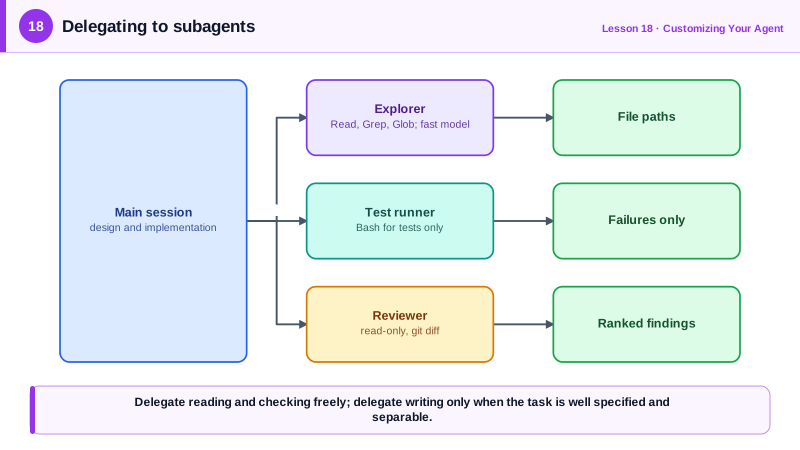
A long coding session accumulates noise. Searching a large codebase, reading a dozen files to find where something happens, running a test suite with verbose output: each of these fills the main context with material that mattered for one step and then becomes clutter (Day 3). Subagents move that work into a separate context window. The main agent sends a task, the subagent does the work in its own fresh context, and only a concise result comes back.
Claude Code ships built-in subagents, such as an Explore agent for read-only codebase research and a Plan agent, and lets you define your own as markdown files in .claude/agents for a project or in your home directory for all projects. Each file has a header with a name, a description that tells the main agent when to delegate, an optional list of allowed tools, and an optional model, followed by the subagent's system prompt. Other tools have similar ideas, such as background agents in Cursor and custom agents in GitHub Copilot.
Restricting tools is a large part of the value. A code reviewer subagent that can only read and run git diff cannot accidentally edit files. A database reader that only runs a read-only query tool cannot drop a table. Choosing the model per subagent controls cost: a fast, inexpensive model is often enough for searching and summarizing, while the main session keeps the most capable model for design and implementation.
Good uses share a shape: the task is self-contained, produces a lot of intermediate material, and has a result that summarizes well. Finding all callers of a function and reporting file paths. Running the full test suite and reporting only failures. Reviewing a diff against a checklist with a fresh perspective (Day 14). Researching how a library is used across a monorepo. Several such subagents can run in parallel, for example exploring three modules at once.
Delegation also has a cost. The subagent does not see the main conversation, so it needs a self-contained brief, and the main agent sees only the summary, so details the summary omits are lost. Tasks where every decision depends on the full context, such as implementing a subtle change across tightly coupled files, are usually better done in the main session. A good rule: delegate reading and checking freely, and delegate writing only when the task is well specified and separable.
| Subagent | Tools | Model | Returns |
|---|---|---|---|
| Explorer | Read, Grep, Glob | Fast and inexpensive | File paths and short explanations |
| Test runner | Bash for tests, Read | Fast | Failing tests and key error lines only |
| Code reviewer | Read, Grep, Bash for git diff | Capable | Prioritized findings with file and line |
| Migration worker | Read, Edit, Bash for tests | Capable | Summary of files changed and test results |
Worked Example: A Read-Only Reviewer Subagent
This project subagent reviews the current branch with a fresh context. It cannot edit files, and its description tells the main agent to use it after implementation.
<!-- .claude/agents/reviewer.md -->
---
name: reviewer
description: Reviews the current branch's diff against main for bugs, weakened tests, security issues and scope creep. Use after finishing an implementation and before committing or opening a PR.
tools: Read, Grep, Glob, Bash(git diff *), Bash(git log *)
model: sonnet
---

You are a senior reviewer seeing this change for the first time.

1. Run git diff main...HEAD --stat, then read the full diff.
2. Read the tests first. Report any assertion that was loosened, any skipped or deleted test,
   and any new code path without a test.
3. Check for: unvalidated input reaching queries or shell commands, missing authorization on
   new endpoints, secrets or personal data in logs, broad exception handling, duplicated helpers
   (search for similar function names), and files changed that are unrelated to the task.
4. Report findings ordered by severity as: severity, file:line, problem, suggested fix.
   If you find nothing significant, say so in one line. Do not restate the diff.
After implementing a feature, asking "use the reviewer agent on this branch" runs the review in a separate context: the main session receives a short, prioritized list instead of the reviewer's file reads and reasoning. Because the reviewer did not write the code, it is less inclined to confirm its own choices.
Real-World Examples
- Claude Code's subagent documentation describes custom subagents as markdown files with name, description, tools and model fields, highlighting separate context windows, tool restrictions and cost control through faster models as their main benefits.
- Anthropic's engineering write-ups on context engineering recommend sub-agent architectures for exploration-heavy work, where subagents search extensively but return condensed summaries of one to two thousand tokens to the lead agent.
Review Questions & Answers
They keep the main session's context focused by doing work that produces a lot of intermediate material, such as searches, file reads and test output, in a separate context window and returning only a concise result.
It limits what the subagent can do to what its job requires, for example a reviewer that cannot edit files or a database reader that cannot write, which prevents accidents and reduces risk.
The subagent does not see the main conversation, so it needs a self-contained brief, and the main agent sees only the summary, so details the summary omits are unavailable.
It does not share the reasoning and assumptions that produced the code, so it is less inclined to confirm earlier choices and looks at the change with fresh eyes.