Best AI Coding Tools Compared: Claude Code, Cursor, Copilot
On this page
Learning Objective
Compare the main categories of AI coding tools in 2026, terminal agents, IDE-integrated agents, editor-native AI IDEs and cloud background agents, understand the trade-offs that matter, and run a fair trial on your own codebase instead of trusting benchmarks or hype.
Concept Explanation
The market moved from autocomplete to agents in about two years, and the products now differ more in workflow than in raw model quality, because most of them can use several frontier models. The useful way to compare them is by where they run, how they fit your workflow, and how much control they give you.
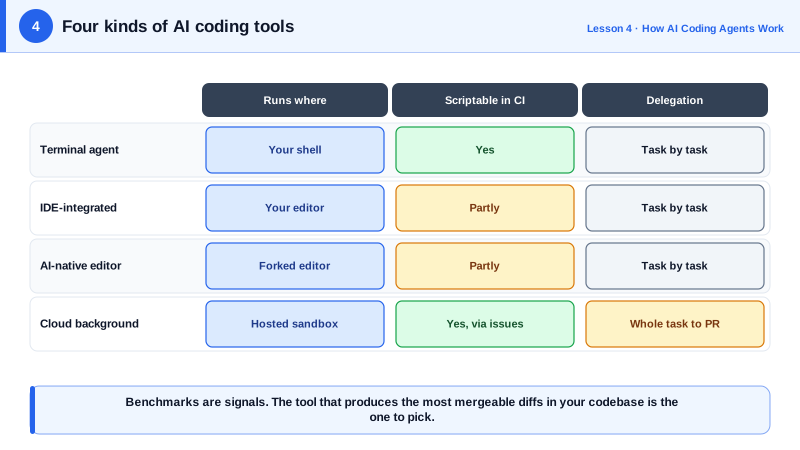
Terminal agents run in your shell next to your existing editor. Claude Code, OpenAI's Codex CLI and Google's Gemini CLI are the best known. They are editor-agnostic, scriptable and easy to run in CI, and they tend to expose configuration as files in the repository: instruction files, permissions, hooks and custom commands. The 2026 Stack Overflow survey found Claude Code to be the most used coding agent among respondents.
IDE-integrated agents live inside an editor you already use. GitHub Copilot in VS Code, Visual Studio and JetBrains offers completions, chat and an agent mode, and integrates closely with GitHub. Claude Code and Codex also ship extensions for VS Code and JetBrains. AI-native editors such as Cursor and Windsurf are forks of VS Code built around AI, with fast inline edits, codebase indexing and their own agent modes.
Cloud background agents take a task from an issue or a chat, work in a hosted sandbox and return a pull request: GitHub Copilot's coding agent, Codex in the cloud, Claude Code on the web and Devin are examples. They suit well-specified tasks that you would otherwise assign to a teammate, and they shift your work almost entirely to writing the task and reviewing the result.
The factors that matter in practice are few. Model access: can you choose the model, and does the tool keep up with new ones? Context handling: does it find the right code in your repository, and can you give it project instructions? Control and safety: permissions, sandboxing, audit logs and where your code is sent. Customization: instruction files, reusable commands, hooks and MCP support. Cost model: seats, usage-based pricing, or both. And team fit: does it work in your editor, with your code host and your CI?
Benchmarks such as SWE-bench measure models on public repositories and are useful signals, but your codebase, conventions and tasks are what count. The reliable way to choose is a short structured trial: pick five to ten real tasks of different kinds from your backlog, run each through the candidate tools with the same instructions, and score the results on correctness, review effort and time.
| Category | Examples | Strength | Watch for |
|---|---|---|---|
| Terminal agent | Claude Code, Codex CLI, Gemini CLI | Scriptable, editor-agnostic, config as files | Learning the terminal workflow |
| IDE-integrated agent | GitHub Copilot, Claude Code and Codex extensions | Stays in your editor, tight GitHub integration | Feature differences between IDEs |
| AI-native editor | Cursor, Windsurf | Fast inline edits, indexing, polished UX | Switching editors, vendor lock-in |
| Cloud background agent | Copilot coding agent, Codex cloud, Claude Code on the web, Devin | Delegate whole tasks, return pull requests | Large diffs, needs precise tasks and tests |
Worked Example: A Fair Tool Trial on Your Own Repository
This script structure records a trial so the decision rests on evidence. Each tool runs the same tasks with the same prompt file; you fill in the review scores by hand after reading each diff.
#!/usr/bin/env bash
# trial.sh: run each task with each tool on a fresh branch and record the result.
set -euo pipefail
TOOLS=("claude-code" "codex" "copilot")          # labels for your records
TASKS=(tasks/*.md)                               # one real backlog task per file

for tool in "${TOOLS[@]}"; do
  for task in "${TASKS[@]}"; do
    name="$(basename "$task" .md)"
    git switch -q main && git switch -q -c "trial/$tool/$name"
    start=$(date +%s)
    echo ">>> Run $tool on $name now, giving it the prompt in $task. Press Enter when it finishes."
    read -r
    tests=$(npm test --silent >/dev/null 2>&1 && echo pass || echo fail)
    lines=$(git diff --stat main | tail -1)
    echo "$tool,$name,$(( $(date +%s) - start ))s,$tests,\"$lines\"" >> trial-results.csv
    git add -A && git commit -qm "trial: $tool $name" || true
  done
done
echo "Now review each branch and add columns: correct (y/n), review minutes, would merge (y/n)."
A useful task set mixes a bug fix with a failing test, a small feature, a refactor across several files, a test-writing task and a change in an unfamiliar part of the codebase. Teams are often surprised that the tool with the best benchmark is not the one that produces the most mergeable diffs in their code.
Real-World Examples
- The 2026 Stack Overflow Developer Survey reported Claude Code used by 66 percent and GitHub Copilot by 59 percent of respondents who use coding agents, with Anthropic and OpenAI models used at nearly equal rates overall.
- SWE-bench Verified, a set of 500 human-validated GitHub issues, became the most cited benchmark for coding agents, but vendors and researchers have repeatedly noted that results on public Python repositories may not predict performance on a specific private codebase.
Review Questions & Answers
An IDE agent works interactively with you in your editor on your machine. A cloud background agent takes a task, works independently in a hosted sandbox and returns a pull request, so your role shifts to specifying the task and reviewing the result.
They measure performance on specific public repositories and task types. Your codebase, languages, conventions and tasks differ, so the tool that scores best may not produce the most mergeable changes for you.
Model access, context handling and project instructions, permission and safety controls, customization such as hooks and MCP support, cost model, and fit with your editor, code host and CI.
Real tasks from your backlog of different kinds, such as a bug fix with a failing test, a small feature, a multi-file refactor, a test-writing task and work in an unfamiliar area, all given to each tool with identical instructions.