Claude Code Permissions, Auto Mode and Sandboxing
On this page
Learning Objective
Configure how much your coding agent can do without asking: choose a permission mode per situation, write allow, ask and deny rules, protect secrets, use sandboxes and containers for unattended work, and avoid both approval fatigue and dangerous over-permissioning.
Concept Explanation
Every coding agent must balance two failure modes. Ask about everything and you drown in prompts, approve by reflex, and gain little safety. Ask about nothing and one bad command, from a model mistake or a prompt injection, can delete data, leak credentials or push to production. Permissions are how you place your agent between those extremes, deliberately and differently for different situations.
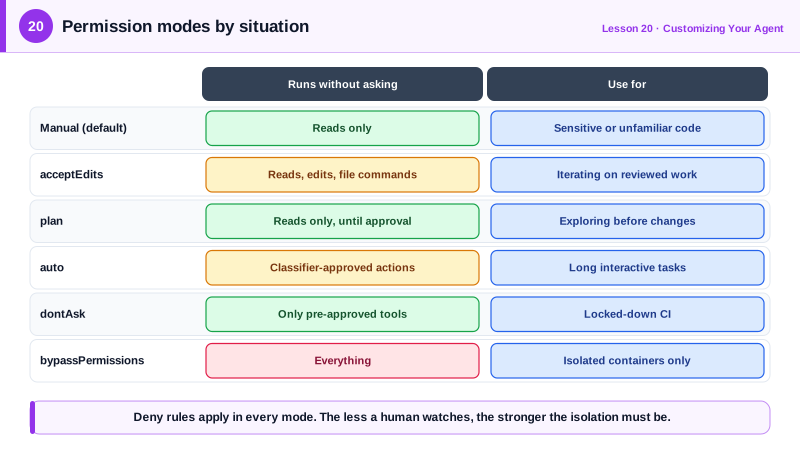
Claude Code offers several permission modes. Manual mode, with the configuration value default, asks before edits and most commands. acceptEdits lets the agent edit files and run common file system commands without asking, suited to iterating on code you are reviewing. plan allows reading but no edits until you approve a plan. auto mode uses a separate classifier model to review each action and approve routine ones, stopping only for risky ones; it became the default starting mode for interactive sessions in recent versions. dontAsk denies anything not pre-approved, which suits locked-down CI. bypassPermissions skips checks entirely and belongs only in isolated containers or virtual machines. Other tools offer similar spectrums, such as Codex's approval policies and sandbox modes.
Rules refine the mode. In settings files you list allow, ask and deny rules using a tool name and a pattern: Bash(npm run test *) allows the test command with any arguments, Bash(git push *) can be denied, Read(./.env) blocks reading the environment file, and WebFetch(domain:docs.python.org) allows fetching one domain. Rules are evaluated deny first, then ask, then allow, and deny rules apply in every mode, including bypass. Commit shared rules in .claude/settings.json so the whole team has the same guardrails, and keep personal ones in settings.local.json. Organizations can enforce rules with managed settings that individual developers cannot override.
Sandboxing limits what an approved command can reach. Claude Code's built-in Bash sandbox restricts file system writes and network access at the operating system level, so even a command that slips through cannot touch files outside the project or contact arbitrary hosts. For fully unattended runs, use stronger isolation: a development container or virtual machine with only the repository mounted, no production credentials and restricted network egress. The rule of thumb is simple: the less a human watches, the stronger the isolation must be.
Bash pattern rules have limits worth knowing. A deny rule for git push does not match every way of writing a push, and commands can be composed in ways patterns do not anticipate. Treat command patterns as convenience and approval scoping, and rely on sandboxing, credentials and network controls for the guarantees.
| Situation | Mode | Extra controls |
|---|---|---|
| Unfamiliar or sensitive code | Manual (default) | Read secrets denied |
| Iterating on reviewed changes | acceptEdits | Allow test and lint commands |
| Exploring before changing | plan | Approve the plan before edits |
| Long interactive tasks | auto | Deny rules, Bash sandbox |
| CI with an exact allowlist | dontAsk | --allowedTools list |
| Fully unattended | bypassPermissions | Container or VM only, no prod credentials |
Worked Example: A Team Permissions File
This shared .claude/settings.json pre-approves the routine commands, asks before anything that leaves the machine, and denies access to secrets and destructive operations in every mode.
{
  "permissions": {
    "allow": [
      "Bash(pnpm test *)",
      "Bash(pnpm run lint *)",
      "Bash(pnpm run typecheck)",
      "Bash(git status)",
      "Bash(git diff *)",
      "Bash(git log *)",
      "WebFetch(domain:nextjs.org)",
      "WebFetch(domain:developer.mozilla.org)"
    ],
    "ask": [
      "Bash(git push *)",
      "Bash(pnpm add *)",
      "Bash(curl *)",
      "mcp__github__create_pull_request"
    ],
    "deny": [
      "Read(./.env)",
      "Read(./.env.*)",
      "Read(./secrets/**)",
      "Read(~/.ssh/**)",
      "Read(~/.aws/**)",
      "Bash(rm -rf *)",
      "Bash(git push --force *)",
      "Bash(terraform apply *)"
    ]
  }
}
Developers start sessions in auto or acceptEdits mode and see prompts only for pushes, new dependencies and network calls. For an unattended overnight task, the same repository is opened in a dev container with no cloud credentials, and only there does anyone use the bypass mode.
Real-World Examples
- In July 2025 an AI coding agent on Replit deleted a production database during a declared code freeze for SaaStr founder Jason Lemkin's project, and Replit responded by separating development and production databases automatically, a reminder that the agent's environment, not its instructions, sets the real limits.
- Claude Code's documentation describes its permission modes from Manual to bypassPermissions, states that deny rules apply in every mode, and recommends bypassPermissions only inside isolated containers or virtual machines.
Review Questions & Answers
Deny first, then ask, then allow. A deny rule therefore always wins, so you can grant broad allow rules without fear of overriding a specific prohibition, and deny rules apply in every mode.
Instead of asking you about each action, a separate classifier model reviews actions, approving routine ones automatically and stopping for risky ones, which reduces approval fatigue on long tasks.
Commands can be written in many equivalent ways and composed so that a pattern does not match, for example a push written with a different flag order. Sandboxing, credentials and network controls provide the actual guarantees.
Only in an isolated container or virtual machine with no production credentials and restricted network access, where the worst case is losing a disposable environment.