Debugging with AI: Root Causes and git bisect
On this page
Learning Objective
Debug systematically with an agent: provide reproduction steps and evidence, have the agent form and test hypotheses rather than guess fixes, use instrumentation and tools such as git bisect, and require a root-cause explanation before accepting a fix.
Concept Explanation
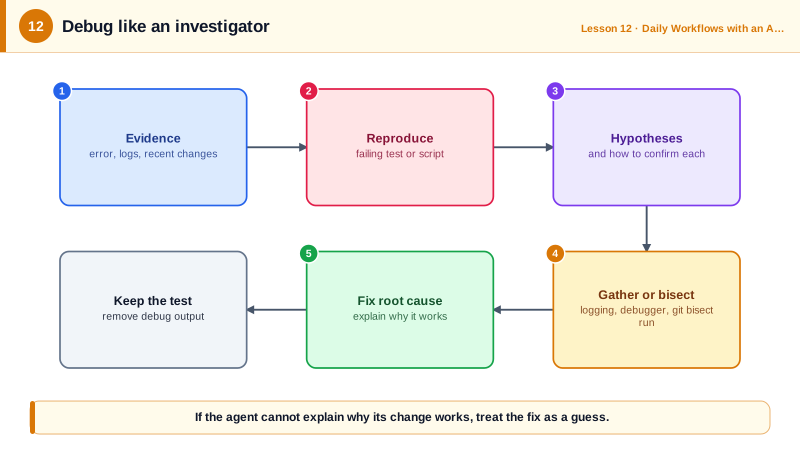
Agents are fast at proposing fixes, which is both their strength and their danger in debugging. Asked to "fix the error", an agent will often change the line in the stack trace until the error disappears. Sometimes that is the fix; often it moves the problem elsewhere, hides it behind a try-except, or breaks a case nobody tested. Good debugging with an agent applies the same discipline as good debugging without one: reproduce, observe, hypothesize, test, and only then fix.
Start with evidence. Give the agent the exact error message and stack trace, logs around the failure, the input that triggers it, what changed recently, and what you have already ruled out. Agents read logs and traces quickly and well, often spotting the relevant line in thousands faster than a person. If you can reproduce the bug, ask for a failing test that captures it before anything else (Day 11).
Then ask for hypotheses, not fixes. "List the three most likely causes, and for each, what evidence would confirm or rule it out" turns the agent from a patch generator into an investigator. It can then gather that evidence: add temporary logging, run the failing case with extra output, query the database, inspect the state at the failing point, or run a debugger. Agents equipped to run programs and inspect their output debug far better than those reasoning from code alone.
When a bug is a regression, git bisect is a powerful tool to hand an agent. Given a known good commit, a known bad one and a script that tests for the bug, git bisect run performs a binary search through the history and names the commit that introduced the problem. Reading that commit's diff usually makes the cause obvious, and the agent can explain why the change broke the behavior.
Require a root-cause explanation before accepting a fix. The explanation should say what was wrong, why the symptom appeared, why the fix addresses the cause rather than the symptom, and whether the same mistake exists elsewhere. If the agent cannot explain why its change works, treat the fix as a guess. Finally, keep the reproducing test as a regression test, and remove temporary logging before committing.
| Step | Ask the agent to | Avoid |
|---|---|---|
| Reproduce | Write a failing test or script that shows the bug | Fixing a bug nobody reproduced |
| Observe | Read logs, traces, add temporary output | Guessing from the stack trace line alone |
| Hypothesize | List likely causes and the evidence for each | Jumping to the first plausible patch |
| Locate | Use git bisect for regressions | Reading the whole history by hand |
| Fix and explain | Fix the root cause, explain why it works | try-except that hides the error |
| Protect | Keep the test as a regression test | Leaving debug logging behind |
Worked Example: Letting the Agent Bisect a Regression
The agent writes a small script that exits non-zero when the bug is present, then runs git bisect between the last good release and the current main branch.
# check_bug.sh: exit 0 if behavior is correct, 1 if the bug is present, 125 to skip a commit.
#!/usr/bin/env bash
set -u
pnpm install --frozen-lockfile --silent >/dev/null 2>&1 || exit 125   # unbuildable commit: skip
out=$(pnpm --silent tsx scripts/repro-login-plus.ts 2>&1) || true
if grep -q "LOGIN_OK" <<<"$out"; then exit 0; else exit 1; figit bisect start
git bisect bad main # bug present now
git bisect good v4.12.0 # last release known to work
git bisect run ./check_bug.sh # binary search: about 7 steps for 100 commits
# -> 3f9c2ab is the first bad commit: "feat: parse form bodies in shared middleware"
git bisect reset
git show 3f9c2ab -- src/middleware/body.tsWith the offending commit in hand, the agent can explain the root cause precisely: the new middleware parses JSON login bodies as URL-encoded forms, turning plus signs into spaces. Exit code 125 tells bisect to skip commits that do not build, which keeps the search reliable across messy history.
Real-World Examples
- Microsoft Research's debug-gym project (2025) gave language-model agents interactive debugging tools such as pdb and reported that agents performed better on debugging benchmarks when they could set breakpoints and inspect state rather than only read code.
- git bisect run has been part of Git since 2007 and is widely used in projects such as the Linux kernel to find regressions automatically, which makes it a natural tool to give an agent that can write the test script.
Review Questions & Answers
The agent may change code until the error disappears without understanding the cause, for example by suppressing the exception or moving the failure elsewhere, which hides the bug instead of fixing it.
It shifts the agent from generating patches to investigating: it gathers evidence such as logs, outputs and state to confirm or rule out causes before changing code.
Given a good and a bad commit and a script that returns success or failure, it performs a binary search through the commits between them, running the script on each candidate until it identifies the first bad commit.
What was wrong, why it caused the observed symptom, why the change fixes the cause rather than the symptom, and whether the same mistake exists elsewhere.