Best MCP Servers for Coding Agents: GitHub, Playwright
On this page
Learning Objective
Extend a coding agent with MCP servers that close its biggest gaps: current documentation, your issue tracker and code host, a browser to verify UI changes, read-only access to data and observability. Configure them for a team, and weigh each server's value against its context cost and security risk.
Concept Explanation
A coding agent's built-in tools cover files and shell commands. Many tasks need more: the issue that describes the bug, the error in your monitoring system, the current documentation of a library released after the model's training, a browser to check that the button actually renders, the shape of production data. The Model Context Protocol lets you plug such capabilities into any MCP-aware agent, including Claude Code, Cursor, GitHub Copilot in VS Code, Codex and Gemini CLI, with the same server.
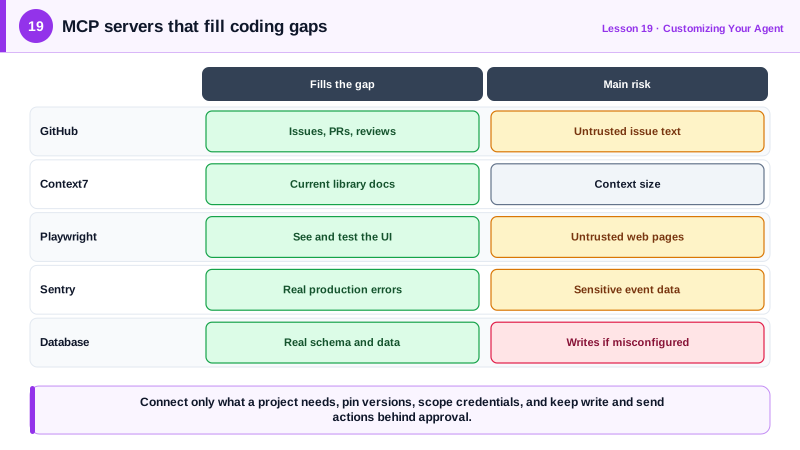
A few categories of server repay their cost for most teams. A code host server, such as GitHub's official MCP server, lets the agent read issues and pull requests, comment and open pull requests. A documentation server, such as Context7, fetches current, version-specific library documentation, which reduces hallucinated APIs for fast-moving libraries. A browser automation server, such as Microsoft's Playwright MCP, lets the agent open your running app, click through a flow and take screenshots, which gives it real feedback on frontend work. An observability server, such as Sentry's, gives it the stack trace and context of a production error. A database server with a read-only role lets it inspect schemas and sample data instead of guessing.
Each connected server has costs. Its tool definitions are added to every request, so several large servers consume context and make tool choice harder; connect what a project needs and enable subsets of tools where servers allow it. Each server is also software running with access you grant: pin versions, prefer official servers from the vendor, and give it the narrowest credentials that work, such as a token scoped to one repository or a read-only database user.
MCP servers also widen the prompt injection surface (Day 23). An issue body, a web page the browser opens, or a document fetched for context can contain instructions aimed at the agent. Combined with access to secrets and the ability to send data out, that is the lethal trifecta. Keep write and send capabilities behind approval, and be especially careful with servers that read untrusted public content.
For teams, put shared servers in the project configuration, .mcp.json for Claude Code, with secrets referenced from environment variables rather than written into the file, and document in the instruction file what each server is for. A line such as "use the playwright server to verify UI changes before finishing" turns an available tool into a habit.
| Server type | Example | Fills the gap | Main risk |
|---|---|---|---|
| Code host | GitHub MCP server | Issues, PRs, reviews | Broad tokens, untrusted issue text |
| Current docs | Context7 | Up-to-date library APIs | Low; context size |
| Browser | Playwright MCP | Seeing and testing the running UI | Untrusted web content |
| Observability | Sentry MCP | Real production errors and traces | Sensitive data in events |
| Database | DBHub or vendor servers, read-only role | Real schema and sample data | Write access if misconfigured |
Worked Example: A Team MCP Setup for Frontend Work
These commands add three servers at project scope, which writes them to .mcp.json for the team. The instruction-file lines tell the agent when to use them.
# Code host: GitHub's remote MCP server, authenticated with each developer's token
claude mcp add --transport http github --scope project https://api.githubcopilot.com/mcp/ \
  --header "Authorization: Bearer \${GITHUB_PAT}"

# Current library documentation
claude mcp add --transport http context7 --scope project https://mcp.context7.com/mcp

# Browser automation to verify UI changes against the local dev server
claude mcp add --transport stdio playwright --scope project -- npx -y @playwright/mcp@0.0.83

# Check status and sign in where needed, inside a session
# /mcp<!-- Added to AGENTS.md -->
## Tools
- Before using a library API you are not certain about, look it up with the context7 server.
- For any change under apps/web, start `pnpm dev`, then use the playwright server to open
http://localhost:3000, exercise the changed flow, and include a screenshot in your summary.
- Read issue details with the github server. Do not comment or open PRs unless asked.The escaped dollar sign keeps the variable unexpanded in .mcp.json, so each developer's own token is substituted at run time. The instruction about Playwright turns visual verification into part of the definition of done for frontend work.
Real-World Examples
- Microsoft's Playwright MCP server lets agents control a real browser through accessibility snapshots rather than screenshots alone, and became one of the most widely installed MCP servers for frontend development during 2025.
- GitHub launched its official remote MCP server in 2025 with OAuth sign-in, fine-grained tokens and configurable toolsets, and Invariant Labs' 2025 demonstration of a malicious public issue steering an agent to leak private repository data showed why its write tools deserve approval.
Review Questions & Answers
It fetches current, version-specific documentation at task time, so the agent uses real APIs of fast-moving libraries instead of relying on possibly outdated training data, reducing hallucinated calls.
Its tool definitions are sent with every request, consuming tokens and adding options that make tool selection harder, even when the task does not need the server.
They bring untrusted content, such as issue bodies and web pages, into the agent's context. Combined with access to private data and the ability to send data out, that content can steer the agent into leaking information.
The file is committed and shared, so it must not contain secrets. Environment variable references let each developer supply their own token locally.