Kafka Topics, Partitions and Offsets Explained
On this page
Kafka ordering: only within a partition
A team expects their consumer to see order 991 created before order 991 paid. Usually it does. Sometimes it doesn't, and the consumer tries to mark an order paid that doesn't exist yet. The reason is the single most important fact about Kafka's data model: order is guaranteed only within a partition.
Kafka topics and partitions
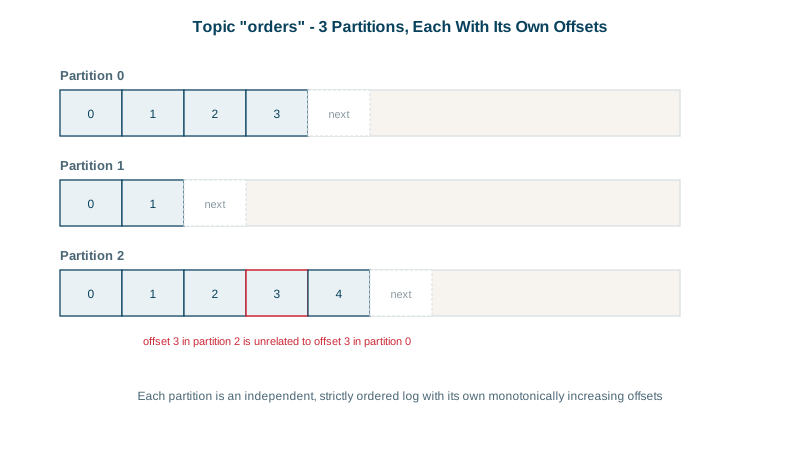
A topic is a named stream of records: orders, page-views, payments. It's not stored as one log. It's split into partitions, and each partition is an independent, ordered, append-only log living on a broker.
Partitions are how Kafka scales: different partitions sit on different brokers, are written in parallel, and are read by different consumers in a group (Day 6). More partitions, more parallelism.
Kafka offsets
Every record in a partition gets an offset: 0, 1, 2 and so on, increasing forever. An offset identifies a record only together with its partition; offset 5 in partition 0 and offset 5 in partition 3 are unrelated. Consumers track their position as "next offset to read" per partition.
How keys decide the partition
A record has an optional key and a value. The default partitioner hashes the key (murmur2) and takes it modulo the partition count, so records with the same key always land in the same partition, and therefore stay in order. Records without a key are spread across partitions.
Creating a 6-partition orders topic and producing three keyed records on a local Kafka 4.3 broker:
bin/kafka-topics.sh --bootstrap-server localhost:9092 --create --topic orders --partitions 6 --replication-factor 1

printf 'cust-42:order 991 created\ncust-42:order 991 paid\ncust-7:order 992 created\n' | \
  bin/kafka-console-producer.sh --bootstrap-server localhost:9092 --topic orders \
  --reader-property parse.key=true --reader-property key.separator=:

bin/kafka-console-consumer.sh --bootstrap-server localhost:9092 --topic orders --from-beginning \
  --formatter-property print.key=true --formatter-property print.partition=true \
--formatter-property print.offset=truePartition:1 Offset:0 cust-7 order 992 created
Partition:2 Offset:0 cust-42 order 991 created
Partition:2 Offset:1 cust-42 order 991 paidBoth cust-42 records went to partition 2, in order. The cust-7 record went to partition 1. Read across partitions and you may see them interleaved in any order; within partition 2, created always comes before paid.
So the fix for the opening problem: key events by the entity whose order matters, here the order id or customer id.
What's inside a record
Besides the key and value, every record carries:
- A timestamp. By default the producer sets it when the record is created (
CreateTime). A topic can instead usemessage.timestamp.type=LogAppendTime, so the broker stamps the time it received the record. Stream processors treat this timestamp as event time (Day 17), so a producer with a wrong clock skews every windowed count. - Headers: key-value pairs of metadata outside the payload, such as a trace id, the event type or a schema version. Consumers can route or filter on headers without deserializing the value, and tracing libraries carry the W3C
traceparentheader here so one request can be followed across services. - Partition and offset, assigned by the broker when the record is written.
The console consumer prints headers with --formatter-property print.headers=true.
How partitions are stored: segments
A partition isn't one endless file. It's a series of segment files (1 GB each by default), plus index files that map offsets and timestamps to file positions. New records go to the active segment; old segments are deleted or compacted according to retention settings (Day 10). Reading from any offset is fast because the index finds the right file position directly.
Choosing a partition count
- Enough partitions for your target parallelism: a consumer group can't use more consumers than there are partitions.
- Adding partitions later is possible but changes which partition each key maps to, breaking per-key ordering for a while. Plan ahead (Day 22).
- Too many partitions cost memory, file handles and recovery time. Tens to low hundreds per topic is common; thousands needs a reason.
Check yourself
They were sent without a key, or with different keys, so they landed in different partitions. Use the order id as the key so they share a partition.
No. Offsets are numbered separately within each partition, so every partition of a topic has its own offset 7. A record is uniquely identified by the topic, the partition and the offset together, which is also what consumer groups commit as their position.
The partition for each key is computed from the partition count, so changing it remaps keys and breaks ordering between old and new records for those keys.
Each partition's log is split into segments, and only the newest one is written to. Retention and compaction work on whole older segments, so deleting old data means removing files rather than rewriting the log, which keeps those operations cheap.
An optional key (used for partitioning and compaction), a timestamp, optional headers for metadata such as trace ids or event types, and the partition and offset assigned when it's written.