Kafka in Production: Pitfalls and Runbook
On this page
Before go-live: reviewing a Kafka service
A new service is about to start producing to and consuming from Kafka in production. Review it against the checklist below before go-live, then make sure on-call has the runbook. Most serious Kafka incidents trace back to one of these items.
Kafka pre-production checklist
Topics
- [ ] Created deliberately, not auto-created; auto-creation disabled on the cluster (Day 4).
- [ ] Partition count planned from measured throughput and consumer parallelism, with headroom (Day 22).
- [ ] Replication factor 3,
min.insync.replicas=2, replicas spread across zones (Day 9). - [ ] Retention or compaction chosen for the data's purpose (Day 10).
- [ ] Schema registered with a compatibility rule (Day 8).
Producers
- [ ]
acks=alland idempotence on (the defaults; check nobody overrode them) (Day 5). - [ ] Keys chosen for the ordering that's needed, and the same partitioner across client libraries (Days 5 and 14).
- [ ] Delivery failures handled in callbacks,
flush()on shutdown. - [ ] Events from database changes published through an outbox, not dual writes (Day 19).
Consumers
- [ ] Auto-commit off for anything important; commit after processing (Day 7).
- [ ] Processing idempotent; duplicates are expected, not exceptional.
- [ ] Poison messages go to a dead-letter topic instead of blocking a partition.
- [ ]
max.poll.interval.mscomfortably above the slowest batch; static membership or the new group protocol for rolling deploys (Day 11).
Cluster and operations
- [ ] TLS, authentication and least-privilege ACLs per service (Day 25).
- [ ] Alerts: offline partitions, under-min-ISR, URP, controller count, disk, time-based consumer lag (Day 23).
- [ ] Broker failure and DR failover tested in staging (Days 24 and 26).
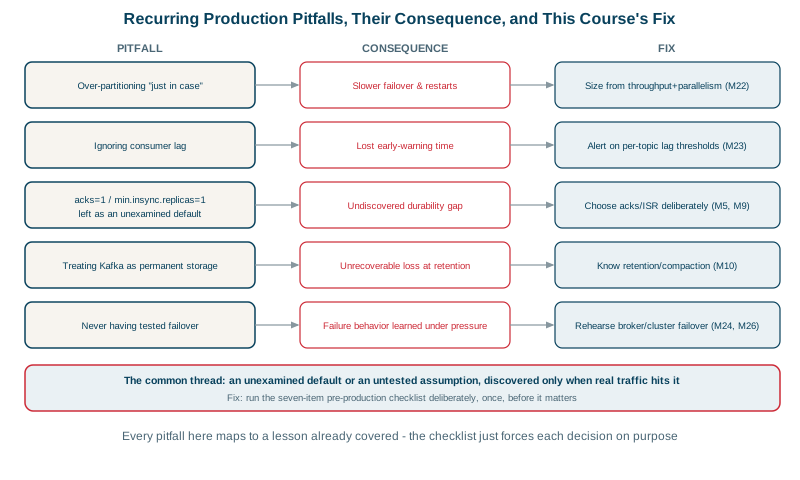
Common Kafka pitfalls and fixes
| Pitfall | What happens | Fix |
|---|---|---|
| Auto-commit with side effects | Lost or duplicated processing after crashes | Manual commit after processing, idempotent handlers |
min.insync.replicas=1 with acks=all | Acknowledged data lost when one broker dies | min.insync.replicas=2 |
| One poison message | A partition stops; lag grows forever | Dead-letter topic and skip after N attempts |
| Changing partition count on keyed topics | Per-key ordering breaks | Plan partitions up front, or migrate to a new topic |
| Treating Kafka as permanent storage without planning | Data silently deleted by retention | Explicit retention, tiered storage, or a lake for history |
| No lag alerting | Consumers hours behind before anyone notices | Time-based lag alerts per critical group |
| Never testing failover | DR fails on a detail during a real outage | Regular game days |
Kafka incident runbook
Consumer lag growing
- Is lag on all partitions or one? One: hot key or a stuck instance (check its logs and the key distribution). All: the group is too slow.
- Check for frequent rebalances (instances crashing or exceeding
max.poll.interval.ms). - Check the downstream: a slow database or API usually explains slow consumers.
- Scale consumers up to the partition count; optimize processing; batch writes.
Producer errors or timeouts
- Check for under-min-ISR or offline partitions on the target topic.
- Check broker request latency and disk.
- Check client-side buffer exhaustion and authorization errors.
Under-replicated partitions (Day 24): find the common broker; check health, disk and network; restart or replace; throttle any reassignment.
Disk filling up
- Find the largest topics (
kafka-log-dirs.sh --describe). - Lower retention temporarily on the offending topic, or add brokers/storage and rebalance.
- Find the cause: a producer writing far more than planned, or a compacted topic that isn't compacting.
Poison message blocking a partition
- Find the offset from consumer logs.
- Fix the consumer to dead-letter it, or, as a last resort, skip it by resetting the group's offset for that partition by one (Day 11), recording what was skipped.
Check yourself
Lowering min.insync.replicas to 1 on topics produced with acks=all. A write can then be acknowledged with only the leader holding it, so losing that one broker loses acknowledged data, even though the replication factor is 3.
That partition's consumer instance (crashes, a stuck poison message) and whether a hot key sends a disproportionate share of traffic to it.
Kafka processes a partition in order, so one record that always fails blocks every record behind it. Sending it to a dead-letter topic, with the error and original coordinates, lets the partition move on, and the bad record can be inspected and replayed once the bug is fixed.
Replication factor 3 with min.insync.replicas=2 and acks=all, idempotent producers, manual offset commits after processing, a dead-letter strategy, schemas in a registry, ACLs per service, auto topic creation off, and alerts on offline partitions, under-replication and lag in time.
Steps like resetting offsets, replacing a broker or failing over to DR are rarely needed and easy to get wrong under pressure. Rehearsing them in staging finds missing permissions and outdated commands while the stakes are low.