Kafka Schema Registry and Serialization (Avro)
On this page
Why Kafka needs schemas: the rename that broke three teams
The order service renames customerId to customer_id in its JSON events and deploys. Billing, analytics and email consume those events. All three start failing or, worse, quietly writing nulls. Nothing stopped the change, because to Kafka a record is just bytes. The producer and its consumers had a contract, but nobody wrote it down or checked it.
JSON vs Avro vs Protobuf for Kafka
| Format | Schema | Size and speed | Evolution checks |
|---|---|---|---|
| JSON | Implicit (or JSON Schema) | Larger, slower to parse | Only with JSON Schema + a registry |
| Avro | Required, defined separately | Compact binary; schema not in each message | Strong, with a registry |
| Protobuf | Required, .proto files | Compact binary, fast | Strong, field numbers (System Design Roadmap, Day 16) |
JSON is easy to start with and to read in tools. Avro and Protobuf are smaller and come with a formal schema, which is what makes automatic compatibility checks possible.
How a schema registry works
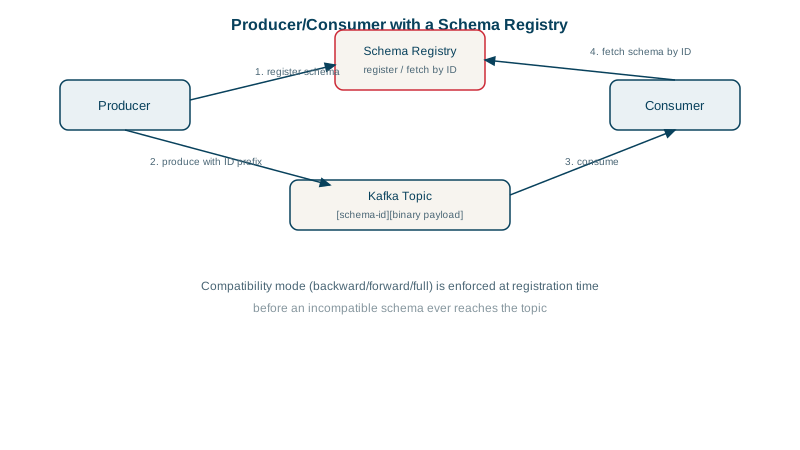
A schema registry (Confluent Schema Registry, Apicurio, or managed versions in Confluent Cloud, AWS Glue and Azure Event Hubs) stores schemas per subject, usually one per topic value (orders-value), with versions.
How it works:
- The producer's serializer registers or looks up the schema and gets a small schema id.
- Each message carries that id (a few bytes) followed by the binary data, not the whole schema.
- The consumer's deserializer reads the id, fetches and caches the schema, and decodes.
- When a producer tries to register a new version, the registry checks it against the subject's compatibility rule and rejects it if it would break consumers.
An Avro schema that can evolve
{
  "type": "record",
  "name": "OrderPlaced",
  "namespace": "shop.orders",
  "fields": [
    {"name": "order_id",    "type": "long"},
    {"name": "customer_id", "type": "long"},
    {"name": "total",       "type": {"type": "bytes", "logicalType": "decimal", "precision": 10, "scale": 2}},
    {"name": "currency",    "type": "string", "default": "EUR"},
    {"name": "coupon",      "type": ["null", "string"], "default": null}
  ]
}
Fields with defaults can be added or removed safely, because a reader missing the field can fill in the default. Renaming a field, or changing its type, is breaking.
Schema compatibility: BACKWARD, FORWARD and FULL
| Rule | Guarantees | Safe changes |
|---|---|---|
BACKWARD (common default) | Consumers on the new schema can read data written with the previous one | Delete fields; add fields with defaults |
FORWARD | Consumers on the previous schema can read new data | Add fields; delete fields that had defaults |
FULL | Both directions | Add or delete fields that have defaults |
*_TRANSITIVE | Same, against all earlier versions, not just the last | As above |
BACKWARD fits the usual rollout order: upgrade consumers first, then producers. With it in place, the customerId rename from the story is rejected at registration time, in the producer's CI or deploy, instead of breaking three teams in production.
To rename safely: add the new field (with a default), have producers fill both, migrate consumers, then remove the old one in a later version.
Several event types in one topic
The default TopicNameStrategy names the subject after the topic (orders-value), so every record on the topic must fit one schema, and compatibility is checked between versions of that one schema. That doesn't fit an orders topic carrying OrderPlaced, OrderPaid and OrderShipped, each with different fields. Two ways to handle it:
- TopicRecordNameStrategy: the serializer registers one subject per event type on the topic, such as
orders-shop.orders.OrderPaid, and each type evolves and is checked on its own. - One schema with a union: keep TopicNameStrategy and make the value a union of the event types, an Avro union or a Protobuf
oneof, referencing each type's schema.
Either way, putting all of an order's events on one topic keyed by order id keeps them in order (Day 3), which is usually why you want them together. Splitting them into one topic per event type would lose that ordering.
Check yourself
Brokers store keys and values as opaque bytes and never inspect their structure. Only a schema registry, with compatibility rules checked when a producer registers a new schema, knows what the bytes mean and can reject a change that would break existing consumers.
No. BACKWARD means consumers using the new schema must be able to read data written with the old one. Old records don't have the new field, so the new reader would fail. Add the field with a default value, which old records then take.
Each record starts with a small header containing the schema's id in the registry. The deserializer fetches that schema once, caches it, and uses it to decode every record with the same id, so payloads stay compact.
With the default TopicNameStrategy, the topic has one subject and one schema, so a second type looks like a breaking change. Use TopicRecordNameStrategy, or a union schema covering all three types.