Kafka Connect Tutorial
On this page
What is Kafka Connect?
The team needs every change to the orders table in PostgreSQL to appear in Kafka, and every event in a Kafka topic to land in S3 for analytics. Writing those programs means handling offsets, retries, restarts, scaling and schema changes, again. Kafka Connect, part of Apache Kafka, is a framework for exactly this: you configure connectors instead of writing code.
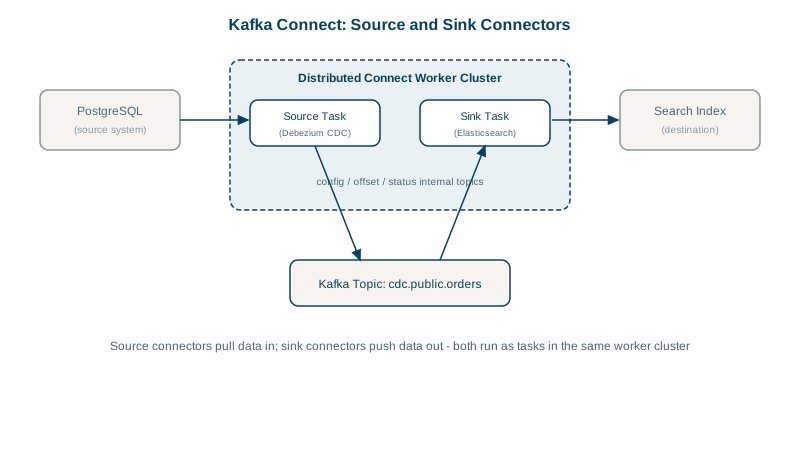
Source connectors, sink connectors and workers
- A source connector reads from an external system into Kafka: database change data, files, message queues, SaaS APIs.
- A sink connector writes from Kafka to an external system: databases, S3, Elasticsearch, data warehouses.
- Connectors run inside workers. In distributed mode, several workers form a Connect cluster: you submit connector configs through a REST API, work is split into tasks spread across workers, and if a worker dies its tasks move to others. Connect stores its configs, offsets and status in compacted Kafka topics, so it has no database of its own.
Converters and single message transforms
- Converters handle serialization independently of the connector: JSON, Avro or Protobuf with a schema registry (Day 8). The same connector can emit either.
- Single Message Transforms (SMTs) make small per-record changes: rename or drop fields, route to a different topic, extract a key, add a timestamp. Keep them small; real processing belongs in a stream processor (Day 15).
Change data capture from PostgreSQL with Debezium
Debezium is the standard open-source CDC connector. It reads the database's write-ahead log (no polling queries, no load from SELECTs) and emits an event for every insert, update and delete, with before and after values.
An update to order 991 arrives roughly like this, with the schema part omitted:
{
  "before": null,
  "after":  { "id": 991, "customer_id": 42, "status": "PAID" },
  "source": { "connector": "postgresql", "db": "shop", "table": "orders", "lsn": 24023128 },
  "op": "u",
  "ts_ms": 1791608337000
}
op is c for an insert, u for an update, d for a delete and r for rows read during the initial snapshot. A delete is followed by a tombstone for the same key, so compacted topics drop the row (Day 10). Notice that before is null: by default PostgreSQL logs only the old row's key, and only for deletes and key changes. Run ALTER TABLE orders REPLICA IDENTITY FULL if consumers need previous values. And when a connector starts for the first time, it snapshots every existing row before streaming changes, so a large table takes a while to appear in full.
PostgreSQL needs wal_level = logical, and a user with replication rights. Then submit the connector:
curl -X PUT http://connect:8083/connectors/orders-cdc/config \
  -H "Content-Type: application/json" -d '{
    "connector.class": "io.debezium.connector.postgresql.PostgresConnector",
    "database.hostname": "orders-db",
    "database.port": "5432",
    "database.user": "debezium",
    "database.password": "${file:/opt/secrets/db.properties:password}",
    "database.dbname": "shop",
    "topic.prefix": "shop",
    "table.include.list": "public.orders,public.order_lines",
    "plugin.name": "pgoutput",
    "tasks.max": "1"
  }'

curl http://connect:8083/connectors/orders-cdc/status
Changes now flow into shop.public.orders and shop.public.order_lines. The ${file:...} syntax uses a config provider so the password isn't stored in the connector config.
A sink in the other direction, such as the S3 or JDBC sink, is configured the same way with topics to read and connection settings for the target.
Kafka Connect vs writing your own consumer
| Use Connect | Write your own consumer or stream app |
|---|---|
| Standard systems with existing connectors | Business logic and decisions |
| Bulk data movement and CDC | Joining, aggregating, enriching streams (Day 15) |
| You want restarts, scaling and offsets handled for you | Unusual systems with no connector |
For publishing domain events from your own service, prefer the outbox pattern (Day 19) over raw table CDC: raw change events expose your internal schema to every consumer, while an outbox table carries deliberate, versioned events. Debezium has a ready transform for outbox tables.
Operating Kafka Connect
- Monitor connector and task status; a failed task doesn't fix itself. Restart with
POST /connectors/<name>/restart?includeTasks=true. - Configure error handling:
errors.toleranceand a dead-letter queue topic for sinks, so one bad record doesn't stop the pipeline. - Watch the database side: an unconsumed replication slot makes PostgreSQL keep WAL files, which can fill its disk.
Check yourself
Log-based CDC reads the database's transaction log, so it captures every insert, update and delete in commit order, including deletes that polling can't see, and puts no query load on the tables. Polling by updated_at misses deletes, can skip rows with equal timestamps, and adds load with every poll.
The Connect cluster rebalances and reassigns the failed worker's tasks to the remaining workers. They resume from the source or sink offsets that Connect stores in Kafka topics, so processing continues with at most some reprocessing.
CDC on main tables publishes your internal schema: every column rename becomes a breaking change for consumers. An outbox table contains deliberate, versioned domain events written in the same transaction, so the database schema and the public event contract can evolve independently.
The table's replica identity. PostgreSQL only logs old values for all columns with REPLICA IDENTITY FULL; by default it logs just the key, for deletes.