ksqlDB Tutorial: Stream Processing with SQL
On this page
What is ksqlDB?
Yesterday's pipeline needed a Java application. An analyst who wants "paid orders per customer, updated live" may not want to write and deploy one. ksqlDB, from Confluent, runs on top of Kafka Streams and lets you express the same processing in SQL. Each query becomes a long-running Kafka Streams job inside the ksqlDB server cluster.
ksqlDB streams and tables
The same two ideas as Kafka Streams (Day 15):
-- a STREAM over an existing topic: every record is an event
CREATE STREAM orders (
  order_id    BIGINT KEY,
  customer_id BIGINT,
  status      VARCHAR,
  total       DECIMAL(10, 2)
) WITH (KAFKA_TOPIC = 'orders', VALUE_FORMAT = 'JSON');

-- a TABLE derived by aggregation: latest value per key, kept up to date
CREATE TABLE paid_per_customer AS
  SELECT customer_id, COUNT(*) AS paid_orders, SUM(total) AS revenue
  FROM orders
  WHERE status = 'paid'
  GROUP BY customer_id
  EMIT CHANGES;
CREATE TABLE ... AS SELECT starts a persistent query: it runs continuously, writes results to a new backing topic, and keeps a state store, exactly like a Streams app would.
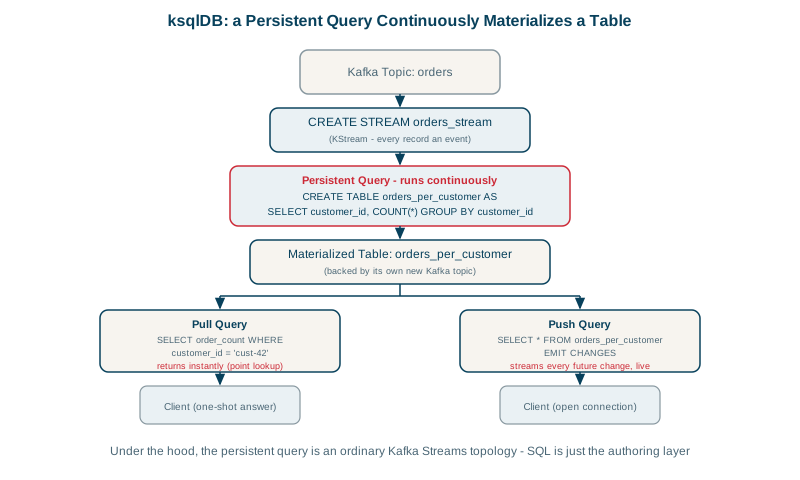
ksqlDB push vs pull queries
-- push query: subscribe to changes as they happen
SELECT * FROM paid_per_customer EMIT CHANGES;

-- pull query: look up the current value, like a normal SELECT
SELECT paid_orders, revenue FROM paid_per_customer WHERE customer_id = 42;
Push queries stream every update to the client; pull queries return the current value from the materialized table and finish, which makes ksqlDB usable as a small serving layer for dashboards.
Windowing, joins and late data work as in Kafka Streams:
CREATE TABLE orders_per_minute AS
  SELECT customer_id, COUNT(*) AS orders
  FROM orders
  WINDOW TUMBLING (SIZE 1 MINUTE, GRACE PERIOD 10 SECONDS)
  GROUP BY customer_id
  EMIT CHANGES;
ksqlDB vs Kafka Streams vs Flink
| ksqlDB | Kafka Streams | Flink (SQL or Java) | |
|---|---|---|---|
| You write | SQL | Java/Kotlin code | SQL or Java |
| Runs as | Its own server cluster | Part of your application | Its own cluster or a managed service |
| Flexibility | Limited to what SQL and its functions express | Full code | Very high, many connectors |
| Best for | Simple filters, joins, aggregations by SQL users | Processing embedded in services | Large-scale or complex pipelines across many systems |
ksqlDB licensing and the shift to Flink SQL
ksqlDB is source-available under the Confluent Community License: free to use, but you can't offer it as a competing hosted service. Confluent's own cloud now centers its SQL stream processing on Apache Flink, and Flink SQL has become the more common choice for new SQL-based stream processing on Kafka. Check the project's current status and your platform's offering before committing; the streams-and-tables thinking carries over either way.
Check yourself
It starts a persistent query that runs continuously on the ksqlDB server, reading the source stream and maintaining a materialized table of results, backed by a Kafka topic. The table updates as new records arrive, and other queries or consumers can read it.
A push query subscribes to changes and keeps streaming results as they happen, like a live feed. A pull query asks for the current state once and returns, like a normal database lookup against a materialized table.
When the logic needs full code, custom libraries or tight integration with a service, or you'd rather not run a separate ksqlDB cluster.
ksqlDB's license and development direction changed, and Confluent's managed platform now emphasizes Flink SQL. Flink offers broader SQL support and runs independently of Kafka's vendor. New projects often choose Flink SQL or Kafka Streams instead.
Quick, SQL-based transformations and filters on topics, such as deriving a filtered or enriched stream, without writing and deploying a Java application. It suits teams fluent in SQL and simple, well-scoped processing.