Kafka Quickstart: Install, Produce and Consume
On this page
What you'll set up
This quickstart gets you a Kafka broker running on your machine, a topic, messages you produced and consumed, and a consumer group whose committed offsets you can inspect. Every command below was run against Kafka 4.3.1.
Step 1: download Kafka or run it in Docker
Kafka needs Java 17 or newer for the broker. Download the binary release from kafka.apache.org and unpack it:
tar xzf kafka_2.13-4.3.1.tgz
cd kafka_2.13-4.3.1
Or use the official container image instead of installing Java:
docker run -d --name kafka -p 9092:9092 apache/kafka:4.3.1The image starts a single-node KRaft broker with sensible defaults; skip to Step 3 and run the scripts inside it with docker exec -it kafka /opt/kafka/bin/....
Step 2: format storage and start the broker
KAFKA_CLUSTER_ID="$(bin/kafka-storage.sh random-uuid)"
bin/kafka-storage.sh format --standalone -t "$KAFKA_CLUSTER_ID" -c config/server.properties
bin/kafka-server-start.sh config/server.properties
config/server.properties sets process.roles=broker,controller and log.dirs, the directory where data is stored (by default under /tmp, so change it if you want data to survive a reboot). The broker listens on localhost:9092.
Step 3: create a topic
bin/kafka-topics.sh --bootstrap-server localhost:9092 --create --topic orders --partitions 6 --replication-factor 1
bin/kafka-topics.sh --bootstrap-server localhost:9092 --describe --topic ordersTopic: orders PartitionCount: 6 ReplicationFactor: 1 Configs: min.insync.replicas=1,segment.bytes=1073741824
Topic: orders Partition: 0 Leader: 1 Replicas: 1 Isr: 1
...Replication factor 1 is fine on one broker; production uses 3 (Day 9).
Step 4: produce and consume messages from the console
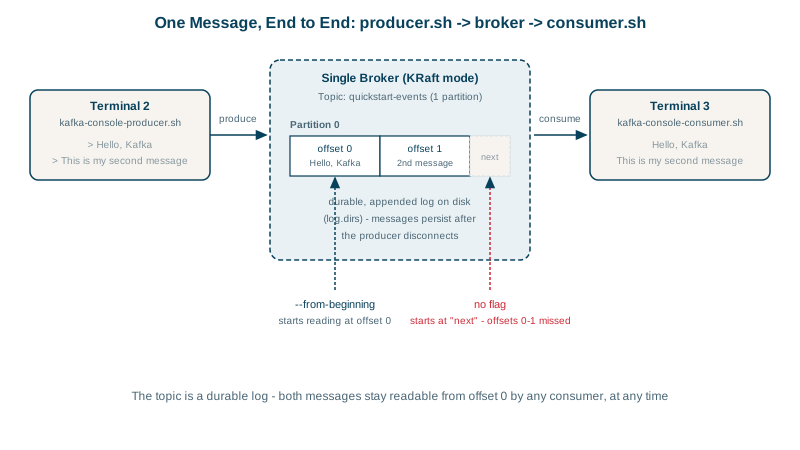
In one terminal, read from the beginning as part of a consumer group named demo:
bin/kafka-console-consumer.sh --bootstrap-server localhost:9092 --topic orders --from-beginning --group demo \
  --formatter-property print.key=true --formatter-property print.partition=true
In another, send keyed messages (key:value per line):
bin/kafka-console-producer.sh --bootstrap-server localhost:9092 --topic orders \
  --reader-property parse.key=true --reader-property key.separator=:
> cust-42:order 991 created
> cust-42:order 991 paid
They appear in the consumer within milliseconds. In Kafka 4.x the older --property flag still works but is deprecated in favor of --reader-property and --formatter-property.
Step 5: check consumer group offsets and lag
bin/kafka-consumer-groups.sh --bootstrap-server localhost:9092 --describe --group demoGROUP TOPIC PARTITION CURRENT-OFFSET LOG-END-OFFSET LAG
demo orders 1 1 1 0
demo orders 2 2 2 0
...CURRENT-OFFSET is the next offset the group will read; LOG-END-OFFSET is the end of the partition; LAG is the difference, how far behind the group is. Stop the consumer, produce more, and the lag grows; restart it and it resumes exactly where it stopped.
Watch out for auto-created topics
If auto.create.topics.enable is true on the broker, producing to a misspelled topic name (oders) silently creates a new topic with default settings. Disable it in shared environments and create topics deliberately, with chosen partition counts and settings.
Common Kafka setup errors
| Symptom | Cause | Fix |
|---|---|---|
Broker won't start: No meta.properties | Storage not formatted | Run kafka-storage.sh format |
Client hangs or Connection to node -1 could not be established | Wrong bootstrap address, or broker not running | Check the broker log and listeners / advertised.listeners |
| Works locally, not from a container | advertised.listeners points to an address the client can't reach | Advertise a reachable host name |
| Consumer shows nothing | No --from-beginning, and the group already read everything | Use a new group name or reset offsets |
Check yourself
It's the number of records between the group's committed offset and the newest offset in the partition, so it shows how far behind the consumers are. Lag that grows steadily means consumers can't keep up; lag that rises and falls quickly is normal batching.
From the offsets the group last committed for each partition, so it continues where it left off, not from the beginning. Only a brand-new group with no committed offsets uses auto.offset.reset, which defaults to latest in most clients.
With auto-creation on, a typo such as oders silently creates a new topic with default partition and replication settings, and messages flow into it while the real consumers wait on the correct topic. Disabling it turns the typo into an immediate error and keeps topic settings deliberate.
It started at the latest offset, so it only sees messages produced after it subscribed. Add --from-beginning, or use a new group, to read existing messages.