Kafka Partitioning Strategy and Key Design
On this page
Symptom: one hot partition is always behind
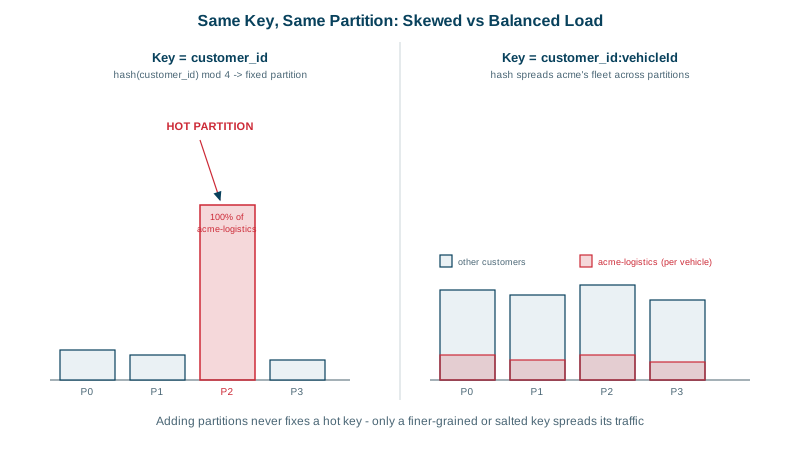
A trip-events topic keyed by customer_id has 24 partitions. Twenty-three consumers keep up easily; the one reading partition 17 is always minutes behind. One enterprise customer generates 30 percent of all events, and every one of them lands in partition 17. Adding consumers doesn't help, because a partition is read by one consumer in a group (Day 6).
How to choose a Kafka partition key
- Ordering: all records with the same key go to the same partition, so they're processed in order (Day 3).
- Distribution: the spread of keys decides how evenly load spreads across partitions.
Good keys satisfy both. Choose the key from the question "what must stay in order relative to each other?", then check that the resulting distribution is reasonable.
| Use case | Must be ordered per | Key |
|---|---|---|
| Order lifecycle events | Order | order_id |
| Account balance updates | Account | account_id |
| Device telemetry | Device | device_id |
| Page views for analytics | Nothing in particular | No key, or a random one |
Over-ordering is a common mistake: keying by customer_id when only per-order ordering matters concentrates load for no benefit.
Diagnose a hot partition
bin/kafka-consumer-groups.sh --bootstrap-server kafka:9092 --describe --group trip-processors
# one partition with growing LAG while the rest are near zero
Broker metrics show the same: bytes in per partition far above the rest. Confirm by sampling keys from that partition.
Fixing a hot partition: finer keys, salting, dedicated topics
Use a finer key if ordering allows. If trip events only need ordering per trip, key by trip_id: the big customer's events spread across all partitions.
Salt the hot key if ordering is needed only within a sub-stream. Key the big customer's events as customer_id + "-" + (trip_id % 8): ordering holds per trip group, and the load spreads over up to 8 partitions. Consumers that need a per-customer view must merge those sub-streams.
Give the tenant its own topic if one customer is so large it's effectively a separate workload.
Don't reach for a custom partitioner first; changing the key is usually clearer and keeps every client consistent. And when several client libraries produce the same keys, make sure they use the same hash (Day 5).
Choosing the partition count
Plan for peak, with headroom, because changing it later remaps keys:
target peak throughput        50 MB/s
per-partition consumer rate   ~5 MB/s (measured for your consumer)
partitions for consumers      50 / 5 = 10
headroom for growth (×2-3)    24 partitions
Also consider producer throughput per partition and the number of consumers you want to run. Day 22 covers capacity planning in detail.
If you must increase partitions on a keyed topic: per-key ordering breaks for records produced around the change. Options are to accept a short window of possible misordering, to pause producers and drain consumers during the change, or to create a new topic with the new count and migrate.
Records without keys: the sticky partitioner
Since Kafka 3.3, the Java client's default for keyless records is a sticky strategy that fills a batch for one partition before moving on, which gives better batching than strict round robin, and adapts to slow brokers. It spreads load well over time; just don't rely on any order across keyless records.
Check yourself
Pick the entity whose events must be processed in order, then check the key spreads load evenly enough; don't order more than you need.
Use a finer key such as the trip or order id if ordering allows, or salt the tenant's key into several sub-keys. A dedicated topic is another option for very large tenants.
The default partitioner maps keys to partitions by hashing modulo the partition count. Adding partitions changes that mapping, so new events for a key may land on a different partition than its old ones, breaking per-key ordering around the change. Choosing a generous count up front avoids that.
Instead of spreading each keyless record to a different partition, it fills a batch for one partition, then moves to another. That produces fuller batches and better throughput while still spreading load over time.
Compare per-partition metrics: one partition with much higher bytes in, a much larger log, or lag that grows while others stay near zero. Then sample its keys to find the one producing most of the traffic.