Kafka Streams Tutorial for Beginners
On this page
What is Kafka Streams? A library, not a cluster
You want a live count of paid orders per customer. You could write a consumer that keeps counts in memory, but then you'd handle crashes, rebalancing, restoring the counts and scaling yourself. Kafka Streams handles those for you, and it's just a library: you add it to an ordinary Java (or Kotlin, Scala) application, run as many instances as you like, and Kafka coordinates them through a consumer group. No processing cluster to operate, unlike Flink or Spark.
Kafka Streams is a Java library, so .NET services can't use it directly. The options there are Streamiz.Kafka.Net, a community port with a similar API; plain Confluent.Kafka consumers and producers with your own state handling; or a separate processor such as Flink or ksqlDB (Day 21). The ideas in Days 15 to 17, streams versus tables, state stores, windows, carry over to all of them.
Kafka Streams topologies
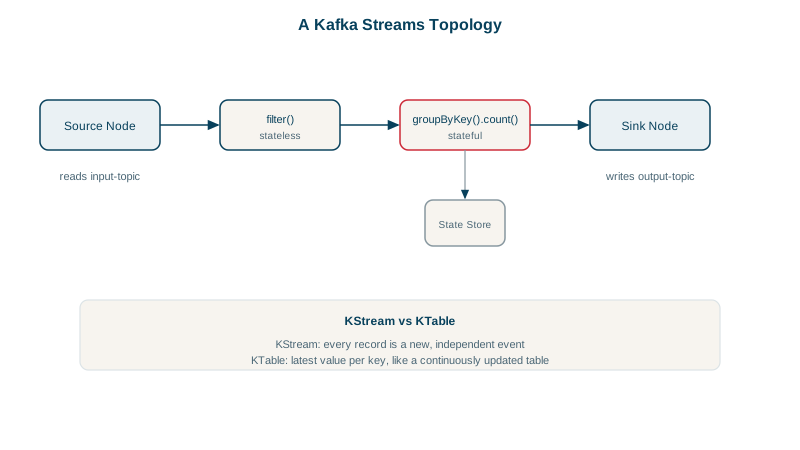
A Streams app is a topology: a graph of processing steps from source topics through operations (filter, map, join, aggregate) to sink topics. You build it with the high-level DSL.
KStream vs KTable
- A KStream is a stream of independent events: "customer 42 paid", "customer 42 paid again". Every record matters.
- A KTable is a changelog seen as a table: the latest value per key. "Customer 42 has 2 paid orders." A new record for a key replaces the old value.
Aggregations turn streams into tables; toStream() turns a table's updates back into a stream.
A Kafka Streams example: paid orders per customer
// PaidPerCustomer.java: count paid orders per customer
static Topology build() {
    StreamsBuilder b = new StreamsBuilder();
    KStream<String, String> orders = b.stream("orders",                // key: customer id, value: status
            Consumed.with(Serdes.String(), Serdes.String()));
    KTable<String, Long> paidCounts = orders
            .filter((customer, status) -> status.equals("paid"))      // stateless
            .groupByKey()
            .count(Materialized.as("paid-counts"));                    // stateful, backed by a store
    paidCounts.toStream().to("paid-counts-by-customer",
            Produced.with(Serdes.String(), Serdes.Long()));
    return b.build();
}
To run it against a cluster, you'd create new KafkaStreams(build(), props) with an application.id (which is also the consumer group id) and the bootstrap servers, then call start().
Testing with TopologyTestDriver
kafka-streams-test-utils includes TopologyTestDriver, which runs a topology in-process, deterministically:
try (TopologyTestDriver d = new TopologyTestDriver(build(), props)) {
    var in = d.createInputTopic("orders", Serdes.String().serializer(), Serdes.String().serializer());
    var out = d.createOutputTopic("paid-counts-by-customer",
            Serdes.String().deserializer(), Serdes.Long().deserializer());
    in.pipeInput("cust-42", "created");
    in.pipeInput("cust-42", "paid");
    in.pipeInput("cust-7", "paid");
    in.pipeInput("cust-42", "paid");
    System.out.println(out.readKeyValuesToList());
}
Running it with the Kafka 4.3.1 jars printed:
[KeyValue(cust-42, 1), KeyValue(cust-7, 1), KeyValue(cust-42, 2)]The created event was filtered out, and each paid event emitted the updated count for its customer, a KTable's changelog. Unit-test every topology this way; it runs in milliseconds.
How Kafka Streams scales: tasks and partitions
A topology is split into tasks, one per input partition. Tasks are spread across all running instances (and threads within them, num.stream.threads). With a 6-partition orders topic, up to 6 instances do useful work; start more and some sit idle, just like a consumer group (Day 6). If one instance dies, its tasks move to the others.
Exactly-once processing in Kafka Streams
Set processing.guarantee=exactly_once_v2 and Streams uses transactions (Day 13) so outputs, state updates and input offsets commit together. Results are correct even across crashes and rebalances.
Check yourself
As a library inside your own application, not a separate cluster. You run as many instances as you need, and they join a consumer group, so Kafka splits the input partitions, and the processing tasks, among them. Scaling out means starting another instance.
A KStream is a sequence of independent events; a KTable represents the latest value per key, where new records update earlier ones.
It runs the whole topology in-process with no broker, feeding input records and reading output records deterministically, including advancing time for windows. Tests run in milliseconds and cover the processing logic precisely, leaving integration tests for configuration and serialization.
The topology is split into tasks, one per input partition. Tasks are distributed across all running instances and their threads, so the maximum parallelism equals the number of input partitions.
It uses Kafka transactions to commit input offsets, state store changelog updates and output records atomically. After a failure, a task's results are either all visible or not at all, so counts and aggregates aren't double-counted.