Kafka Streams Windowing and Time Semantics
On this page
Which minute does this order belong to?
A phone takes an order at 09:00:58, loses signal and sends it at 09:03:10. Does it count in the 09:00 minute or the 09:03 minute? For a "orders per minute" chart the honest answer is 09:00, when it happened. But then the 09:00 count can change after the minute is over. Windowing is about handling exactly that.
Event time vs ingestion time vs processing time
- Event time: when the event happened, set by the producer (the record timestamp, or a field you extract).
- Ingestion time: when the broker received it.
- Processing time: when your app processes it.
For most business aggregations, event time is correct: replaying yesterday's data gives the same results, and late arrivals land in the right window. Kafka Streams uses each record's timestamp as event time by default, and tracks stream time: the highest timestamp seen so far. If the real event time is a field in the payload rather than the record timestamp (Day 3), plug in a custom TimestampExtractor that reads it.
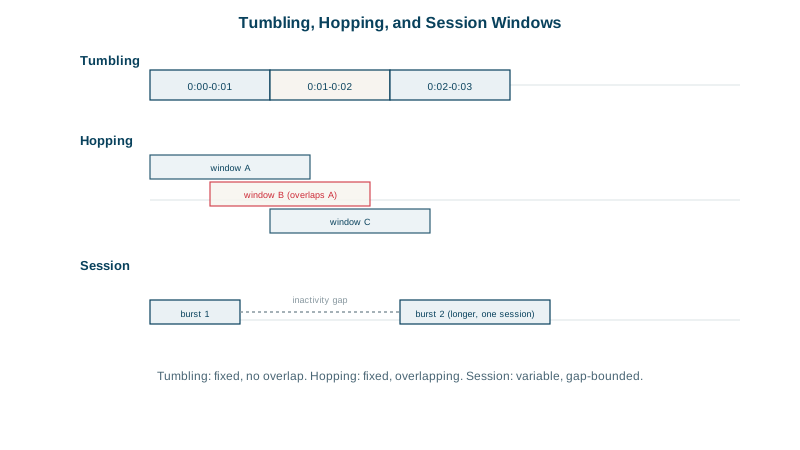
Tumbling, hopping, sliding and session windows
| Window | Shape | Example |
|---|---|---|
| Tumbling | Fixed size, no overlap | Orders per minute |
| Hopping | Fixed size, advancing by a smaller step, so windows overlap | 5-minute totals updated every minute |
| Sliding | Fixed size, defined by the time difference between records | "3 failed logins within 1 minute" |
| Session | Gaps of inactivity separate windows; sizes vary | One user's browsing session |
Grace periods: how long to wait for late data
A window can't stay open forever. A grace period says how long after a window's end (measured in stream time) late records are still accepted. Later records are dropped and counted in a metric.
// tumbling 1-minute windows on event time, accepting records up to 10 s late
orders.groupByKey()
      .windowedBy(TimeWindows.ofSizeAndGrace(Duration.ofMinutes(1), Duration.ofSeconds(10)))
      .count()
      .toStream((windowed, count) -> windowed.key() + "@" + windowed.window().startTime())
      .to("orders-per-minute", Produced.with(Serdes.String(), Serdes.Long()));
Testing it with TopologyTestDriver (Day 15) and these records:
cust-42 at 09:00:05, cust-42 at 09:00:25, cust-7 at 09:00:35
cust-42 at 09:01:05                       stream time is now 09:01:05
cust-7  at 09:00:58  (late, within grace)  09:00 window closes at 09:01:10
cust-9  at 09:01:35                       stream time is now 09:01:35
cust-7  at 09:00:45  (too late)            09:00 window already closed
Output (each line is an update to a window's count):
cust-42@09:00 = 1,  cust-42@09:00 = 2,  cust-7@09:00 = 1,  cust-42@09:01 = 1,
cust-7@09:00 = 2,  cust-9@09:01 = 1
The late cust-7 record at 09:00:58 updated its window to 2. The one at 09:00:45 arrived after stream time passed 09:01:10 and was dropped. Choose the grace period from how late your data really arrives: measure it.
Window updates vs final results with suppress
By default a windowed count emits an update for every record, as above. Downstream consumers see 1, then 2. If they need one final value per window (for example, to send an alert once), use suppress(Suppressed.untilWindowCloses(...)), which holds results until the grace period ends, trading latency for finality.
Check yourself
Event time puts each event in the window of when it actually happened, so a delayed mobile event still counts toward the right minute, and replaying the same data later produces the same results. Processing time depends on when the app happened to see the event, which changes with lag and restarts.
The window has already closed, so the record is dropped from it and counted in the dropped-records metric. Raise the grace period if late data matters more than how quickly results become final.
Session windows with a 30-minute inactivity gap. A session window grows as long as events keep arriving within 30 minutes of each other and closes after 30 minutes of silence, so each user's sessions have their natural length.
Tumbling windows are fixed-size and don't overlap, such as each minute. Hopping windows are fixed-size but advance by a smaller step, such as five-minute windows every minute, so each event belongs to several windows.
It holds back intermediate updates and emits only the final result for each window once its grace period ends. Use it when downstream systems should see one final value per window rather than every update.