MFA and Passwordless Authentication Explained
On this page
Why passwords alone fail: phishing and credential stuffing
Attackers rarely guess passwords one at a time. They reuse passwords leaked from other sites (credential stuffing), or trick users into typing them into a fake login page (phishing). A second factor means a stolen password alone isn't enough.
Authentication factors: know, have, are
Authentication factors come in three kinds: something you know (password, PIN), something you have (phone, security key), something you are (fingerprint, face). MFA combines at least two different kinds.
SMS vs authenticator apps vs push vs passkeys
| Method | How it works | Phishing-resistant | Weaknesses |
|---|---|---|---|
| SMS / email codes | A code sent to the phone or inbox | No | SIM swapping, interception, and users type the code into fake sites |
| TOTP apps | A 6-digit code that changes every 30 seconds, from a shared secret | No | A phishing proxy can relay the code in real time |
| Push approval | Approve a prompt in an app | No | "MFA fatigue": attackers spam prompts until someone taps approve; number matching helps |
| Security keys and passkeys (WebAuthn) | The device signs a challenge for the specific website | Yes | Recovery and multi-device setup need planning |
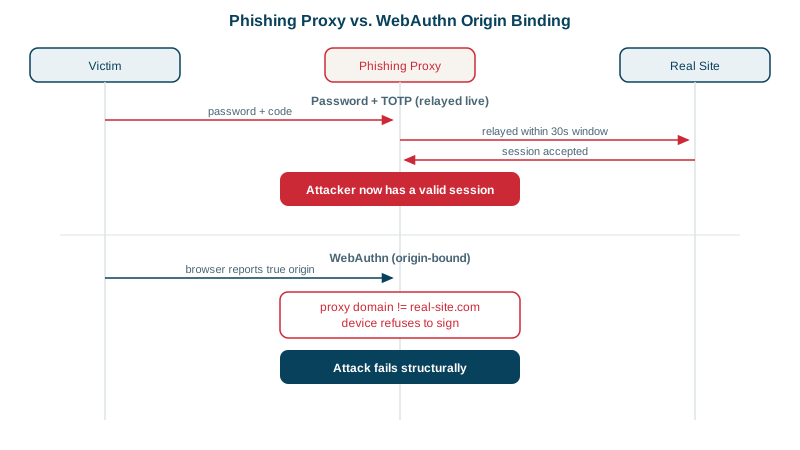
How a real-time phishing proxy beats codes: the attacker's site sits in the middle and forwards everything. You type your password on the fake page; the proxy types it on the real one. The real site asks for a code; the proxy shows you the same prompt; you type the code; the proxy submits it within seconds and keeps the session cookie the real site hands back. Ready-made toolkits automate exactly this, so it isn't a rare, skilled attack.
Any second factor blocks most credential stuffing. Only WebAuthn stops real-time phishing, which is why CISA and others call it phishing-resistant MFA.
Why WebAuthn and passkeys resist phishing
With WebAuthn (the standard behind passkeys and security keys):
- At registration, the device creates a key pair for that site. The private key never leaves the device (or the user's password manager, for synced passkeys); the server stores the public key.
- At sign-in, the server sends a random challenge. The browser passes it to the authenticator together with the origin from the address bar.
- The authenticator signs the challenge only with the key registered for that origin. On
examp1e-login.com, the key forexample.comisn't even offered.
// Browser side, simplified: the browser, not the page, supplies the origin
const assertion = await navigator.credentials.get({
  publicKey: {
    challenge: serverChallenge,           // random bytes from the server, single use
    rpId: 'example.com',                  // must match the site's domain, enforced by the browser
    userVerification: 'preferred',        // device PIN or biometric
  },
});
// Send assertion to the server, which verifies the signature with the stored public key
A phishing page can't make the browser claim to be example.com, so there's nothing to relay. Use a maintained library (SimpleWebAuthn, webauthn4j, py_webauthn) for the server-side verification; it has many subtle checks.
Passkeys: passwordless sign-in
A passkey is a WebAuthn credential that replaces the password entirely: sign in with Face ID, a fingerprint or a device PIN. Passkeys synced through Apple, Google or a password manager survive losing a phone; device-bound passkeys (hardware keys) give the strongest assurance. Major platforms (Apple, Google, Microsoft, GitHub, Amazon) support them.
How to roll out MFA and passkeys
- Offer passkeys and TOTP; treat SMS as a fallback, not a default for high-value accounts.
- Require phishing-resistant MFA for admins and anyone with production access.
- Plan recovery: multiple passkeys per account, recovery codes stored offline, and a careful identity-verification process; account recovery is a favorite attack path.
- Rate limit MFA attempts, and use number matching for push approvals.
- Re-authenticate for sensitive actions (changing email, adding a new passkey).
Check yourself
The browser binds the signature to the origin in the address bar; on a fake domain, the real site's credential isn't used, so there's nothing valid to forward.
A proxy can capture the code the user types on the fake site and submit it to the real site within its 30-second window.
Attackers who already have the password send repeated push prompts until a tired or confused user approves one. Number matching, where the user types a number shown on the login screen, rate limits on prompts and passkeys reduce it.
Codes can be intercepted by SIM swapping, where an attacker takes over the phone number, and they can be phished like any other code. It's still better than no MFA.
Recovery must be as strong as sign-in, using backup codes or a second registered passkey. A weak email-only reset lets attackers skip MFA entirely.