HTTP Security Headers and Content Security Policy
On this page
Why HTTP security headers matter
Browsers can block injected scripts, refuse to load your site in a hostile frame, insist on HTTPS, and stop guessing file types, but only if you ask. You ask with response headers. They're cheap to add and stop whole classes of attacks, or limit the damage when other defenses fail.
Security headers that matter, from helmet's defaults
The Node helmet middleware sets a sensible baseline. From a real response:
content-security-policy: default-src 'self';base-uri 'self';font-src 'self' https: data:;form-action 'self';
                         frame-ancestors 'self';img-src 'self' data:;object-src 'none';script-src 'self';
                         script-src-attr 'none';style-src 'self' https: 'unsafe-inline';upgrade-insecure-requests
strict-transport-security: max-age=31536000; includeSubDomains
x-content-type-options: nosniff
x-frame-options: SAMEORIGIN
referrer-policy: no-referrer
cross-origin-opener-policy: same-origin
x-powered-by: (absent)| Header | Protects against |
|---|---|
| Content-Security-Policy | XSS and data injection: controls where scripts, styles, images and frames may come from |
| Strict-Transport-Security (HSTS) | Downgrade to HTTP and SSL stripping; the browser uses HTTPS only for the max-age period |
| X-Content-Type-Options: nosniff | Browsers treating an uploaded text file as script or HTML |
| frame-ancestors (CSP) / X-Frame-Options | Clickjacking: your page embedded invisibly in an attacker's frame |
| Referrer-Policy | Leaking full URLs (with tokens or IDs) to other sites |
| Cross-Origin-Opener-Policy | Cross-window attacks from pages you open or that open you |
| Permissions-Policy | Pages or embedded frames using the camera, microphone or geolocation |
Removing X-Powered-By hides which framework you run; minor, but free.
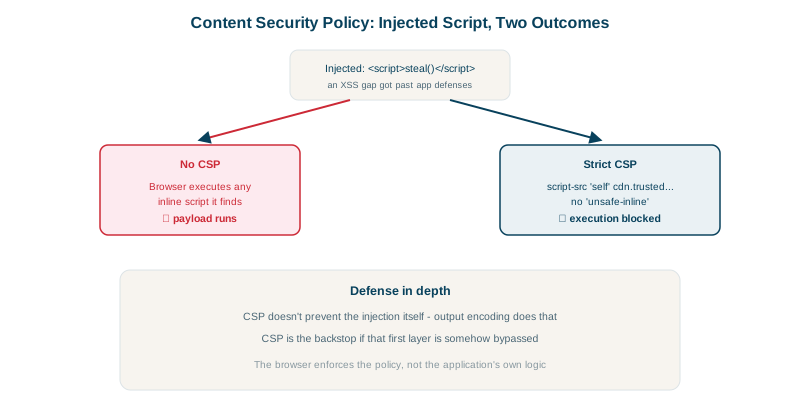
Content Security Policy blocking XSS
CSP is the most powerful header and the hardest to deploy. A policy without 'unsafe-inline' in script-src stops inline scripts and event-handler attributes, which is how most injected XSS executes.
In the XSS test from Day 9, the same vulnerable innerHTML code ran in Chrome twice. Without CSP the cookie was stolen; with a strict policy:
mode=innerHTML         stolen: session=abc123
mode=innerHTML&csp=2   stolen: (none)   console: Executing inline event handler violates the following Content Security Policy directive...
The bug was still there, but the browser refused to run the injected handler.
Deploying a nonce-based CSP without breaking your site
- Start in report-only mode:
Content-Security-Policy-Report-Onlywith areport-toendpoint shows what would be blocked. - Prefer a nonce- or hash-based strict policy over long allow-lists of domains, which are often bypassable through JSONP endpoints or script gadgets on allowed hosts:
Content-Security-Policy:
  script-src 'nonce-R4nd0mPerRequest' 'strict-dynamic';
  object-src 'none';
  base-uri 'none';
  frame-ancestors 'none'
Each page response includes a fresh random nonce, and only <script nonce="..."> tags with that value run; 'strict-dynamic' lets those trusted scripts load their own dependencies.
- Move inline scripts and
onclickhandlers into files or nonce'd blocks. - Enforce once the reports are clean, and keep monitoring them.
Deploying HSTS carefully
max-age=31536000; includeSubDomains tells browsers to use HTTPS for a year on every subdomain. Make sure every subdomain supports HTTPS first. Adding preload and submitting to the browser preload list protects even the first visit, but is hard to undo.
Check your site with Mozilla's HTTP Observatory or securityheaders.com. The browser security headers course goes deeper into each header.
Check yourself
The browser refuses to run inline scripts and event-handler attributes like onerror, which is how most injected scripts execute. Only scripts from allowed sources or with the right nonce run.
It reports what the policy would block without breaking the site, so you can find and fix legitimate inline scripts and third-party sources before enforcing. Enforcing first usually breaks something and gets the policy reverted.
Users being downgraded to unencrypted HTTP, for example by an attacker on public Wi-Fi intercepting the first plain-HTTP request and stripping the redirect to HTTPS. Once seen, the browser uses HTTPS only for that domain.
It stops browsers from guessing a response's type, so a file served as text can't be executed as a script.
It controls which sites may embed your pages in frames, preventing clickjacking, where a hidden frame tricks users into clicking your buttons. It replaces the older X-Frame-Options header with more flexible rules.