Software Supply Chain Security for Developers
On this page
Why software supply chain security matters
A typical Node or Python application has hundreds of dependencies, most of them indirect. Each is code that runs with your application's permissions, written by people you've never met. OWASP's 2025 Top 10 made Software Supply Chain Failures its own category, at number three.
Vulnerable vs malicious dependencies
| Risk | Example | Defense |
|---|---|---|
| Vulnerable dependencies: honest code with a bug | Log4Shell (2021) in Log4j allowed remote code execution through a logged string | Know what you use, scan, update quickly |
| Malicious dependencies: code designed to attack you | Typosquatted package names; a hijacked maintainer account publishing a poisoned version; the 2024 xz Utils backdoor, planted by a long-term contributor; self-spreading npm worms in 2025 that stole tokens and republished infected packages | Lock versions, verify provenance, limit install scripts, react fast |
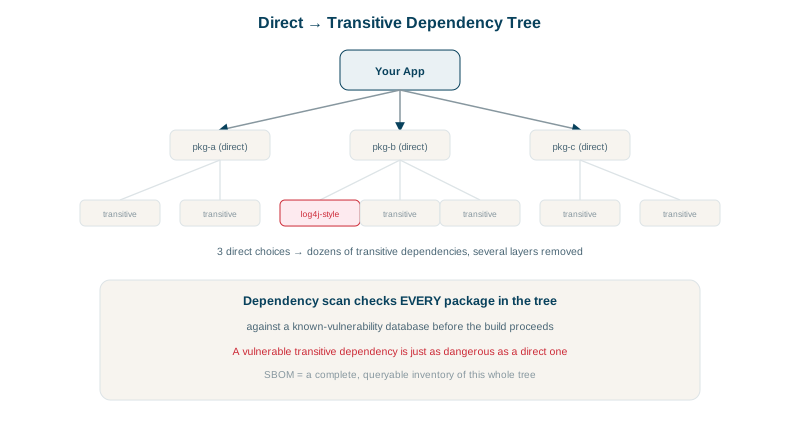
Supply chain controls: lockfiles, scanning, signatures, SBOMs
Pin and lock. Commit lockfiles (package-lock.json, poetry.lock, go.sum) and install with npm ci or equivalent, so builds use exactly the reviewed versions, not whatever was published this morning.
Scan for known vulnerabilities on every pull request and on a schedule (Day 7): npm audit, pip-audit, OSV-Scanner, Dependabot or Renovate alerts, Trivy for container images.
Verify registry signatures and provenance. npm can check that installed packages were signed by the registry and, for packages published from CI with provenance, which source repository and build produced them. Run in a test project:
npm audit signaturesaudited 127 packages in 0s
127 packages have verified registry signatures
20 packages have verified attestationsAll 127 were signed by the registry; 20 also carry build provenance attestations, linking the package to the exact repository and workflow that built it. Sigstore and SLSA provenance do the same for containers and other artifacts.
Update deliberately and often. Automated update pull requests (Renovate, Dependabot) with tests keep you current, so an urgent security patch is a small change rather than a jump across three major versions. A short cooldown (waiting a few days after a release before adopting it) avoids most malicious versions, which are usually caught and removed within hours or days.
Reduce what runs at install time. Many npm attacks run in postinstall scripts. pnpm and recent package managers can block install scripts except for allow-listed packages; npm ci --ignore-scripts works for many projects.
Know what you ship. Generate an SBOM (software bill of materials, CycloneDX or SPDX) for each build, so "are we affected by the new CVE?" is a query, not an investigation.
Protect the build itself. Pin CI actions to commit SHAs, use least-privilege tokens, require reviews for workflow changes, and sign release artifacts (see the CI/CD course).
Choose dependencies with care. Before adding one: is it maintained, widely used, does it need all those permissions, and could ten lines of your own code replace it?
What to do when a dependency is compromised
- Find where it's used, using SBOMs and lockfile searches across repositories.
- Pin to a known-good version or remove it; rebuild and redeploy.
- Rotate any secrets the malicious code could have reached: CI tokens, cloud credentials, npm tokens.
- Check logs for indicators of compromise named in the advisory.
Check yourself
A vulnerable one has an accidental bug that attackers can exploit. A malicious one contains code deliberately written to attack its users, often added through a hijacked maintainer account or a typosquatted name, and runs during install or at import.
That installed packages carry valid registry signatures, proving they came from the registry unaltered, and where present, provenance attestations linking each package to the source repository and CI build that produced it.
Malicious releases are usually detected and removed within hours or days. A short delay, which tools like Renovate support, avoids installing them during that window, while security fixes can be fast-tracked.
They pin exact versions and integrity hashes for every dependency, so builds install the same reviewed code instead of whatever is newest.
Many malicious packages run their payload in postinstall. npm ci --ignore-scripts, or allow-listing packages that need scripts, removes that path.