Key Management and Secrets Storage Best Practices
On this page
Why secrets don't belong in code
const dbConfig = {
  host: 'db.internal.example.com',
  user: 'app',
  password: 'Sup3rSecret2024!',   // now in Git history, every clone, and every CI log that prints config
};
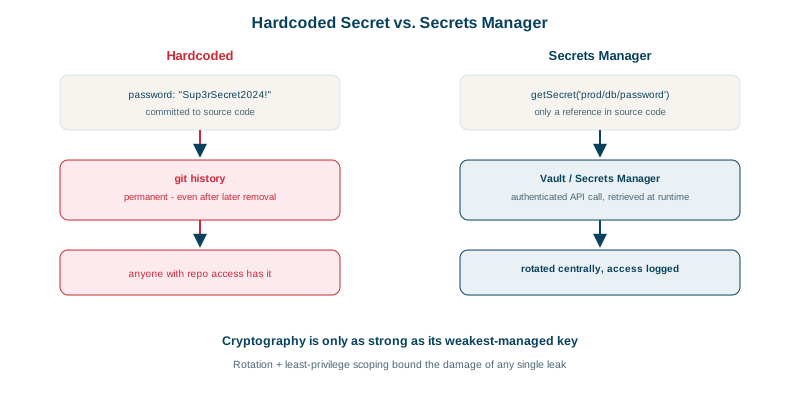
Once committed, a secret lives in every copy of the repository's history. Deleting it in the next commit doesn't remove it (see the CI/CD course for a gitleaks demonstration). Hardcoded secrets also can't be rotated without a deploy, and every developer with read access to the code holds production credentials.
Where secrets shouldn't live
- Source code and config files in Git.
- Container images (anyone who can pull the image can read every layer).
- Plain environment variables baked into deployment manifests in the repository.
- Chat messages, tickets and wiki pages.
- Logs and error messages (Day 27).
How secrets managers work
A secrets manager (AWS Secrets Manager, HashiCorp Vault, Azure Key Vault, Google Secret Manager, Doppler, 1Password Secrets Automation) stores secrets encrypted, controls who can read each one, logs every access, and can rotate them.
The application fetches secrets at startup or runtime, authenticating with its workload identity (an IAM role, a Kubernetes service account), not with another secret:
import { SecretsManagerClient, GetSecretValueCommand } from '@aws-sdk/client-secrets-manager';

const sm = new SecretsManagerClient({});        // credentials come from the instance or task role
const { SecretString } = await sm.send(new GetSecretValueCommand({ SecretId: 'prod/orders/db' }));
const db = JSON.parse(SecretString);            // { username, password, host, port }
Better still: avoid long-lived secrets entirely where the platform allows, using IAM database authentication, OIDC federation for CI (Day 26), or Vault's dynamic secrets, which create short-lived database credentials per application instance.
KMS and envelope encryption
Keys that encrypt data need the same care, plus hardware protection. A key management service (AWS KMS, Google Cloud KMS, Azure Key Vault, or an HSM) holds master keys that never leave it; you call it to encrypt and decrypt.
Envelope encryption makes this practical for large data:
- Ask KMS for a data key: you receive it in plaintext and encrypted under the master key.
- Encrypt your data locally with the plaintext data key (AES-GCM, Day 16), then discard it from memory.
- Store the encrypted data key next to the encrypted data.
- To decrypt, send the encrypted data key to KMS (which checks IAM permissions and logs the call), get the plaintext key back, and decrypt locally.
An everyday picture: your documents are in a locked drawer (data encrypted with a data key), and the drawer key sits in a bank's safe deposit box (the KMS). Each time you need the drawer key, the bank checks your ID and writes your visit in its log. Large data never travels to KMS; access to keys is controlled and audited centrally; and rotating the master key doesn't require re-encrypting everything.
Key management rules: least privilege, rotation, auditing
- Least privilege per secret: the orders service reads
prod/orders/*, nothing else. - Separate environments: production secrets are unreachable from dev and staging.
- Rotate regularly and immediately after exposure or staff changes; automate it so rotation isn't a risky manual event.
- Audit access and alert on unusual reads.
- Scan for leaks in commits, images and logs (gitleaks, GitHub secret scanning with push protection).
- Cache carefully: fetching a secret on every request is slow and costly; cache in memory with a refresh interval that respects rotation.
- Local development uses separate, low-value credentials, loaded from an untracked
.envfile or the secrets manager.
Check yourself
It remains in Git history and in every clone, fork and CI cache, and bots scan public repositories within minutes. The secret must be revoked and replaced; cleaning history is secondary.
Through its workload identity, such as an IAM role, a Kubernetes service account or a managed identity, issued and rotated by the platform. The application never handles a long-lived credential.
Encrypting data with a data key, and encrypting that data key with a master key held in a KMS, storing the encrypted data key alongside the data.
Rotation limits how long a leaked secret stays useful and proves rotation works, so an emergency rotation after a leak isn't the first attempt.