Security Incident Response and Logging
On this page
Why breaches are found late
Industry reports have long measured the time to identify and contain a breach in months. Often the victim learns from a customer, a journalist or the attacker. Good logging and alerting shrink that window from months to minutes, and good records make the investigation possible at all. OWASP 2025 lists Security Logging and Alerting Failures as A09.
Which security events to log
Log security-relevant events, structured (JSON), with enough context to reconstruct what happened:
- Authentication: logins, failures, MFA enrollment and challenges, password resets, new passkeys, session revocations.
- Authorization failures: denied access, especially repeated 403s and 404s on object IDs (enumeration, Day 11).
- Sensitive actions: changing email or password, role and permission changes, API key creation, data exports, payment detail changes.
- Admin activity and configuration changes.
- Input validation failures that look like attacks (SQL keywords, path traversal sequences) at a sampled rate.
- Infrastructure: cloud API calls (CloudTrail and equivalents), network flow logs, WAF decisions.
Logging safely without leaking secrets
// Poor: no context, and it leaks a secret
logger.info('Login attempt');
logger.error(`Login failed for user with password ${password}`);    // never log passwords

// Better: structured, investigable, no sensitive data
logger.warn('auth.login.failed', {
  event: 'auth.login.failed',
  userId: user?.id ?? null,          // or a hash of the submitted identifier
  reason: 'invalid_password',
  ip: req.ip,
  userAgent: req.get('User-Agent'),
  requestId: req.id,
  timestamp: new Date().toISOString(),
});- Never log passwords, tokens, session IDs, full card numbers, secrets or unnecessary personal data. Redact at the logger level, so one careless call can't leak them.
- Use UTC timestamps and request IDs to correlate events across services.
- Prevent log injection: structured logging escapes newlines and control characters that could forge log lines.
- Protect the logs: ship them off the host to central storage, restrict who can read them, and make them tamper-resistant (append-only or object-locked storage), since attackers delete logs.
- Retain long enough for investigations and regulations (often a year or more for security events).
Security alerts worth having
- Many failed logins for one account or from one source; logins from impossible locations.
- A user accessing far more records than usual, or an unusual bulk export.
- Admin role grants, new API keys or MFA disabled, especially outside working hours.
- Cloud: root account use, disabled logging (
StopLogging), new access keys, resources in unused regions. - Spikes in 401, 403 or 404 responses.
Send these to a SIEM or alerting system with an owner, and tune them: noisy alerts get ignored.
The security incident response lifecycle
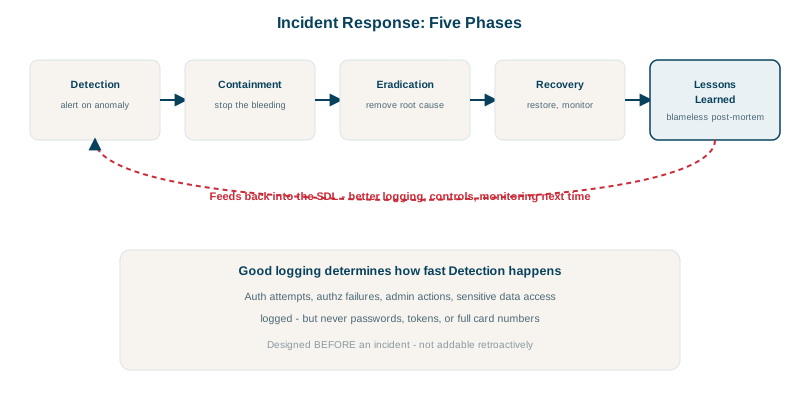
The NIST incident response lifecycle, in practice:
- Prepare: runbooks, contacts, access to logs, tested backups, a decision on who leads.
- Detect and analyze: confirm it's real, scope it (which systems, data, users), and preserve evidence (snapshots, logs) before changing things.
- Contain: revoke credentials, isolate affected hosts, block attacker infrastructure, disable compromised accounts.
- Eradicate and recover: remove persistence, patch the cause, rebuild from known-good images, restore data, monitor closely.
- Lessons learned: a blameless review (see the CI/CD course) with owned actions.
Security incidents add duties ordinary outages don't: legal and regulatory notification deadlines (GDPR's 72 hours, sector and state laws), communication with affected customers, and coordination with law enforcement or insurers. Involve legal early.
Check yourself
Logs are widely accessible and long-lived; anyone with log access, or an attacker who reaches them, could use the credentials.
Containment actions like rebuilding hosts or rotating everything can destroy logs, memory and artifacts needed to understand how attackers got in and what they touched. Snapshot first, then contain, unless active damage forces immediate action.
A login from an unusual location followed by changes to email, password or MFA settings; or many failed logins followed by a success.
Logins and failures, MFA changes, password resets, permission changes, access denials, admin actions and access to sensitive data, with who, what, when and from where.
Attackers who compromise a host often delete or alter local logs to hide their tracks. Shipping logs immediately to a separate, write-protected system keeps the evidence, and lets you correlate events across hosts.