Hashing vs HMAC vs Digital Signatures
On this page
Hash vs HMAC vs digital signature
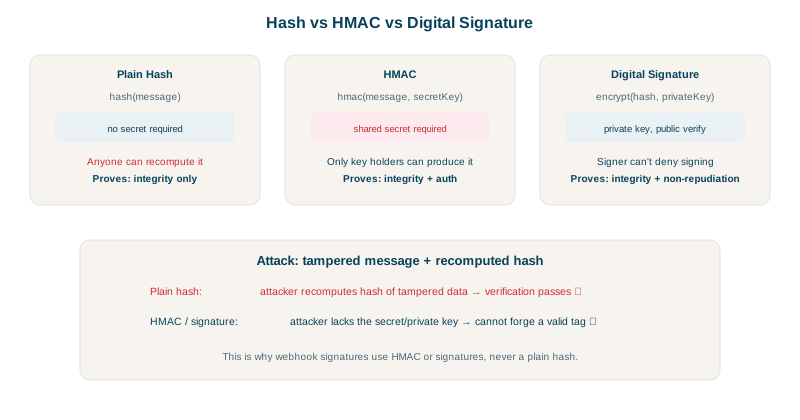
All three take a message and produce a short value. The difference is who can produce it, which decides what it proves.
| Who can create it | Who can verify it | Proves | |
|---|---|---|---|
| Hash (SHA-256) | Anyone | Anyone | The data matches a known fingerprint, if you got the fingerprint from somewhere trusted |
| HMAC (HMAC-SHA256) | Holders of a shared secret | Holders of the same secret | The data came from someone with the secret and wasn't changed |
| Digital signature (Ed25519, ECDSA, RSA-PSS) | Only the private key holder | Anyone with the public key | The data came from the key owner, unchanged; third parties can check |
Computed for the same payment message in Node:
const msg = '{"paymentId":"pay_1","amount":4200}';
crypto.createHash('sha256').update(msg).digest('hex');
crypto.createHmac('sha256', 'shared-secret').update(msg).digest('hex');
const { publicKey, privateKey } = crypto.generateKeyPairSync('ed25519');
const sig = crypto.sign(null, Buffer.from(msg), privateKey);SHA-256 : 834e14270fe5c352353c991b4a59fc8a... (anyone can compute)
HMAC-SHA256 : a452fd6d29ed5114ed883ad94936c8de... (needs the shared secret)
Ed25519 sig : xi7D+e0hPGEGvb0xxnKwLrLonHpJLbQ/... (needs the private key; anyone with the public key verifies)
verify original: true
verify altered : falseChanging the amount from 4200 to 1 made the signature check fail.
When to use a hash
- Uses: checking file downloads against a published checksum, content addressing (Git commits, Docker image digests), deduplication, cache keys.
- Not for authenticity: an attacker who can change a file can change its hash too, unless the hash comes from a trusted channel.
- Not for passwords: use a slow password hash (Day 2).
- Use SHA-256, SHA-3 or BLAKE2/3; MD5 and SHA-1 are broken for collisions (two different inputs with the same hash have been produced for both).
When to use an HMAC
- Uses: webhook signatures (see the API design course), signed cookies and URLs, API request signing (AWS Signature Version 4), message integrity between your own services.
- Compare in constant time (
crypto.timingSafeEqual,hmac.compare_digest), so response timing doesn't reveal how many bytes matched. - Don't build your own as
sha256(secret + message): that construction is vulnerable to length-extension attacks with SHA-256. In plain words, SHA-256's output is also its internal state at the end of the input, so an attacker who sees the tag foramount=10can keep hashing from there and produce a valid tag foramount=10&amount=10000without knowing the secret. HMAC exists to avoid this.
When to use a digital signature
- Uses: TLS certificates (Day 18), JWTs signed with ES256 or RS256 (Day 20), software releases and container images (Sigstore cosign, Day 23), Git commit signing, code signing for apps.
- The advantage over HMAC: verifiers don't need a secret. Thousands of clients can verify your releases, and none of them can forge one.
- Non-repudiation: since only the key owner can sign, a valid signature is evidence they did, which HMAC can't give (any secret holder could have created it).
- Ed25519 is a good default: fast, small keys, hard to misuse.
Choosing between hash, HMAC and signature
- Checking a download against a checksum from a trusted page: hash.
- Two systems you control, sharing a secret: HMAC.
- Many verifiers, or proof of who signed: signature.
Check yourself
An attacker who replaces the file can replace the checksum too; a hash only helps when it comes from a trusted source.
Users verify with a public key and can't forge releases, whereas anyone holding an HMAC secret could create valid tags.
A normal comparison stops at the first mismatch, and timing differences can let an attacker guess a valid tag byte by byte.
A hash detects accidental changes but anyone can compute it. An HMAC mixes in a secret key, so only key holders can produce a valid tag.
With SHA-2, an attacker who sees a valid hash can extend the message and compute a valid hash for the longer one without knowing the secret, a length extension attack. HMAC's construction is designed to prevent this, so use it.