JWT Security: Structure, Verification and Pitfalls
On this page
JWT structure: signed, not secret
A JSON Web Token has three base64url parts, header.payload.signature. Decoding one shows everything inside; no key is needed:
decodeJwt (no verification!): {"role":"user","sub":"42","iss":"https://auth.example.com",
                               "aud":"https://api.example.com","iat":1791736527,"exp":1791737127}
So: never put secrets in a JWT payload, and never trust a payload you haven't verified. Decoding isn't verifying; it's the first mistake on the list below.
What JWT verification must check
| Check | Why |
|---|---|
| Signature, with an allow-listed algorithm | Proves the token came from the issuer, unmodified |
exp (and nbf) | Stops expired tokens being used |
iss | It came from the issuer you trust |
aud | It was issued for this API, not another service |
| Key from a trusted source | Your configured key, or the issuer's JWKS endpoint, never a key named inside the token |
With the jose library, the options carry these rules:
const opts = { algorithms: ['ES256'], issuer: 'https://auth.example.com', audience: 'https://api.example.com' };
const { payload } = await jwtVerify(token, publicKey, opts);   // throws if any check fails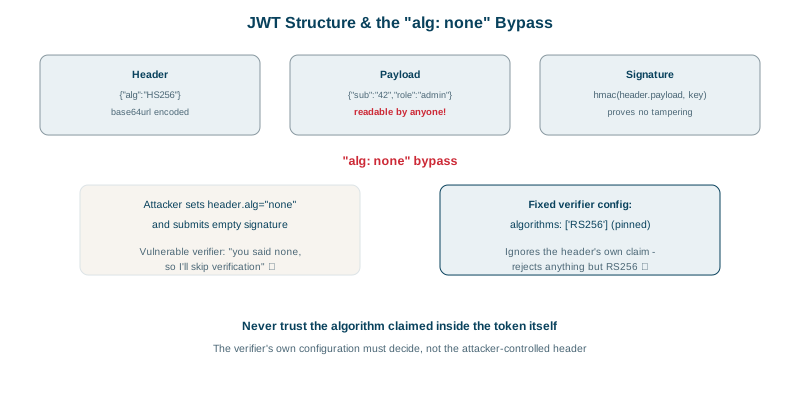
Six JWT attacks, tested: alg none to algorithm confusion
Each token was sent to that verifier:
valid token                    ACCEPTED {"role":"user","sub":"42",...}
alg "none", no signature       rejected: ERR_JOSE_ALG_NOT_ALLOWED
payload edited (role=admin)    rejected: ERR_JWS_SIGNATURE_VERIFICATION_FAILED
HS256 signed with public key   rejected: ERR_JOSE_ALG_NOT_ALLOWED
token for another API          rejected: ERR_JWT_CLAIM_VALIDATION_FAILED
expired a minute ago           rejected: ERR_JWT_EXPIRED
alg: none: the JWT spec defines an unsigned mode. Old libraries honored whateveralgthe token claimed, so attackers removed the signature and set"alg": "none".- Edited payload: changing
roletoadmininvalidates the signature, if the signature is checked. - Algorithm confusion: the server uses an ES256 (or RS256) public key. An attacker signs a token with HS256, using that public key (which is public) as the HMAC secret. A library that picks the algorithm from the token header would verify it with the same key and accept it. Pinning
algorithmsstops this. - Wrong audience: a token issued for the billing API shouldn't work on the orders API, even with a valid signature.
- Expired: obvious, and still skipped by hand-rolled verifiers.
Other JWT pitfalls: weak secrets, kid injection, storage
- Weak HMAC secrets: HS256 tokens signed with a short or guessable secret can be brute-forced offline from one captured token. Use 256 bits of randomness, or asymmetric keys.
kidandjkuheader injection: don't let token headers choose a key file path, a database lookup with unsanitized input, or a URL to fetch keys from.- Long lifetimes: JWTs can't easily be revoked; keep access tokens to minutes and use refresh tokens with rotation.
- Storage in browsers: tokens in
localStorageare readable by any XSS. For browser apps, an HttpOnly session cookie (Day 4) or a backend-for-frontend that holds tokens server-side is safer. - Using JWTs as sessions by default: if you need instant logout and revocation, server-side sessions are simpler.
Check yourself
A JWT's payload is just base64url-encoded JSON that anyone can create or edit. Only verifying the signature with a trusted key, plus checking expiry, issuer and audience, proves it's authentic and meant for you.
The verifier ignores the token's own alg choice, so a token signed with HS256 is rejected when only ES256 is allowed.
It ensures the token was issued for this API; otherwise a valid token for one service could be replayed against another.
Signed JWTs are encoded, not encrypted, so anyone holding the token can read its claims. Don't put secrets or sensitive personal data in them.
Keep access tokens short-lived, and for urgent cases check a deny-list of token ids or a per-user token version on each request.