Command Injection and Path Traversal Explained
On this page
How input escapes into commands and file paths
Applications often shell out to tools (image converters, ping, git) and read files by name (downloads, templates, uploads). Both are fine until user input can change what runs or which file is read.
Command injection: exec vs execFile
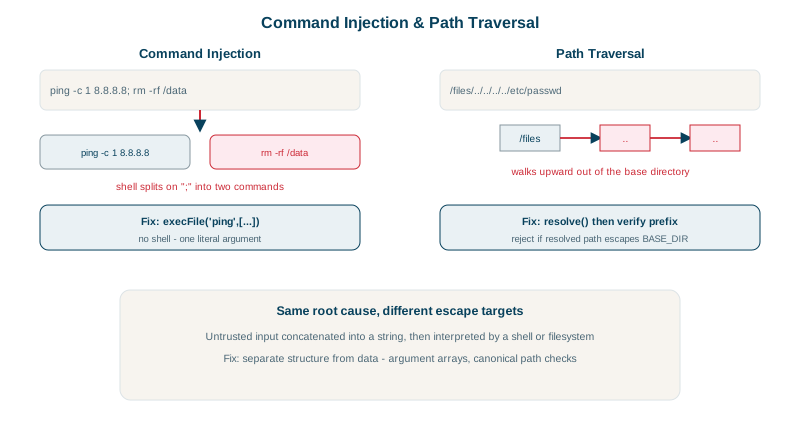
A shell interprets special characters: ; ends a command, $(...) runs one, | pipes, && chains. Passing user input to a shell lets it add its own commands. Tested in Node:
const input = 'hello; echo INJECTED: $(uname)';

await exec(`echo ${input}`);          // through a shell
await execFile('echo', [input]); // program + argument list, no shellexec (shell): hello
INJECTED: Darwin
execFile : hello; echo INJECTED: $(uname)Through the shell, the input ran a second command and a command substitution. With execFile, the whole string is a single literal argument: the operating system starts echo directly, and no shell ever parses it. A real payload would download malware or read secrets instead of printing.
Defenses:
- Avoid the shell. Use a library instead of a command where possible (an image library rather than calling ImageMagick).
- Use argument arrays:
execFile/spawnin Node,subprocess.run([...])withoutshell=Truein Python,ProcessBuilderin Java. - Validate inputs against strict allow-lists (an IP address, a known filename pattern).
- Watch for option injection: an argument starting with
-can become a flag (--output=/etc/...). Put--before user arguments where the tool supports it.
Path traversal: ../ and how to block it
A download endpoint joins a base folder with a filename from the request. The filename ../app.env climbs out of the folder:
const UPLOADS = path.resolve('uploads');

// VULNERABLE: join alone
const vulnerableRead = (name) => fs.readFile(path.join(UPLOADS, name), 'utf8');

// FIXED: resolve, then verify the result is still inside the folder
async function safeRead(name) {
  const full = path.resolve(UPLOADS, name);
  if (!full.startsWith(UPLOADS + path.sep)) throw new Error(`blocked: ${name} resolves outside uploads`);
  return fs.readFile(full, 'utf8');
}file: q3.txt
path.join only : "report contents\n"
resolve + check: "report contents\n"
file: ../app.env
path.join only : "SECRET=hunter2\n"
resolve + check: "blocked: ../app.env resolves outside uploads"The check compares against UPLOADS + path.sep, so a sibling folder named uploads-old can't pass a plain prefix test. Checking the resolved path catches every variant: ../, absolute paths, ..\ on Windows, and URL-encoded forms once decoded.
More defenses:
- Don't use client-supplied names at all: store files under generated IDs (
uploads/7f3c...) and keep the original name only as metadata. - Resolve symlinks (
fs.realpath) if users can create files in the folder. - Run with least privilege: the app's user shouldn't be able to read secrets or system files anyway.
- The same flaw appears when extracting archives ("Zip Slip"): check every entry's resolved path.
Check yourself
No shell parses the input; it's passed as one literal argument to the program, so ; and $(...) have no special meaning.
Attackers have many ways to express a parent directory, such as URL encoding, mixed separators or Unicode lookalikes, and filters miss some. Resolving gives the real final path, and checking it starts with the allowed base directory is reliable.
Don't use user-supplied filenames as paths at all. Store files under server-generated ids, keep the original name in the database, and look files up by id, so there's no path for an attacker to manipulate.
It passes the command through a shell, which interprets characters like ;, | and $(), so any user input in the command can run extra commands.
Zip entries can contain ../ paths (zip slip). Resolve each extracted path and confirm it stays inside the destination directory.