Secure Coding Practices and Input Validation
On this page
Input validation vs safe output handling
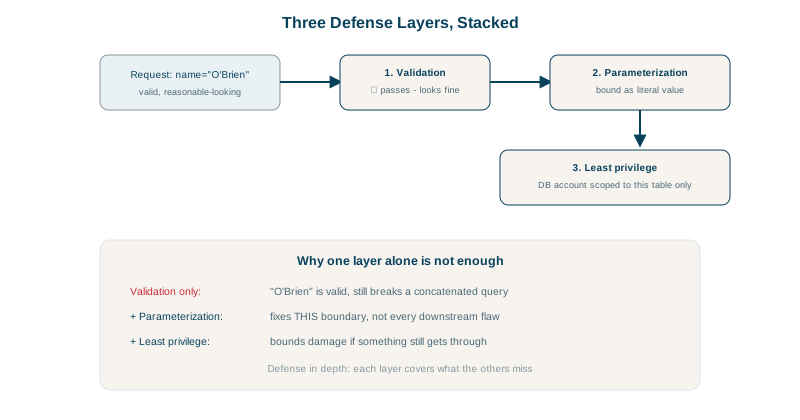
A name field allows letters, spaces, hyphens and apostrophes. O'Brien passes validation, as it should: it's a real name. Then it's concatenated into SQL and the apostrophe breaks the query, or worse. Validation did its job; the use of the data was the problem.
const isValidName = (name) => /^[\p{L}' -]{1,50}$/u.test(name);
isValidName("O'Brien");    // true: a legitimate name

// The bug isn't the validation; it's what happens next
db.query(`SELECT * FROM customers WHERE last_name = '${name}'`);     // breaks, or worse
db.query('SELECT * FROM customers WHERE last_name = $1', [name]);    // correct
Secure code needs both halves:
- Input validation: reject data that isn't what the business expects.
- Context-safe output: whatever passes validation, handle it safely where it's used: parameters for SQL (Day 8), encoding for HTML (Day 9), argument arrays for commands (Day 14).
Input validation that works: allow-lists and schemas
- Validate on the server, at the trust boundary. Client-side validation is for user experience only.
- Allow-list, don't block-list: define what's acceptable (type, length, range, format, enum values) rather than searching for "bad" characters.
- Validate with a schema so rules are declared once and enforced consistently: Zod or Ajv (JSON Schema) in TypeScript, Pydantic in Python, Bean Validation in Java, FluentValidation in .NET.
import { z } from 'zod';

const CreateOrder = z.object({
  productId: z.string().uuid(),
  quantity: z.number().int().min(1).max(100),
  couponCode: z.string().regex(/^[A-Z0-9]{6,12}$/).optional(),
  shipping: z.enum(['standard', 'express']),
}).strict();                                  // unknown fields are rejected (no mass assignment)

const parsed = CreateOrder.safeParse(req.body);
if (!parsed.success) return problem(res, 422, 'validation-error', 'Request failed validation',
{ errors: parsed.error.issues });- Canonicalize before validating: decode URL encoding and normalize Unicode first, or checks can be bypassed with alternative encodings. Two examples run in Node:
"%2e%2e%2fapp.env"           decoded           -> "../app.env"
"\uff0e\uff0e\uff0fapp.env"  contains "../"?   false
                              NFKC-normalized   -> "../app.env"
The second uses full-width dots and slash, characters that look different but become ordinary ../ when normalized. A check for ../ on the raw input passes it; a later step that normalizes, such as some file systems or libraries, turns it into a traversal. Decode and normalize first, then validate the result.
- Validate business rules too: a quantity of 100 might be valid, but not for an item with 3 in stock; a refund can't exceed the original charge.
- Limit sizes of strings, arrays, uploads and request bodies.
Handling errors safely: fail closed
- Fail closed: if a check throws or a dependency times out, deny, don't allow (OWASP 2025's A10).
- Generic messages to users, details in logs keyed by a request ID (see the API design course on problem details).
- Don't leak stack traces, SQL, file paths, framework versions or whether an account exists.
Secure coding habits that remove whole bug classes
- Use safe APIs by default: parameterized queries, auto-escaping templates,
execFileoverexec,textContentoverinnerHTML. - Centralize security logic: one authorization module, one validation layer, one output-encoding approach.
- Least privilege for processes, database users and service accounts.
- Keep dependencies current (Day 23) and avoid dangerous functions (
eval,pickle.loadson input,new Function). - Use linters and SAST rules that flag these patterns in review: Semgrep, CodeQL, ESLint security plugins, Bandit for Python.
- Write tests for abuse cases: negative quantities, huge inputs, unicode, other users' IDs.
Check yourself
Legitimate values like O'Brien contain characters that are dangerous in SQL; safety comes from parameterized queries where the data is used.
Defining what's valid, like a pattern for order ids or a list of allowed sort fields, is finite and testable. Lists of bad input always miss new encodings, case variants and Unicode tricks.
When a security check can't complete, for example because the policy service errored or timed out, the request is denied rather than allowed. Failing open turns any outage or induced error into a security bypass.
The input wasn't normalized before validation; full-width characters become ../ after Unicode normalization. Canonicalize first, then validate, and check the resolved path.