Secrets Management in CI/CD and the Cloud
On this page
Why CI/CD pipelines are a prime target
Attackers increasingly go after the systems that build and run software rather than the software itself: CI pipelines with deploy keys, build caches, compromised third-party actions, cloud workloads with broad roles. A CI secret often opens production.
The problem with long-lived cloud keys
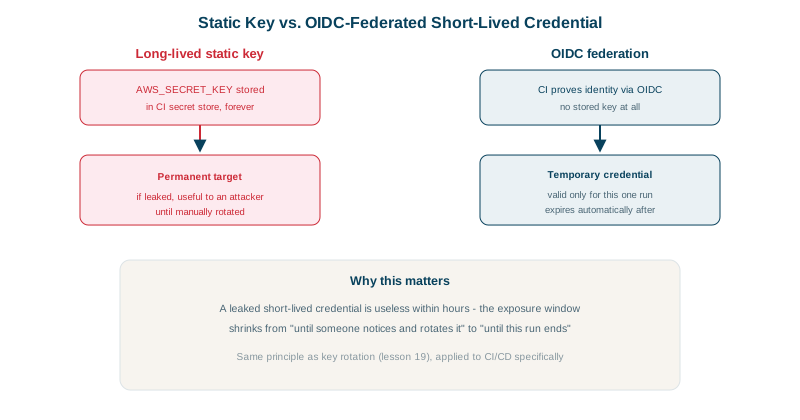
The old pattern: create a cloud access key, paste it into the CI system's secret store, use it forever. That key works from anywhere, never expires, and anyone who reads the CI configuration, a build log, or a compromised dependency can take it.
Workload identity and OIDC instead of stored keys
Modern platforms give each workload an identity, and the cloud exchanges it for short-lived credentials:
| Where code runs | Identity mechanism |
|---|---|
| GitHub Actions, GitLab CI, CircleCI, Buildkite | OIDC tokens exchanged for cloud credentials (AWS role, Azure workload identity federation, GCP workload identity) |
| EC2, ECS, Lambda | Instance and task IAM roles |
| Kubernetes (EKS, GKE, AKS) | Service account linked to a cloud role (EKS Pod Identity, GKE Workload Identity) |
| Between your services | mTLS certificates (SPIFFE/SPIRE, service mesh), or short-lived tokens |
With OIDC, the CI job proves "I am repository acme/checkout-svc, branch main, environment production", and the cloud's trust policy decides what that's worth. Nothing long-lived is stored. A GitHub Actions example:
permissions:
  id-token: write   # allow this job to request an OIDC token
  contents: read

jobs:
  deploy:
    runs-on: ubuntu-latest
    environment: production
    steps:
      - uses: aws-actions/configure-aws-credentials@v6
        with:
          role-to-assume: arn:aws:iam::123456789012:role/gha-deploy-checkout-svc
          aws-region: us-east-1
The trust policy on that role should match the sub claim exactly (repo:acme/checkout-svc:environment:production), so pull requests from forks and other repositories can't assume it. In the role's trust policy, that's this condition:
"Condition": {
  "StringEquals": {
    "token.actions.githubusercontent.com:aud": "sts.amazonaws.com",
    "token.actions.githubusercontent.com:sub": "repo:acme/checkout-svc:environment:production"
  }
}
Handling secrets you can't avoid storing
Third-party API keys, signing keys and webhook secrets still exist:
- Keep them in a secrets manager (Day 19) and fetch them at runtime with the workload's identity, rather than in CI variables.
- Scope CI secrets to environments with required reviewers, so only approved production jobs see production secrets.
- Never expose secrets to untrusted code: pull requests from forks don't receive secrets by default; don't work around that with
pull_request_targetcheckouts of their code. - Rotate on a schedule and after any suspected exposure.
Detecting leaked secrets quickly
- Push protection: GitHub secret scanning (and GitLab's equivalent) blocks pushes that contain recognizable keys.
- Scanners in CI and on history: gitleaks or TruffleHog, including old commits.
- Partner programs: many providers (AWS, Stripe, GitHub, Slack) are notified when their key formats appear in public repositories and revoke them automatically.
- Cloud detection: GuardDuty and similar services alert when credentials are used from unusual places.
What to do when a secret leaks
- Revoke or rotate it immediately. Removing it from the repository isn't enough (Day 19).
- Review its usage logs (CloudTrail, provider dashboards) for activity since the leak.
- Look for persistence: new users, keys, roles or resources the attacker created.
- Fix the path it leaked through, and add a scanner rule so it can't recur.
Check yourself
There's no long-lived secret to steal; each job receives short-lived credentials, and the trust policy restricts which repositories and environments can get them.
Jobs from other branches, pull requests, environments or even other repositories could assume the role and deploy or read resources. Restrict sub to the exact repository and branch or environment that should deploy.
Revoke and replace the key immediately, then check its usage logs for unexpected activity. Removing the commit doesn't make the key safe, since it may already have been cloned or scraped by bots within minutes.
Secrets leak through commits, debug output and build artifacts. Scanners like GitHub secret scanning or gitleaks catch them quickly, often before attackers do.
Environments with required reviewers and branch rules keep pull requests, forks and untrusted branches from reaching secrets meant only for releases. Otherwise anyone who can open a pull request could run code that reads them.