XSS Explained: Stored, Reflected and DOM-Based
On this page
What is cross-site scripting (XSS)?
If an attacker can get JavaScript to run on your site, it runs with the victim's session: it can read the page, make requests as the user, change their settings, or capture what they type. That's cross-site scripting (XSS).
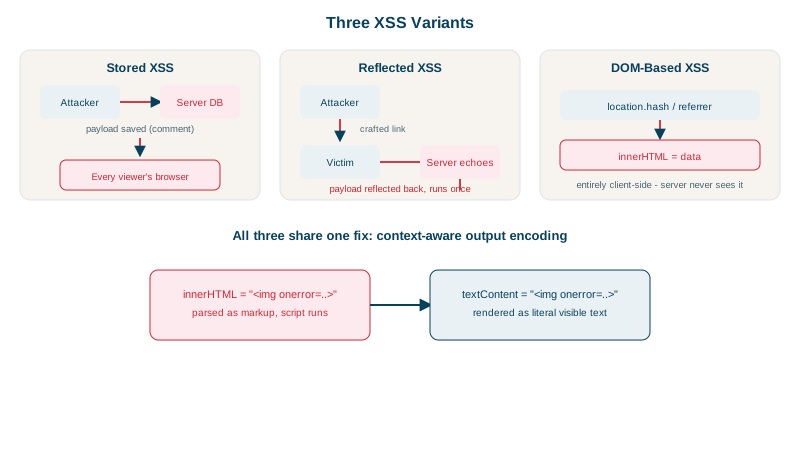
Stored vs reflected vs DOM-based XSS
| Type | Where the payload lives | Example |
|---|---|---|
| Stored | Saved in your database, shown to other users | A comment containing a script, viewed by everyone who opens the post |
| Reflected | In the request, echoed back immediately | A search page printing ?q= unescaped; the victim clicks a crafted link |
| DOM-based | Never reaches the server; client-side code writes it into the page | JavaScript copying location.hash into innerHTML |
All three come from the same mistake: untrusted data inserted into a page as HTML or script.
XSS demo: innerHTML vs textContent vs DOMPurify vs CSP
A page greets the user with a name taken from an untrusted source. The name is:
<img src=x onerror="window.stolen = document.cookie">AnaRun in real headless Chrome (through Playwright), with a session=abc123 cookie set by the page:
el.innerHTML = 'Hello, ' + attack + '!';                     // 1. HTML parsing
el.textContent = 'Hello, ' + attack + '!';                   // 2. plain text
el.innerHTML = DOMPurify.sanitize('Hello, ' + attack + '!'); // 3. sanitized HTML
// 4. innerHTML again, but the page sends a strict Content-Security-Policymode=innerHTML stolen: session=abc123
mode=textContent stolen: (none)
mode=sanitized stolen: (none)
mode=innerHTML&csp=2 stolen: (none) console: Executing inline event handler violates the following Content Security Policy directive...innerHTMLparses the string as HTML. The image fails to load,onerrorfires, and the script reads the cookie. A real attack would send it to the attacker's server.textContenttreats it as text: the user sees the literal characters<img ...>, and nothing runs.- DOMPurify keeps safe HTML and strips the event handler: the result was
Hello, <img src="x">Ana!. - A Content Security Policy without
'unsafe-inline'makes the browser refuse to run the inline handler, even though the vulnerable code still executed.
Marking the session cookie HttpOnly (Day 4) would have hidden it from document.cookie, but the script could still act as the user.
How to prevent XSS
- Use frameworks that escape by default. React, Vue, Angular and server templates (Jinja, Razor, Thymeleaf) encode output automatically. Most XSS today comes through their escape hatches:
dangerouslySetInnerHTML,v-html,[innerHTML],|safe. - Encode for the context. HTML text, HTML attributes, JavaScript strings, URLs and CSS each need different encoding. Never insert untrusted data into
<script>blocks or event-handler attributes. "Encoding" means rewriting the characters that have special meaning in that place, so they're shown instead of obeyed:
| Where the data goes | Dangerous character | Becomes |
|---|---|---|
| HTML text | < | < |
| HTML attribute (quoted) | " | " |
| JavaScript string | ' and < | \', \u003c |
| URL query value | space, &, / | %20, %26, %2F |
Your template engine applies the right one automatically in normal output, which is why rule 1 comes first.
- Prefer safe DOM APIs:
textContent,setAttributeon safe attributes,createElement. - Sanitize when HTML is required (rich text, Markdown output) with DOMPurify or an equivalent, never with homemade regex.
- Validate URLs you put in
hrefandsrc: allow onlyhttps:(and maybemailto:), sincejavascript:alert(1)is a valid link. - Add a strict CSP (Day 25) and HttpOnly cookies as layers that limit damage.
- Trusted Types (supported in Chromium-based browsers) make DOM sinks like
innerHTMLreject plain strings, catching DOM XSS at the source.
Check yourself
Stored XSS is saved on the server and served to other users; DOM-based XSS happens entirely in client-side JavaScript that writes untrusted data into the page.
It inserts the string as text, so the browser displays the characters <script> instead of parsing them as HTML, and nothing executes. Framework templates that escape by default work the same way.
CSP is a second layer that can be weakened or bypassed; the injection point is still a bug that may enable other attacks, such as injected HTML or phishing content.
When you must render user-supplied HTML, such as rich text comments. It removes dangerous elements and attributes while keeping safe formatting.
dangerouslySetInnerHTML, along with user-controlled javascript: URLs in href or src. Both bypass React's default escaping, so any user content passed to them must be sanitized or validated first.