What Is an AI Agent? Agents vs Workflows vs Chatbots
On this page
Learning Objective
Define an AI agent precisely, tell it apart from a chatbot and from a fixed LLM workflow, and decide with a short checklist whether a task deserves an agent at all. By the end you should be able to look at a product idea and say which of the three shapes fits it, and why.
Concept Explanation
The word agent is used for almost anything with a language model inside it, which makes it hard to reason about. A useful definition comes from Anthropic's engineering guidance: an agent is a system in which the model dynamically directs its own process and tool usage, keeping control over how it accomplishes a task. The key word is dynamically. The model, not your code, decides which step comes next, which tool to call, and when the job is done.
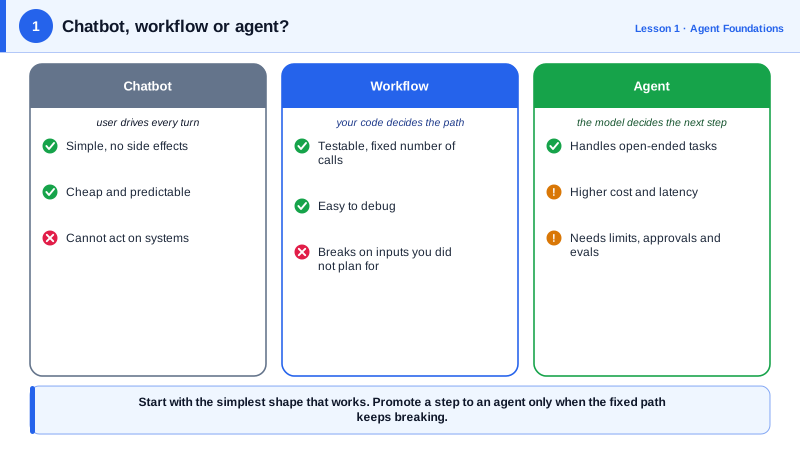
That definition separates three shapes of LLM application. A chatbot answers one message at a time and takes no actions; the user drives every step. A workflow is a program you wrote in which some steps call a model: summarize this ticket, then classify it, then draft a reply. The path is fixed in code, and the model fills in content at each step. An agent is a loop: the model looks at the goal and the current state, chooses an action such as calling a tool, sees the result, and repeats until it decides the goal is met or it gives up.
Each shape trades predictability for flexibility. Workflows are easy to test because the same input follows the same path, and they are cheap because you know how many model calls happen. Agents can handle tasks whose steps you cannot write down in advance, such as fixing a failing test in an unfamiliar codebase, but they cost more, take longer, and can fail in creative ways: looping, calling the wrong tool, or stopping early with a confident wrong answer.
So the first design decision is not which framework to use but whether you need an agent. A good checklist has four questions. Is the task complex enough that you cannot list its steps ahead of time? Is the outcome valuable enough to justify higher cost and latency? Is the model actually capable at this kind of task? And can errors be caught and recovered from, through tests, review, or an undo? If any answer is no, a workflow or a single well-designed call is usually the better product. Many teams that report success with agents started with a workflow and only promoted a step to an agent when the fixed path kept breaking.
Agents also differ in autonomy. A coding assistant that proposes a change and waits for approval is an agent with a human checkpoint on every action. A support agent that can issue refunds up to fifty dollars on its own has bounded autonomy. A background agent that runs overnight and opens pull requests has high autonomy with review at the end. Autonomy is a dial you set per action, based on how reversible and how costly that action is, and much of this course is about setting that dial deliberately.
| Shape | Who decides the next step | Strength | Typical use |
|---|---|---|---|
| Chatbot | The user, every turn | Simple, no side effects | Q&A, drafting, brainstorming |
| Workflow | Your code, fixed in advance | Predictable, testable, cheap | Classify then route, extract then summarize |
| Agent | The model, at run time | Handles open-ended tasks | Coding, research, multi-system operations |
| Agent with checkpoints | The model, with human approval on risky actions | Flexible but safe | Refunds, deploys, sending email |
Worked Example: The Same Task as a Workflow and as an Agent
Here is a support task, "answer a customer's billing question", built both ways. The workflow fixes the steps in code. The agent gets tools and decides for itself. Notice how much less control flow the agent version has, and how much more trust it requires.
import anthropic

client = anthropic.Anthropic()
MODEL = "claude-opus-5-5"

def ask(prompt: str) -> str:
    msg = client.messages.create(model=MODEL, max_tokens=2000,
                                 messages=[{"role": "user", "content": prompt}])
    return next(b.text for b in msg.content if b.type == "text")

# 1) Workflow: the path is fixed. Every question costs exactly three model calls.
def billing_workflow(question: str, customer_id: str) -> str:
    topic = ask(f"Classify as one word, REFUND, INVOICE or PLAN: {question}").strip()
    if topic == "REFUND":
        context = lookup_refund_policy()
    elif topic == "INVOICE":
        context = fetch_invoices(customer_id)
    else:
        context = fetch_plan(customer_id)
    return ask(f"Using only this context:\n{context}\n\nAnswer: {question}")

# 2) Agent: the model chooses which tools to call, in what order, and when to stop.
TOOLS = [
    {"name": "fetch_invoices", "description": "List a customer's invoices with amounts and dates.",
     "input_schema": {"type": "object", "properties": {"customer_id": {"type": "string"}},
                      "required": ["customer_id"]}},
    {"name": "fetch_plan", "description": "Get the customer's current subscription plan.",
     "input_schema": {"type": "object", "properties": {"customer_id": {"type": "string"}},
                      "required": ["customer_id"]}},
    {"name": "lookup_refund_policy", "description": "Return the company's refund policy text.",
     "input_schema": {"type": "object", "properties": {}}},
]
# The loop that runs these tools is the subject of Day 2 and Day 3.
If ninety percent of billing questions fall into three known categories, the workflow is the better product: cheaper, faster and easier to test. The agent wins when questions combine sources in ways you did not anticipate, such as "why did my invoice go up after I changed plans mid-month?", which needs the plan history, two invoices and the proration policy.
Real-World Examples
- Anthropic's December 2024 essay "Building effective agents" reported that the most successful customer implementations used simple, composable patterns rather than complex frameworks, and recommended starting with the simplest solution and adding agentic complexity only when it demonstrably improves outcomes.
- Coding agents such as Claude Code, OpenAI Codex and GitHub Copilot's coding agent are the clearest production case for full agents: the steps to fix a bug cannot be known in advance, and the cost of errors is contained because tests and code review catch mistakes before they ship.
Review Questions & Answers
In an agent the model dynamically decides the next step, including which tool to call and when to stop. In a workflow the sequence of steps is fixed in your code and the model only produces content at each predefined step.
A workflow is predictable, so it is easier to test and debug, and it has a known, bounded cost and latency because the number of model calls is fixed. If most inputs follow a few known paths, those benefits outweigh the agent's flexibility.
Agents make mistakes that are harder to predict, such as calling the wrong tool or stopping early. If those mistakes can be caught by tests, review or an undo, the agent's flexibility is worth it. If an error causes irreversible harm, you need either a workflow or human approval on that action.
You decide per action how much the agent may do without approval, based on cost and reversibility. Reading data may be fully autonomous, small refunds may be bounded, and deploys or large payments may always require a human checkpoint, all within the same agent.