Context Engineering for AI Agents Explained
On this page
Learning Objective
Treat the context window as the agent's scarce working memory. Learn what belongs in the system prompt, how to keep tool results lean, and when to use context editing, compaction, external notes and subagents so long-running agents stay accurate and affordable.
Concept Explanation
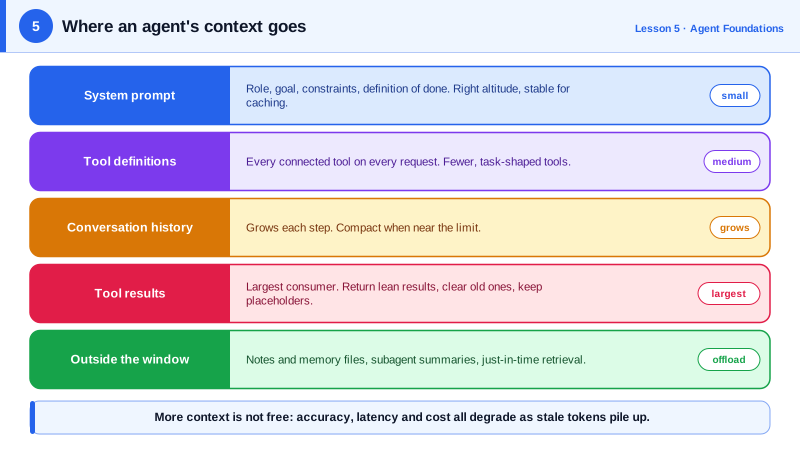
Prompt engineering asks how to phrase an instruction. Context engineering asks a broader question: of everything that could be in the model's window at this step, which tokens give it the best chance of choosing the right next action? For agents the question is pressing because context accumulates. Every tool call and result is appended, so a task that takes fifty steps can fill hundreds of thousands of tokens, much of it stale.
More context is not free even when it fits. Studies of long-context models, including Chroma's 2025 "context rot" report, show that accuracy on retrieval and reasoning tasks degrades as input length grows, even well inside the advertised window. Large windows also cost money and latency on every step, because the whole history is resent each time. Prompt caching reduces the price of a stable prefix, but it does not make irrelevant tokens useful.
The system prompt should sit at the right altitude: specific enough to guide behaviour, general enough not to hardcode brittle if-then rules. A good agent system prompt states the role, the goal, the important constraints and the definition of done, and explains why rules exist so the model can generalize. Long lists of special cases are better handled by tools that encode the logic, or by examples that show the expected style.
Tool results are usually the biggest consumer of context, so they get the most attention. Return only what the next decision needs (Day 4). Once a result has been used, it can often be cleared: context editing features remove old tool results from the history while keeping a placeholder, so the model knows the call happened. For very long sessions, compaction summarizes earlier parts of the conversation into a dense note and continues from there.
Two other techniques move information out of the window entirely. Structured note taking lets the agent write progress, decisions and open questions to a file or memory tool and read them back later, the way a developer keeps a scratch file. Subagents take a large subtask, such as searching a codebase, in their own fresh context and return only a short summary, so the main agent never sees the thousands of tokens of exploration. Just-in-time retrieval completes the picture: instead of loading every document up front, give the agent tools to fetch what it needs when it needs it.
| Technique | What it does | Best for |
|---|---|---|
| Lean tool results | Return only fields the next step needs | Every agent, always |
| Context editing | Clears old tool results, keeps placeholders | Many tool calls with bulky outputs |
| Compaction | Summarizes earlier history into a note | Very long sessions near the window limit |
| External notes or memory | Agent writes and rereads its own state | Multi-hour tasks, resumable work |
| Subagents | Explore in a separate window, return a summary | Search and research subtasks |
| Just-in-time retrieval | Fetch documents on demand with tools | Large knowledge bases |
Worked Example: Trimming Stale Tool Results in Your Own Loop
Hosted features such as the Claude API's context editing and compaction do this server side. The same idea in your own loop looks like this: keep the latest results in full and replace older bulky ones with a short placeholder.
KEEP_RECENT = 3          # tool results kept verbatim
BULKY = 2_000            # characters; smaller results are cheap enough to keep

def trim_history(messages: list[dict]) -> list[dict]:
    """Replace old, large tool_result contents with a one-line placeholder."""
    result_positions = [
        (i, j) for i, m in enumerate(messages) if m["role"] == "user" and isinstance(m["content"], list)
        for j, block in enumerate(m["content"]) if block.get("type") == "tool_result"
    ]
    for i, j in result_positions[:-KEEP_RECENT]:
        block = messages[i]["content"][j]
        text = block["content"] if isinstance(block["content"], str) else str(block["content"])
        if len(text) > BULKY:
            block["content"] = f"[Cleared {len(text)} chars of old tool output. Re-run the tool if needed.]"
    return messages

# In the loop from Day 3, before each model call:
#   messages = trim_history(messages)
# Note: rewriting history invalidates the prompt cache after the edited point, so trim
# in batches (for example every 10 steps) rather than on every call.
The placeholder matters: the model still sees that the call happened and knows it can repeat it. The note about caching reflects a real trade-off, since every edit to earlier history forces the rest of the prompt to be reprocessed.
Real-World Examples
- Anthropic's September 2025 post "Effective context engineering for AI agents" describes compaction, structured note taking and sub-agent architectures as the main techniques for long-horizon tasks, and recommends finding the smallest set of high-signal tokens for each step.
- Chroma's 2025 "Context Rot" study tested 18 models and found performance on simple tasks declined as input length increased, reinforcing that a bigger window is not a substitute for curating what goes into it.
Review Questions & Answers
Model accuracy degrades as input grows, even within the context window, and irrelevant or stale tokens compete for attention with the information that matters. Each extra token also adds cost and latency on every step because the history is resent.
Context editing removes specific old content, typically bulky tool results, and leaves placeholders, while the rest of the history stays verbatim. Compaction summarizes a large part of the earlier conversation into a condensed note that replaces it.
A subagent performs a large subtask, such as searching many files, in its own fresh context window and returns only a short summary. The main agent gets the conclusion without carrying thousands of tokens of exploration.
It is specific enough to guide behaviour, stating role, goal, constraints and the definition of done, but not so detailed that it becomes a brittle list of special cases. It explains reasons so the model can generalize to situations the prompt did not list.