AI Agent Frameworks Compared: Claude Agent SDK, LangGraph
On this page
Learning Objective
Compare the main ways to build an agent in 2026, from a hand-written loop to SDK helpers, batteries-included agent SDKs, graph frameworks and hosted agent platforms, and choose one based on control, built-in capabilities and where the agent runs.
Concept Explanation
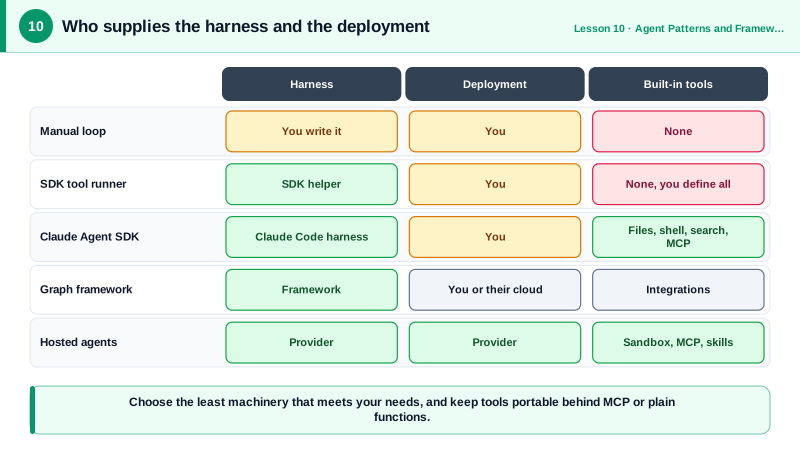
There are now many ways to build an agent, and the options differ along two independent axes. The first is who supplies the harness, meaning the loop, context management, tool execution and error handling. The second is who supplies the deployment, meaning the servers, sandboxes and state storage the agent runs on. Keeping those axes apart clears up most of the confusion between products that sound alike.
The lowest level is a manual loop over a model API, as you built on Day 3. You own every decision, depend on nothing beyond the SDK, and can implement any control flow, at the cost of writing retries, limits, streaming and context management yourself. One step up are tool runner helpers in the official SDKs, such as the Anthropic SDK's tool runner, which generate tool schemas from typed functions and run the loop for you while still letting you inspect each turn. They suit most custom-tool agents.
Batteries-included agent SDKs package a complete harness. The Claude Agent SDK is the same harness that powers Claude Code, exposed as a Python and TypeScript library: you call query with a prompt and options, and it brings built-in tools for files, shell, search and web, MCP connections, subagents, hooks, permissions and session management. The OpenAI Agents SDK offers agents, handoffs between agents, guardrails and tracing around OpenAI's models. These SDKs save enormous work when your agent needs those capabilities, but you inherit their abstractions.
Graph frameworks such as LangGraph model the agent as a state machine: nodes are steps, edges are transitions, and state is checkpointed so runs can pause, resume and accept human input. They shine for long-running workflows with explicit branching and durable state, and they are model-agnostic. Google's Agent Development Kit and Microsoft's Agent Framework occupy similar ground in their ecosystems.
Finally, hosted agent platforms provide both harness and deployment. Claude Managed Agents, for example, stores versioned agent configurations, runs the loop on Anthropic's infrastructure and gives each session a sandboxed container for code and files. You trade control for not having to operate anything.
The decision rule is to choose the least machinery that meets your needs. Start with a tool runner or a short manual loop for focused agents. Adopt an agent SDK when you need its built-in tools, such as file editing and shell access. Use a graph framework when durable, inspectable state and complex branching dominate. Use a hosted platform when you would rather not run sandboxes and schedulers yourself. Whatever you choose, keep tools behind MCP or plain functions so you can switch later.
| Option | You write | Harness | Deployment | Best when |
|---|---|---|---|---|
| Manual loop | Loop, tools, limits | You | You | Full control, unusual control flow |
| SDK tool runner | Tool functions | SDK helper | You | Most custom-tool agents |
| Claude Agent SDK | Prompt and options | Claude Code harness with built-in tools | You | Agents that edit files, run commands, use MCP |
| OpenAI Agents SDK | Agents, handoffs, guardrails | SDK | You | Multi-agent handoffs on OpenAI models |
| LangGraph and similar | Graph of nodes and state | Framework | You or their cloud | Durable state, branching, human-in-the-loop |
| Hosted agents (for example Claude Managed Agents) | Config and tool results | Provider | Provider | No infrastructure to operate |
Worked Example: The Same Agent with the Tool Runner and the Claude Agent SDK
Both versions answer questions about a repository. The tool runner version needs you to write every tool. The Agent SDK version gets file reading and search built in, and adds a custom tool through an in-process MCP server.
# Option A: Anthropic SDK tool runner. You define every tool.
import anthropic
from anthropic import beta_tool

client = anthropic.Anthropic()

@beta_tool
def read_file(path: str) -> str:
    """Read a UTF-8 text file from the repository.

    Args:
        path: Path relative to the repository root.
    """
    return open(path, encoding="utf-8").read()[:20_000]

runner = client.beta.messages.tool_runner(
    model="claude-opus-5-5", max_tokens=16000, tools=[read_file],
    messages=[{"role": "user", "content": "What does setup.py install?"}])
final = runner.until_done()     # runs the loop; iterate over runner to inspect each turn
print("".join(b.text for b in final.content if b.type == "text"))

# Option B: Claude Agent SDK. Read, Grep and Glob are built in; add one custom tool.
import asyncio
from claude_agent_sdk import query, ClaudeAgentOptions, tool, create_sdk_mcp_server

@tool("ticket_status", "Get the status of a Jira ticket by key, e.g. PLAT-12.", {"key": str})
async def ticket_status(args):
    return {"content": [{"type": "text", "text": f"{args['key']}: In review"}]}

options = ClaudeAgentOptions(
    allowed_tools=["Read", "Grep", "Glob", "mcp__jira__ticket_status"],
    mcp_servers={"jira": create_sdk_mcp_server("jira", tools=[ticket_status])},
    permission_mode="default", max_turns=15)

async def main():
    async for msg in query(prompt="Which module implements PLAT-12, and is it merged?", options=options):
        if type(msg).__name__ == "ResultMessage":
            print(msg.result)

asyncio.run(main())
The custom tool's name in the allow list follows the mcp__server__tool convention that MCP-aware hosts use. Notice that option B never defines a file-reading tool: the harness provides it, along with permission checks and context management.
Real-World Examples
- Anthropic renamed the Claude Code SDK to the Claude Agent SDK in September 2025, explaining that the harness built for coding was being used for research, support and finance agents, and that the same loop, tools and context management generalize beyond code.
- LangGraph is used by companies such as Klarna and LinkedIn for agent workflows that need persistent state and human review steps, where checkpointing and explicit graphs make long-running processes debuggable.
Review Questions & Answers
Who supplies the harness, meaning the loop, context management and tool execution, and who supplies the deployment, meaning the infrastructure the agent runs on. For example, the Claude Agent SDK supplies a harness but you deploy it, while a hosted agent platform supplies both.
When the agent needs capabilities the SDK provides out of the box, such as reading and editing files, running shell commands, searching code, connecting MCP servers, subagents and permission handling, which you would otherwise have to build and secure yourself.
Long-running processes with explicit branching, durable checkpointed state, the ability to pause and resume, and human approval steps, where modeling the agent as a state machine makes it inspectable.
It keeps the tools portable, so you can change the harness or framework later without rewriting every integration, and the same tools can serve several agents and hosts.