How to Add MCP Servers to Claude Code and VS Code
On this page
Learning Objective
Connect existing MCP servers to the most common hosts, understand configuration scopes and file formats, keep secrets out of shared configuration, and evaluate whether a third-party server is safe to install.
Concept Explanation
Before building servers, it is worth being fluent as a user of them, because every server you build will be judged in these hosts. Each host has its own configuration, but the information is always the same: a name, a transport, and either a command to launch (stdio) or a URL to call (HTTP), plus any environment variables or headers.
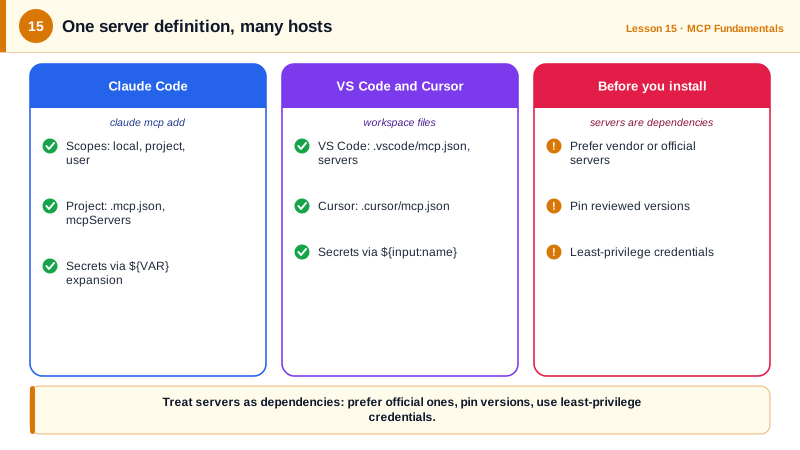
Claude Code manages servers with the claude mcp command. claude mcp add --transport http adds a remote server by URL; claude mcp add --transport stdio name -- command args adds a local one, with the double dash separating Claude Code's options from the server's command. Servers have three scopes. Local scope, the default, is private to you in the current project. Project scope writes a .mcp.json file to the repository root so the whole team gets the same servers through version control. User scope applies to all your projects. The .mcp.json format uses an mcpServers object keyed by server name, and supports environment variable expansion such as ${API_KEY} so the file can be committed without secrets. Inside a session, the /mcp command shows server status and runs OAuth sign-in for remote servers. Tools appear to the model with names like mcp__github__create_pull_request.
VS Code reads .vscode/mcp.json with a top-level servers object and supports input variables such as ${input:token}, which prompt the user once and store the value securely instead of in the file. Cursor uses .cursor/mcp.json. Claude Desktop reads claude_desktop_config.json with an mcpServers object, and also supports one-click desktop extensions that bundle a local server with its runtime. The shapes are similar enough that converting between them takes seconds. For step-by-step setup in Cursor, Gemini CLI, Codex CLI, JetBrains IDEs and Zed, and for popular servers such as GitHub, Playwright, Context7, Supabase and Figma, see the MCP Setup Guides.
Installing a server is installing software that the model can drive, so evaluate it like a dependency. Prefer servers from the vendor of the system it connects to, or official reference servers. Check what tools it exposes and whether any are destructive. Pin versions instead of always fetching latest, since a compromised update would run with your permissions. Give it the narrowest credentials that work, such as a read-only database user or a token scoped to one repository. In September 2025 a malicious npm package impersonating a Postmark email server added a hidden BCC to every email sent through it, the first widely reported malicious MCP server, and a reminder that the trust question is real.
Finally, fewer servers is usually better. Every connected server adds tool definitions to every request, which costs tokens and makes tool selection harder. Enable the servers a project actually needs, and disable the rest.
| Host | Config location | Top-level key | Secrets |
|---|---|---|---|
| Claude Code (project scope) | .mcp.json in repo root | mcpServers | ${VAR} expansion from the environment |
| Claude Code (local or user scope) | ~/.claude.json | mcpServers | Managed by claude mcp add |
| VS Code | .vscode/mcp.json | servers | ${input:name} prompts, stored securely |
| Cursor | .cursor/mcp.json | mcpServers | Environment variables |
| Claude Desktop | claude_desktop_config.json | mcpServers | Desktop extensions or environment |
Worked Example: A Team Configuration Without Secrets
The project-scoped file below gives every developer the same three servers. Secrets come from each person's environment, the database user is read-only, and package versions are pinned.
{
  "mcpServers": {
    "github": {
      "type": "http",
      "url": "https://api.githubcopilot.com/mcp/",
      "headers": { "Authorization": "Bearer ${GITHUB_PAT}" }
    },
    "analytics-db": {
      "type": "stdio",
      "command": "npx",
      "args": ["-y", "@bytebase/dbhub@1.4.0", "--dsn", "${ANALYTICS_READONLY_DSN}"]
    },
    "playwright": {
      "type": "stdio",
      "command": "npx",
      "args": ["-y", "@playwright/mcp@0.0.83"]
    }
  }
}
The equivalent commands, run once by the person who sets it up, are claude mcp add --transport http github --scope project followed by the URL and header, and claude mcp add --transport stdio analytics-db --scope project followed by a double dash and the npx command. Each teammate then exports GITHUB_PAT and ANALYTICS_READONLY_DSN and runs /mcp to confirm the servers connect. The versions shown were current in October 2026; pin whichever versions you have reviewed.
Real-World Examples
- In September 2025 Koi Security reported that the npm package postmark-mcp, which imitated a legitimate Postmark email server, began silently copying every outgoing email to an attacker's address in a later version, after earlier versions had built trust with users.
- GitHub's official remote MCP server at api.githubcopilot.com supports OAuth and fine-grained tokens and lets organizations restrict which toolsets are enabled, an example of a vendor-hosted server designed for least privilege.
Review Questions & Answers
Local, the default, is private to you in the current project. Project writes .mcp.json to the repository so the team shares the servers. User applies to all of your projects on your machine.
Reference the key with environment variable expansion, such as ${GITHUB_PAT} in .mcp.json, or use VS Code's ${input:name} variables, so each developer supplies the secret locally.
A server runs with your permissions and the model can drive it. Always fetching the latest version means a compromised or malicious update would run automatically, as happened with the postmark-mcp package.
Each server's tool definitions are added to every request, which costs tokens and gives the model more similar options to choose between, increasing the chance of picking the wrong tool.