How to Test and Debug MCP Servers: MCP Inspector
On this page
Learning Objective
Test MCP servers at three levels: interactively with the MCP Inspector, automatically with in-process unit tests, and behaviorally with evaluations that check whether a model actually uses the tools well. Diagnose the most common server failures.
Concept Explanation
An MCP server has two kinds of correctness. The first is ordinary software correctness: tools return the right data, errors are handled, schemas are valid. The second is usability by a model: given the tool names and descriptions, does an agent pick the right tool with the right arguments and recover from errors? You need different tests for each.
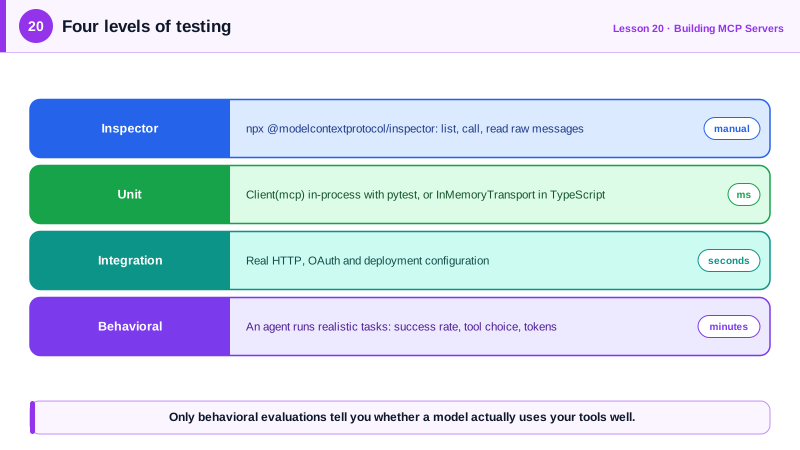
The MCP Inspector is the interactive tool. Running npx @modelcontextprotocol/inspector followed by the command that starts your server opens a web interface that connects as a client. You can list tools, resources and prompts, call them with arguments, see raw JSON-RPC messages and inspect errors. It also connects to Streamable HTTP servers by URL. Use it while developing to check that descriptions read well and that results look as you intended.
For automated tests, the Python SDK's Client accepts an MCPServer instance directly and connects in-process, without a subprocess or network. Tests are then ordinary pytest functions that list tools and call them, asserting on structured content and isError. The TypeScript SDK provides an InMemoryTransport pair for the same purpose. In-process tests run in milliseconds, so you can cover edge cases such as invalid inputs, empty results, truncation and permission errors, and run them in continuous integration.
Behavioral evaluation is the level most teams skip, and it is where tool design pays off. Write realistic tasks a user might give an agent, run an agent with your server's tools against them, and measure whether it succeeds, which tools it calls, how many calls it needs and how many tokens it spends. Anthropic's tool design guidance recommends exactly this loop: evaluate, read the transcripts, improve names, descriptions and results, and evaluate again. Changes to a description can move success rates noticeably, and only an evaluation tells you which way.
Some failures are specific to MCP. A stdio server that prints to standard output corrupts the protocol stream; the symptom is a client that fails to connect or reports parse errors. A server that works in the Inspector but not in a desktop host often lacks environment variables or uses a relative path, because hosts launch servers from a different working directory with a minimal environment. Tools that never get called usually have vague descriptions or names that overlap with another server's tools. Timeouts usually come from slow tools without progress reporting.
| Level | Tool | Checks | Speed |
|---|---|---|---|
| Interactive | MCP Inspector | Schemas, descriptions, raw messages | Manual |
| Unit | In-process Client (Python) or InMemoryTransport (TypeScript) | Results, errors, edge cases | Milliseconds |
| Integration | Real transport against a running server | Auth, HTTP, deployment config | Seconds |
| Behavioral | Agent runs realistic tasks with your tools | Tool selection, success rate, cost | Minutes, costs tokens |
Worked Example: In-Process Tests for the Database Server
These pytest tests exercise the Day 16 server without starting a subprocess. They check the structured output, the read-only error message and the advertised annotations.
import pytest
from mcp import Client
from server import mcp                    # the MCPServer instance from Day 16

@pytest.fixture
def anyio_backend():
    return "asyncio"

@pytest.mark.anyio
async def test_run_query_returns_structured_rows():
    async with Client(mcp) as client:     # in-process connection
        result = await client.call_tool(
            "run_query", {"sql": "SELECT customer, total FROM orders ORDER BY id", "max_rows": 2})
        assert result.is_error is False
        assert result.structured_content["columns"] == ["customer", "total"]
        assert result.structured_content["truncated"] is True

@pytest.mark.anyio
async def test_writes_are_rejected_with_a_helpful_error():
    async with Client(mcp) as client:
        result = await client.call_tool("run_query", {"sql": "DELETE FROM orders"})
        assert result.is_error is True
        assert "read-only" in result.content[0].text

@pytest.mark.anyio
async def test_tools_advertise_read_only():
    async with Client(mcp) as client:
        tools = {t.name: t for t in (await client.list_tools()).tools}
        assert tools["run_query"].annotations.read_only_hint is True
        assert "truncated" in tools["run_query"].output_schema["properties"]
To debug interactively, run npx @modelcontextprotocol/inspector python server.py and call run_query from the browser. For a behavioral check, give an agent ten realistic questions about the orders data and count how often it calls list_tables before writing a query.
Real-World Examples
- Anthropic's "Writing effective tools for agents" describes generating realistic evaluation tasks, running agents against MCP servers, and using the transcripts to refine tool descriptions, reporting that this held-out evaluation loop improved performance beyond hand-written tool definitions.
- The MCP Inspector, maintained in the modelcontextprotocol organization, is the standard debugging tool referenced in the official server tutorials for both Python and TypeScript.
Review Questions & Answers
Unit tests check that tools return correct data, but not whether a model chooses the right tool with the right arguments from the names and descriptions. Behavioral evaluations with an agent measure that usability.
Pass the MCPServer instance directly to mcp.Client, which connects in-process, and then call list_tools and call_tool inside ordinary async test functions.
The host launches the server from a different working directory with a minimal environment, so relative paths and missing environment variables are the usual culprits. Use absolute paths and pass needed variables in the host configuration.
The client fails to connect or reports JSON parse errors, because non-protocol text has been injected into the message stream. Logs must go to standard error.