MCP Tools vs Resources vs Prompts Explained
On this page
Learning Objective
Understand MCP's three server primitives and who controls each: tools called by the model, resources selected by the application, and prompts chosen by the user. Use resource templates, tool annotations and change notifications, and decide which primitive fits a given capability.
Concept Explanation
MCP servers expose three kinds of capability, and the distinguishing question is who decides when each one is used. Getting this right shapes how a capability feels inside a host and how safe it is.
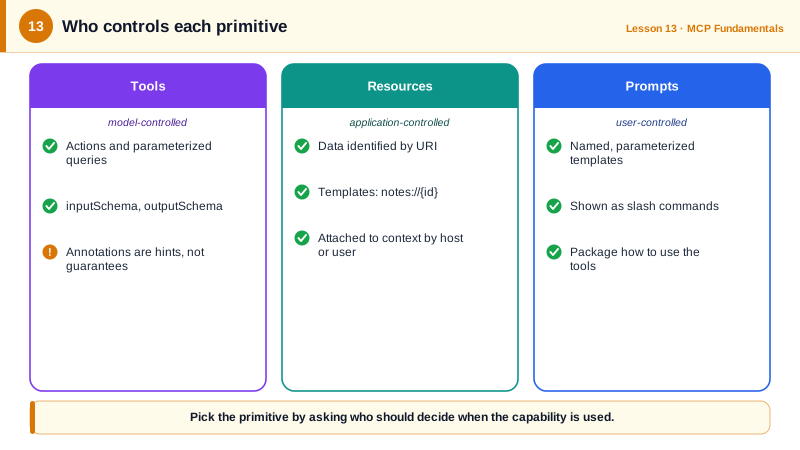
Tools are model-controlled. The host lists them to the model, and the model decides when to call one, with arguments that match the tool's inputSchema. Tools are for actions and for queries whose parameters the model must work out: create an issue, search orders, run a SQL query. Because a tool call may have side effects, hosts typically ask the user before running tools, and tool annotations help them decide. readOnlyHint says the tool does not modify anything, destructiveHint warns that it may delete or overwrite, idempotentHint says repeating the call is harmless, and openWorldHint says it touches external systems. Annotations are hints from the server, so a host should only trust them from servers it trusts.
Resources are application-controlled. A resource is data identified by a URI, such as file:///project/README.md, postgres://db/schema/orders or notes://42, with a MIME type. The host decides how to use resources: it might show a picker so the user can attach a file to the conversation, automatically include a project's schema, or let the model fetch them through a helper. Resource templates use URI templates such as notes://{note_id} to describe whole families of resources without listing each one. Resources suit reference material that a person or the application chooses to bring into context.
Prompts are user-controlled. A prompt is a named, parameterized message template that the user explicitly invokes, often as a slash command in the host. A server for a code review tool might offer a review_pr prompt that takes a pull request number and produces messages instructing the model how to review it. Prompts package expertise about how to use the server's other capabilities well.
All three can change at run time. A server that adds tools when the user logs in can advertise listChanged in its capabilities and notify clients, which then fetch the list again. In the stateless protocol, clients opt into such change notifications through a subscriptions/listen request, and list results carry ttlMs so well-behaved clients cache them instead of polling.
Choosing the primitive is a design decision. If the model should decide when to fetch it, make it a tool. If the user or app chooses what to attach, make it a resource. If it is a reusable workflow the user starts on purpose, make it a prompt. Many servers expose the same data both ways: a resource for attaching a document, and a search tool for the model to find documents.
| Primitive | Controlled by | Discovered with | Used for | Example |
|---|---|---|---|---|
| Tool | The model | tools/list, then tools/call | Actions and parameterized queries | create_issue, search_orders |
| Resource | The application or user | resources/list, resources/templates/list, resources/read | Reference data attached to context | file:///README.md, notes://{id} |
| Prompt | The user | prompts/list, prompts/get | Reusable workflows, slash commands | review_pr(number) |
Worked Example: One Server, Three Primitives
A small knowledge-base server written with the Python SDK's MCPServer class exposes a search tool, articles as a resource template and a prompt that drafts a customer reply using both.
from mcp.server.mcpserver import MCPServer
from mcp.server.mcpserver.prompts.base import UserMessage
from mcp.types import ToolAnnotations

mcp = MCPServer("kb", instructions="Help articles for the Acme product.")
ARTICLES = {
    "reset-password": "Go to Settings > Security > Reset password. Links expire in 1 hour.",
    "export-data": "Admins can export data from Settings > Data > Export as CSV.",
}

@mcp.tool(annotations=ToolAnnotations(readOnlyHint=True, openWorldHint=False))
def search_articles(query: str) -> list[str]:
    """Find help articles whose text mentions the query. Returns article slugs.
    Read an article with the resource kb://articles/{slug}."""
    return [slug for slug, text in ARTICLES.items() if query.lower() in text.lower()]

@mcp.resource("kb://articles/{slug}", mime_type="text/markdown")
def article(slug: str) -> str:
    """The full text of one help article."""
    return ARTICLES[slug]

@mcp.prompt()
def draft_reply(customer_question: str) -> list[UserMessage]:
    """Draft a support reply grounded in help articles."""
    return [UserMessage(
        f"A customer asked: {customer_question}\n"
        "Use search_articles to find relevant articles, read them, and draft a short, "
        "friendly reply that links the article slug. Do not invent steps.")]

if __name__ == "__main__":
    mcp.run()
In a host, draft_reply appears as a command the user picks, articles appear in an attach menu, and search_articles is available to the model. The tool's description points at the resource template, which teaches the model how the pieces connect.
Real-World Examples
- The official GitHub MCP server exposes tools such as creating issues and pull requests, and repository contents as resources, while Claude Code surfaces MCP prompts as slash commands named after the server and prompt.
- The reference filesystem server marks reading tools as read-only and writing tools as destructive through annotations, so hosts can auto-approve reads while still asking before edits.
Review Questions & Answers
Tools are model-controlled, meaning the model decides when to call them. Resources are application-controlled, chosen by the host or the user to add to context. Prompts are user-controlled templates the user invokes explicitly.
readOnlyHint says the tool does not modify state, and destructiveHint warns it may delete or overwrite data, which helps hosts decide when to ask for approval. They are hints from the server, so a host should rely on them only for servers it trusts.
A URI template such as notes://{note_id} that describes a whole family of resources. It lets a server expose many items without listing each one, and lets clients construct URIs for specific items.
As a resource when the user or host should decide to attach the schema to the conversation, for example at the start of a SQL session. As a tool, perhaps with a table filter, when the model should decide during a task that it needs part of the schema.