The AI Agent Loop Explained: Think, Act, Observe
On this page
Learning Objective
Understand the core loop that every agent runs, from the user's goal through model calls, tool executions and observations to a final answer. Learn the stopping conditions that keep the loop safe, and why the conversation history is the agent's working memory.
Concept Explanation
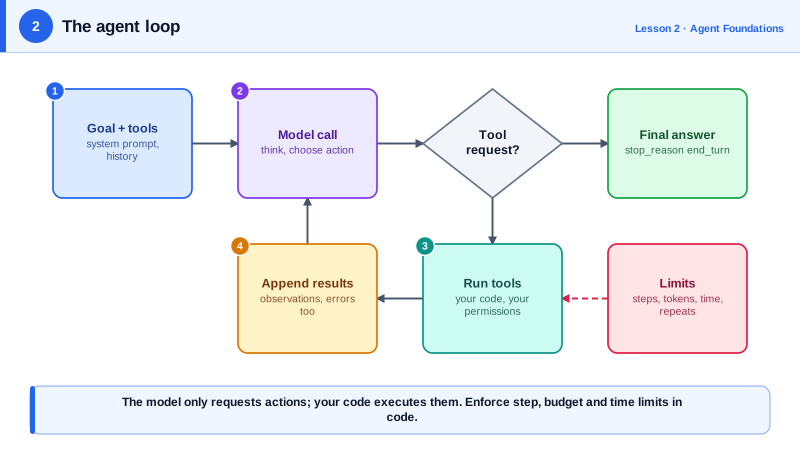
Strip away the frameworks and every agent is the same small loop. You send the model a goal, a list of tools it may use, and the history so far. The model replies either with a final answer or with one or more requests to call tools. Your code runs those tools, appends the results to the history, and calls the model again. The loop ends when the model answers without requesting a tool, or when one of your safety limits trips.
This pattern has several names. Research papers call it ReAct, short for reasoning and acting, from a 2022 paper by Yao and colleagues that interleaved reasoning traces with actions. Practitioners often describe it as think, act, observe. Whatever the name, the mechanics are identical: the model never executes anything itself. It only emits structured requests, and your program decides whether and how to fulfil them. That separation is what makes agents controllable, because every action passes through code you own.
The history is the agent's working memory. Each turn appends the model's request and the tool's result, so the model sees everything that has happened when it decides the next step. This has two consequences. First, the context grows with every step, so long tasks eventually hit the context window or become slow and expensive; Day 5 covers how to manage that. Second, whatever a tool returns becomes input the model trusts and acts on, which is why tool output must be accurate, concise and treated as untrusted when it comes from the outside world (Day 23).
A loop without limits is a liability. Models sometimes repeat the same failing call, oscillate between two approaches, or keep searching long after they have enough information. Production loops therefore enforce several stopping conditions in code: a maximum number of iterations, a maximum token or dollar budget, a wall-clock timeout, and detection of repeated identical calls. When a limit trips, the agent should stop gracefully, report what it did and what is left, and never pretend it finished.
There are also two kinds of stop from the model's side. The normal end is when the model answers without a tool request, in the Claude API signalled by a stop reason of end_turn. The other is when output was cut off by the token limit, signalled by max_tokens, which means the answer is incomplete and must not be treated as final. Distinguishing them is a common source of subtle bugs.
| Loop element | What it is | Owned by |
|---|---|---|
| Goal and instructions | The task plus the system prompt that sets rules | You, at the start |
| Tool request | Structured request to run a named tool with arguments | The model |
| Tool execution | Actually running code, querying data, calling APIs | Your program |
| Observation | The tool result appended to history | Your program |
| Stop decision | Final answer, or a limit such as iterations or budget | Model and your limits |
Worked Example: A Bare Agent Loop with Hard Limits
This loop is independent of any framework. The call_model and run_tool functions are placeholders that Day 3 replaces with real Claude API calls. Focus on the structure: the history, the stopping conditions and the repeat detection.
import json, time

MAX_STEPS = 12
MAX_SECONDS = 120

def run_agent(goal: str, call_model, run_tool) -> str:
    history = [{"role": "user", "content": goal}]
    seen_calls = set()
    started = time.monotonic()

    for step in range(MAX_STEPS):
        if time.monotonic() - started > MAX_SECONDS:
            return f"Stopped: time limit after {step} steps."

        reply = call_model(history)            # returns {"text": ..., "tool_calls": [...]}
        history.append({"role": "assistant", "content": reply})

        if not reply["tool_calls"]:            # the model chose to finish
            return reply["text"]

        results = []
        for call in reply["tool_calls"]:
            key = (call["name"], json.dumps(call["args"], sort_keys=True))
            if key in seen_calls:              # same call with same args: likely a loop
                results.append({"id": call["id"], "error": "Repeated call. Try a different approach."})
                continue
            seen_calls.add(key)
            try:
                results.append({"id": call["id"], "output": run_tool(call["name"], call["args"])})
            except Exception as exc:           # errors are observations, not crashes
                results.append({"id": call["id"], "error": str(exc)})
        history.append({"role": "user", "content": results})

    return f"Stopped: reached {MAX_STEPS} steps without finishing."
Two details matter. Tool errors are returned to the model as observations instead of crashing the program, so the model can correct a bad argument and try again. And the repeat check gives the model explicit feedback rather than silently skipping, which usually breaks the loop pattern within one step.
Real-World Examples
- The ReAct paper by Yao and colleagues (2022) showed that interleaving reasoning with actions such as Wikipedia lookups reduced hallucination on question answering compared with reasoning alone, and the pattern became the default architecture for tool-using agents.
- OpenAI's Agents SDK and Anthropic's Claude Agent SDK both expose a maximum-turns setting for exactly this reason: an unbounded loop is the most common way an agent burns budget in production.
Review Questions & Answers
The model only emits structured tool requests. Your program decides whether to run them, with what permissions, and what to return. This gives you a single control point for validation, approval, logging and limits, which is the foundation of agent safety.
Every request and tool result is appended to the history, so context grows with each step. Long tasks become slower and more expensive and can eventually exceed the context window, which requires techniques such as trimming tool results or compaction.
A maximum number of iterations, a maximum token or cost budget, and a wall-clock timeout. Detecting repeated identical tool calls is a useful fourth.
The model can often fix the problem, for example by correcting an invalid argument or trying another tool. Raising the exception ends the run, while returning it as an observation lets the agent recover.