How to Design Tools for AI Agents: Best Practices
On this page
Learning Objective
Design tool interfaces for a model rather than for a programmer: choose the right granularity, write names and descriptions that guide selection, return concise and meaningful results, and craft error messages that help the agent recover.
Concept Explanation
A tool is an interface with an unusual consumer. A human developer reads documentation once, remembers it, and learns from mistakes across days. A model reads the tool definitions in every request, decides in the moment, and learns only from what is in its context. That changes what good design looks like. Anthropic's engineering post on writing tools for agents summarizes it as designing for agent affordances: make the right action obvious, the wrong action hard, and every result useful for the next decision.
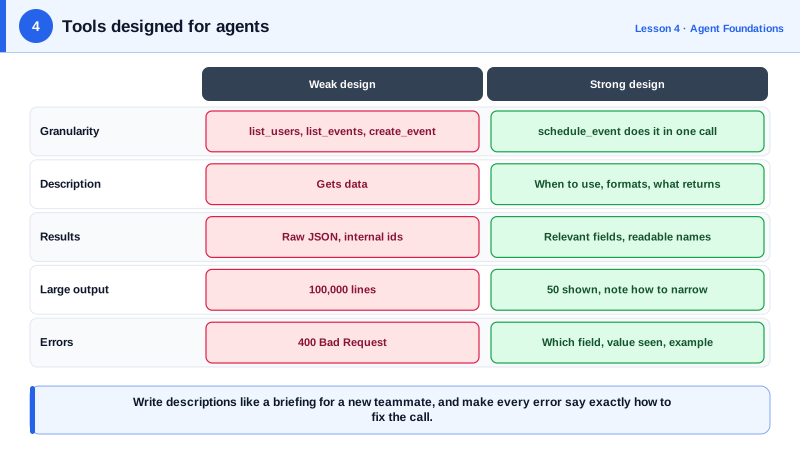
Granularity comes first. Wrapping every REST endpoint one to one produces dozens of narrow tools that force the agent to chain many calls and hold intermediate data in context. Tools built around tasks work better. Instead of list_users, list_events and create_event, a schedule_event tool that finds availability and books the slot does in one call what took five. Instead of returning ten thousand log lines, a search_logs tool that filters by service and time window returns only the relevant lines. Fewer, task-shaped tools also mean fewer definitions competing for the model's attention.
Names and descriptions are prompts. The model chooses a tool mostly from its name and description, so write them the way you would brief a new teammate: what the tool does, when to use it instead of a similar tool, what the parameters mean, what formats they take, and what comes back. Namespacing related tools with a shared prefix, such as github_create_issue and github_search_code, helps the model and the user see which system a tool touches, which matters when an agent connects to many services.
Results should be built for the next decision, not for completeness. Return human-meaningful fields such as names and titles rather than opaque internal identifiers, unless the agent needs an id for a follow-up call. Truncate or paginate long results and say so in the result, for example by noting that 40 of 312 matches are shown and how to narrow the search. Offering a concise and a detailed response format lets the agent choose cheap results by default and detail when needed.
Errors are teaching moments. An error that says only "400 Bad Request" leaves the agent guessing. An error that says the date must be in YYYY-MM-DD format and the value received was 10/07/2026 lets it fix the call immediately. Validate early, name the offending parameter, show an example of a correct value, and suggest the next step.
| Principle | Weak design | Strong design |
|---|---|---|
| Granularity | list_users, list_events, create_event | schedule_event that checks availability and books |
| Description | "Gets data" | When to use it, parameter formats, what it returns |
| Results | Full raw JSON with internal ids | Relevant fields, readable names, pagination note |
| Errors | "Invalid input" | Which parameter, what was received, a correct example |
| Naming | search, search2 | crm_search_contacts, crm_search_deals |
Worked Example: Redesigning a Log Search Tool
The first version is a thin API wrapper. The second is shaped for an agent: required filters, a response format switch, a hard cap with a truncation notice, and errors that teach.
from datetime import datetime, timedelta, timezone

# Before: returns everything, any filter optional, cryptic errors.
def get_logs(service=None, start=None, end=None):
    return LOG_STORE.query(service, start, end)          # can return 100,000 lines

# After: shaped for an agent.
MAX_LINES = 50

def search_logs(service: str, query: str, since_minutes: int = 60,
                response_format: str = "concise") -> str:
    """Search application logs for one service.

    Use this to investigate errors or incidents. Narrow with query, for example
    "timeout" or "status=500". since_minutes looks back from now (max 1440).
    response_format "concise" returns time, level and message; "detailed" adds
    trace ids and request paths, useful for correlating with traces.
    """
    if service not in KNOWN_SERVICES:
        raise ValueError(f"Unknown service '{service}'. Valid: {', '.join(sorted(KNOWN_SERVICES))}.")
    if not 1 <= since_minutes <= 1440:
        raise ValueError(f"since_minutes must be 1 to 1440, got {since_minutes}.")

    since = datetime.now(timezone.utc) - timedelta(minutes=since_minutes)
    rows = LOG_STORE.search(service, query, since)
    shown = rows[:MAX_LINES]
    fields = ("time", "level", "message") if response_format == "concise" else \
             ("time", "level", "message", "trace_id", "path")
    lines = [" | ".join(str(r[f]) for f in fields) for r in shown]
    if len(rows) > MAX_LINES:
        lines.append(f"[{MAX_LINES} of {len(rows)} matches shown. Narrow query or since_minutes.]")
    return "\n".join(lines) or f"No matches for '{query}' in {service} in the last {since_minutes} minutes."
The docstring becomes the tool description in most SDKs, so it is written for the model. The empty result is explicit rather than an empty string, which prevents the agent from wondering whether the call failed.
Real-World Examples
- Anthropic's September 2025 post "Writing effective tools for agents" recommends consolidating functionality into fewer task-oriented tools, namespacing tool names, returning meaningful context instead of low-level identifiers, and offering a response_format parameter, based on evaluations of internal agents.
- The SWE-agent research from Princeton (2024) found that a purpose-built agent computer interface, with commands such as a windowed file viewer and a search that summarizes results, significantly improved a model's success at fixing GitHub issues compared with giving it a raw shell.
Review Questions & Answers
They force the agent to chain many narrow calls, hold intermediate data in its context and choose among many similar definitions. A single task-shaped tool does the same work in one call with less context and fewer chances to pick the wrong tool.
What the tool does, when to use it rather than similar tools, the meaning and format of each parameter, and what the result contains. It is effectively a prompt that guides the model's choice.
Return a bounded subset and say so explicitly, for example "50 of 312 matches shown", along with guidance on how to narrow the request. Silently truncating leaves the agent unaware that data is missing.
It names the parameter that was wrong, shows the value received, and gives an example of a correct value or the next step to take. That lets the model correct its call on the next turn instead of guessing.