Build an MCP Server in TypeScript: SDK v2 Tutorial
On this page
Learning Objective
Build a remote MCP server with the official TypeScript SDK version 2: register tools with Zod schemas, expose a resource template and a prompt, serve the stateless 2026-07-28 protocol over HTTP with createMcpHandler, and protect a local endpoint with host and origin validation.
Concept Explanation
Version 2 of the TypeScript SDK split the old monolithic @modelcontextprotocol/sdk package into focused packages. @modelcontextprotocol/server holds McpServer and everything for building servers, @modelcontextprotocol/client holds the client, and @modelcontextprotocol/node adapts the web-standard HTTP handler to Node's http module, with sibling packages for Express, Hono and Fastify. Schemas use the Standard Schema interface, so Zod version 4 works out of the box and other validators such as Valibot and ArkType are supported.
Tools are registered with server.registerTool(name, config, handler). The config holds a title, a description, an inputSchema as a Zod object, an optional outputSchema, and annotations. The SDK validates arguments against the schema before calling your handler, so constraints such as an enum, an integer range or a regular expression are enforced for free, and the model gets a precise validation message when it sends something invalid. The handler receives the parsed arguments and a context object, and returns content blocks, plus structuredContent when an output schema is declared.
Resources use registerResource. A fixed URI string registers a single resource; a ResourceTemplate such as deploy://{id} registers a family, and the read callback receives the template variables. The template takes a list callback, which can be undefined when the family cannot be enumerated. Prompts use registerPrompt with an argsSchema and a callback that returns messages.
Errors thrown inside a tool handler are caught by the SDK and returned as a result with isError set and the error's message as text. That makes throwing with a clear message the simplest way to report a failure the model should see and fix.
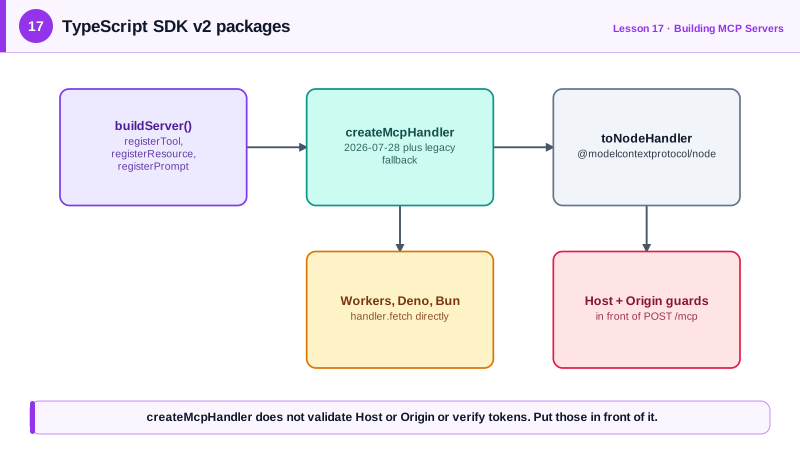
For HTTP, createMcpHandler takes a factory function that builds a fresh McpServer and returns a handler that serves the 2026-07-28 protocol. By default it also falls back to stateless serving for clients that still speak the 2025 revisions, so old and new clients both work against one endpoint built from one definition. The handler exposes a web-standard fetch interface for runtimes such as Cloudflare Workers, Deno and Bun; toNodeHandler from @modelcontextprotocol/node adapts it for Node. The handler itself performs no Host or Origin validation and no authentication, so you add those in front of it.
| Task | TypeScript SDK v2 API | Package |
|---|---|---|
| Create a server | new McpServer({ name, version }, { instructions }) | @modelcontextprotocol/server |
| Tool | server.registerTool(name, { inputSchema: z.object(...) }, handler) | @modelcontextprotocol/server |
| Resource family | server.registerResource(name, new ResourceTemplate('x://{id}', { list }), meta, read) | @modelcontextprotocol/server |
| Prompt | server.registerPrompt(name, { argsSchema }, build) | @modelcontextprotocol/server |
| HTTP endpoint | createMcpHandler(factory), then toNodeHandler(handler) | server and node |
| Local protection | localhostHostValidation(), localhostOriginValidation() | @modelcontextprotocol/node |
Worked Example: A Deployments Server over HTTP
This server lets an agent inspect deployments, read a deployment record as a resource and draft release notes from a prompt. Day 19 adds a confirmed promote tool to it.
import { createServer } from 'node:http';
import { McpServer, ResourceTemplate, createMcpHandler } from '@modelcontextprotocol/server';
import { toNodeHandler, localhostHostValidation, localhostOriginValidation } from '@modelcontextprotocol/node';
import * as z from 'zod/v4';

type Deployment = { id: string; service: string; env: 'staging' | 'production'; version: string; status: string };
const DEPLOYS: Deployment[] = [
  { id: 'd-101', service: 'checkout', env: 'production', version: '2.4.1', status: 'succeeded' },
  { id: 'd-102', service: 'checkout', env: 'staging', version: '2.5.0', status: 'succeeded' },
];

function buildServer(): McpServer {
  const server = new McpServer({ name: 'deployments', version: '1.0.0' },
    { instructions: 'Inspect and roll out service deployments. Check recent deployments first.' });

  server.registerTool('list_deployments', {
    title: 'List deployments',
    description: 'Recent deployments for one service, newest first. env filters to staging or production.',
    inputSchema: z.object({
      service: z.string(),
      env: z.enum(['staging', 'production']).optional(),
      limit: z.number().int().min(1).max(20).default(5),
    }),
    annotations: { readOnlyHint: true },
  }, async ({ service, env, limit }) => {
    const rows = DEPLOYS.filter((d) => d.service === service && (!env || d.env === env)).slice(0, limit);
    const text = rows.length ? rows.map((d) => `${d.id} ${d.env} v${d.version} ${d.status}`).join('\n')
                             : `No deployments for ${service}. Known services: checkout, search.`;
    return { content: [{ type: 'text', text }] };
  });

  server.registerResource('deployment', new ResourceTemplate('deploy://{id}', { list: undefined }),
    { title: 'Deployment record', mimeType: 'application/json' },
    async (uri, { id }) => {
      const d = DEPLOYS.find((x) => x.id === id);
      if (!d) throw new Error(`No deployment ${id}`);
      return { contents: [{ uri: uri.href, text: JSON.stringify(d, null, 2) }] };
    });

  server.registerPrompt('release_notes', {
    description: 'Draft release notes for a service version.',
    argsSchema: z.object({ service: z.string(), version: z.string() }),
  }, ({ service, version }) => ({ messages: [{ role: 'user', content: { type: 'text',
      text: `Draft concise release notes for ${service} v${version}. Use list_deployments for context.` } }] }));

  return server;
}

const node = toNodeHandler(createMcpHandler(buildServer));    // 2026-07-28 plus legacy fallback
const validHost = localhostHostValidation();
const validOrigin = localhostOriginValidation();
createServer((req, res) => {
  if (req.url !== '/mcp') { res.writeHead(404).end(); return; }
  if (!validHost(req, res) || !validOrigin(req, res)) return;
  void node(req, res);
}).listen(3001, '127.0.0.1', () => console.error('deployments MCP on http://127.0.0.1:3001/mcp'));
Sending limit 99 returns an isError result with "Too big: expected number to be <=20", produced by the SDK's validation before the handler runs. Connect it to Claude Code with claude mcp add --transport http deployments http://127.0.0.1:3001/mcp.
Real-World Examples
- The TypeScript SDK's version 2 README describes the move from the single @modelcontextprotocol/sdk package to split server, client and framework adapter packages, with version 1 maintained on a separate branch for existing projects.
- Cloudflare's guides for remote MCP servers deploy the web-standard fetch handler directly on Workers, which works because a stateless handler needs no sticky sessions or per-connection memory.
Review Questions & Answers
It serves the 2026-07-28 protocol from a per-request server factory and, by default, falls back to stateless serving for older clients. It does not validate Host or Origin headers and does not verify tokens, so you add those in front of it.
The SDK validates arguments against the Zod inputSchema before calling the handler. Invalid input produces an error result with a precise message, such as which field was too big, and the handler never runs.
The handler creates a server per request, which matches the stateless protocol and keeps requests independent. Any replica can serve any request without shared per-connection state.
It enumerates the concrete resources that match the template so clients can show them. It can be undefined when the family is too large or cannot be listed, in which case clients read specific URIs directly.