MCP Structured Output, outputSchema and isError
On this page
Learning Objective
Return results that both models and programs can use: declare output schemas, return structuredContent alongside text, choose between text, images, resource links and embedded resources, and distinguish tool execution errors from protocol errors.
Concept Explanation
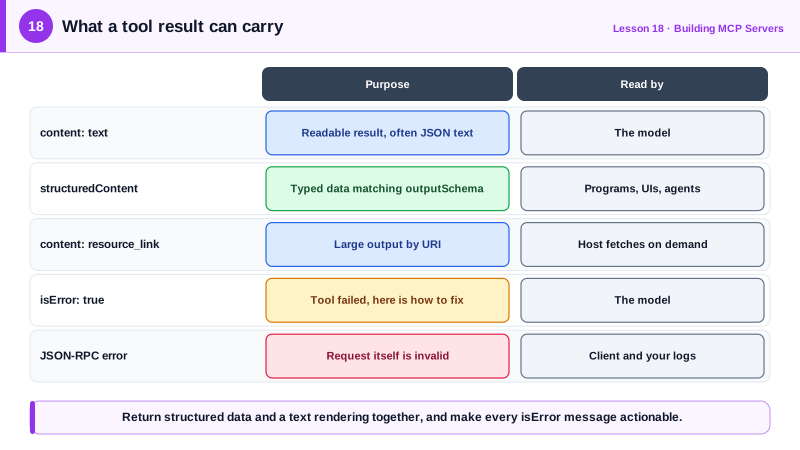
For most of MCP's early life a tool result was a list of content blocks, usually text. That works for a model, which reads text well, but it forces any program consuming the result to parse prose or a JSON string. The specification therefore added structured output. A tool may declare an outputSchema, a JSON Schema describing its result, and return the matching data in a structuredContent field. Since 2026-07-28 output schemas may use any JSON Schema 2020-12 keywords and structuredContent may be any JSON value, not only an object.
When a tool declares an output schema, its result must conform, and clients can validate it. For backwards compatibility and for the model, the tool should also return the same data as text content, typically serialized JSON. Hosts then have a choice: give the model the text, give a program the structured data, or both. The Python SDK does this automatically when a function's return type is annotated with a Pydantic model, a TypedDict, a dataclass or a primitive: it derives the schema, fills structuredContent and adds a text rendering. Primitive and list returns are wrapped in an object with a result key so the schema stays an object at the top level.
Content blocks come in several types. Text is the default. Image and audio blocks carry base64 data with a MIME type, useful for charts and screenshots. A resource link points to a resource by URI without inlining it, which is ideal for large outputs: the tool returns a link to a generated report and the host or model reads it only if needed. An embedded resource inlines the resource's contents with its URI. Content blocks can carry annotations, such as audience, to suggest whether a block is meant for the user, the model, or both.
MCP has two kinds of errors and they serve different readers. Tool execution errors are failures inside the tool: an API returned 404, the input was valid JSON but semantically wrong, a rate limit was hit. They are returned as a normal result with isError set to true and an explanation in the content, so the model sees them and can recover. Protocol errors are JSON-RPC error responses for problems with the request itself: malformed messages, unsupported methods, or an unsupported protocol version. The model typically never sees these; the client handles them. In practice the official SDKs report schema validation failures and many unknown-tool cases as isError results, because a model can usually fix them.
The rule of thumb is that anything the model could fix by changing its call should be an isError result with an actionable message. Anything that indicates a broken integration belongs in a protocol error and in your logs.
| Output element | Purpose | Consumer |
|---|---|---|
| content: text | Readable result, often serialized JSON | The model |
| structuredContent plus outputSchema | Typed data that can be validated | Programs, UIs, other agents |
| content: image or audio | Charts, screenshots, recordings | The model if multimodal, the user |
| content: resource_link | Points to a large result by URI | Host fetches on demand |
| isError: true | Tool failed; message explains how to fix | The model |
| JSON-RPC error | Request itself is invalid | The client and your logs |
Worked Example: Typed Results in Python and TypeScript
In Python the return annotation produces the schema and structured content. In TypeScript you declare outputSchema and return structuredContent yourself; the SDK checks that they match.
from pydantic import BaseModel, Field
from mcp.server.mcpserver import MCPServer
from mcp.server.mcpserver.exceptions import ToolError

mcp = MCPServer("weather")

class Forecast(BaseModel):
    city: str
    high_c: float = Field(description="Daily high in Celsius")
    low_c: float
    summary: str

@mcp.tool()
def forecast(city: str) -> Forecast:
    """Tomorrow's forecast for a city."""
    if city.lower() not in {"paris", "tokyo"}:
        raise ToolError(f"No forecast for '{city}'. Supported cities: Paris, Tokyo.")
    return Forecast(city=city, high_c=19.5, low_c=11.0, summary="Light rain in the afternoon")
# tools/list now includes an outputSchema; tools/call returns structuredContent
# {"city": "Paris", "high_c": 19.5, ...} plus the same data as text content.import { McpServer } from '@modelcontextprotocol/server';
import * as z from 'zod/v4';
const server = new McpServer({ name: 'weather', version: '1.0.0' });
const Forecast = z.object({ city: z.string(), highC: z.number(), lowC: z.number(), summary: z.string() });
server.registerTool('forecast', {
description: "Tomorrow's forecast for a city.",
inputSchema: z.object({ city: z.string() }),
outputSchema: Forecast,
}, async ({ city }) => {
if (!['paris', 'tokyo'].includes(city.toLowerCase())) {
throw new Error(`No forecast for '${city}'. Supported cities: Paris, Tokyo.`); // becomes isError
}
const data = { city, highC: 19.5, lowC: 11, summary: 'Light rain in the afternoon' };
return { content: [{ type: 'text', text: JSON.stringify(data) }], structuredContent: data };
});A dashboard can now render the forecast from structuredContent without parsing text, while the model still reads a clear text version. Both error paths produce isError results whose message lists the supported cities.
Real-World Examples
- Structured tool output was added to the MCP specification in the 2025-06-18 revision, and the 2026-07-28 revision loosened it to allow any JSON Schema 2020-12 keywords in schemas and any JSON value in structuredContent.
- OpenAI's Apps SDK, built on MCP, uses structuredContent to pass data from tools to interactive UI components rendered in ChatGPT, while the text content stays focused on what the model needs to read.
Review Questions & Answers
structuredContent gives programs typed, schema-validated data, while the text version serves the model and clients that predate structured output. Returning both keeps every consumer working.
It derives an outputSchema from the model, places the returned data in structuredContent, and adds a text rendering of it to the content.
When the output is large, such as a generated report or a big file. The link lets the host or model fetch the content only if needed, keeping the tool result and the context small.
A tool execution error is a failure inside the tool returned as a normal result with isError true, so the model sees it and can adjust. A protocol error is a JSON-RPC error for an invalid or unsupported request, handled by the client rather than the model.