Build an MCP Server in Python: MCPServer Tutorial
On this page
Learning Objective
Build a working MCP server with the official Python SDK version 2: register tools with type hints and docstrings, share resources such as a database connection through a lifespan, use the Context object for progress, and run the server over stdio and Streamable HTTP.
Concept Explanation
The official Python SDK, the mcp package, offers two layers. The low-level Server class gives you raw protocol handlers. The high-level MCPServer class, which was called FastMCP in version 1 and renamed in version 2, turns ordinary Python functions into MCP tools, resources and prompts with decorators. Version 2 implements the stateless 2026-07-28 protocol and still talks to older clients, so you write the server once and the SDK handles version negotiation.
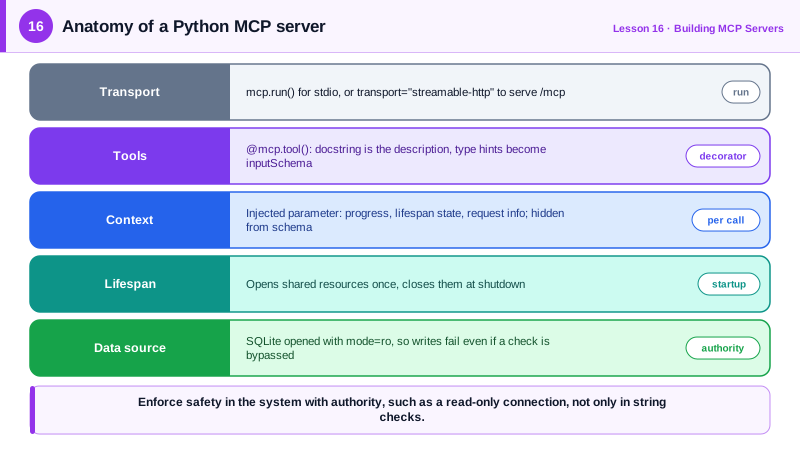
A tool is a decorated function. The function name becomes the tool name, the docstring becomes the description the model reads, and the type hints become the inputSchema. Parameters with defaults become optional fields. Pydantic models and typing.Annotated with Field add descriptions and constraints, such as a minimum or a pattern, which appear in the schema and are validated before your function runs. If the return type is annotated, the SDK also produces an outputSchema and fills structuredContent automatically (Day 18). Functions can be sync or async; use async for anything that does I/O.
Servers usually need shared resources: a database connection pool, an HTTP client, a cache. The lifespan parameter takes an async context manager that runs once at startup and yields an object your tools can reach through the Context. Cleanup code after the yield runs at shutdown. This avoids reconnecting on every call and keeps connection details out of tool code.
Any tool can declare a parameter typed as Context. The SDK injects it and hides it from the schema, so the model never sees it. Through Context a tool can report progress with report_progress, read resources, reach the lifespan state, and inspect the request, such as the protocol version and headers. Progress matters for slow tools: hosts show it to the user, and it reassures them that a long query is working rather than hung.
Errors deserve design. Raise ToolError with a message written for the model when the input is valid but the operation cannot proceed, for example a forbidden SQL statement. The SDK turns it into a tool result with isError set, so the model reads the message and can try again. Unexpected exceptions are also reported as errors, but with less helpful text, so catch known failure modes and translate them.
Running the server is one line. mcp.run() serves stdio, which is what Claude Desktop, Claude Code and VS Code launch for local servers. mcp.run(transport="streamable-http") starts an HTTP server with the endpoint at /mcp. The mcp command line tool can also run a file and launch the Inspector for testing (Day 20).
| Concept | Python SDK v2 | Notes |
|---|---|---|
| Server class | MCPServer from mcp.server.mcpserver | Was FastMCP in version 1 |
| Tool | @mcp.tool() on a function | Docstring is the description, type hints are the schema |
| Shared state | lifespan async context manager | Reached via ctx.request_context.lifespan_context |
| Per-call helpers | Parameter typed Context | Progress, resources, request info; hidden from schema |
| Model-facing error | raise ToolError("...") | Becomes a result with isError true |
| Run | mcp.run() or mcp.run(transport="streamable-http") | stdio by default |
Worked Example: A Read-Only Database Server
This server gives an agent safe, read-only access to a SQLite database. The connection opens once in read-only mode, the query tool rejects anything but SELECT, reports progress and returns a typed result.
import sqlite3
from contextlib import asynccontextmanager
from dataclasses import dataclass
from pydantic import BaseModel, Field
from mcp.server.mcpserver import MCPServer, Context
from mcp.server.mcpserver.exceptions import ToolError
from mcp.types import ToolAnnotations

DB_PATH = "shop.db"

@dataclass
class AppState:
    db: sqlite3.Connection

@asynccontextmanager
async def lifespan(server: MCPServer):
    # mode=ro makes SQLite itself refuse writes, a second line of defense.
    db = sqlite3.connect(f"file:{DB_PATH}?mode=ro", uri=True, check_same_thread=False)
    try:
        yield AppState(db=db)
    finally:
        db.close()

mcp = MCPServer("shop-db", instructions="Read-only access to the shop's SQLite database.", lifespan=lifespan)

class QueryResult(BaseModel):
    columns: list[str]
    rows: list[list]
    truncated: bool = Field(description="True if more rows exist than were returned")

@mcp.tool(annotations=ToolAnnotations(readOnlyHint=True))
def list_tables(ctx: Context) -> list[str]:
    """List the tables in the database."""
    db = ctx.request_context.lifespan_context.db
    return [r[0] for r in db.execute("SELECT name FROM sqlite_master WHERE type='table' ORDER BY name")]

@mcp.tool(annotations=ToolAnnotations(readOnlyHint=True))
async def run_query(sql: str, ctx: Context, max_rows: int = 50) -> QueryResult:
    """Run one read-only SELECT statement. Use list_tables first. max_rows caps the result (1-200)."""
    if not sql.lstrip().lower().startswith(("select", "with")):
        raise ToolError("Only SELECT or WITH queries are allowed. This server is read-only.")
    db = ctx.request_context.lifespan_context.db
    await ctx.report_progress(0, 1, "running query")
    try:
        cur = db.execute(sql)
    except sqlite3.Error as exc:
        raise ToolError(f"SQL error: {exc}. Check table and column names with list_tables.")
    rows = cur.fetchmany(max_rows + 1)
    await ctx.report_progress(1, 1, "done")
    return QueryResult(columns=[d[0] for d in cur.description],
                       rows=[list(r) for r in rows[:max_rows]], truncated=len(rows) > max_rows)

if __name__ == "__main__":
    mcp.run()                     # stdio; use transport="streamable-http" to serve /mcp over HTTP
To use it from Claude Code, run claude mcp add --transport stdio shop-db -- python server.py. The prefix check is a convenience for the model; the real guarantee is the read-only connection, because a clever query could otherwise slip past a string check.
Real-World Examples
- The official Python SDK documentation's migration guide notes that FastMCP was renamed to MCPServer in version 2 and that importing the old module raises an error pointing to the new name, a common first stumbling block when following older tutorials.
- Database MCP servers such as Bytebase's DBHub and the Postgres servers offered by cloud vendors recommend read-only database roles for agent access, enforcing safety in the database rather than trusting query filtering.
Review Questions & Answers
From the function itself: the name becomes the tool name, the docstring becomes the description, and the type hints, defaults and Field metadata become the JSON Schema for the inputs.
It sets up shared resources such as a database connection once at startup and cleans them up at shutdown. Tools reach the yielded object through the injected Context at ctx.request_context.lifespan_context.
When the failure is a known, explainable condition the model can act on, such as a forbidden statement or a bad column name. ToolError returns a clear message as an error result, which helps the model correct its next call.
String checks can be bypassed by crafted queries or missed edge cases, while a read-only connection makes the database itself refuse writes. Safety should be enforced by the system with the authority, not only by input filtering.