Build an MCP Client Host with the Claude API
On this page
Learning Objective
Build the host side of MCP: connect to several servers, translate their tools into Claude API tool definitions, route the model's tool calls back to the right server, run approval checks for actions with side effects, and know the alternatives such as SDK helpers and the API's MCP connector.
Concept Explanation
So far you have built servers and used existing hosts. Building a host is how MCP becomes part of your own product: a support assistant that uses your CRM server, an internal agent that uses a dozen company servers, a CI bot that uses a code search server. A host is the agent loop from Day 3 with one change: the tools come from MCP servers instead of local functions.
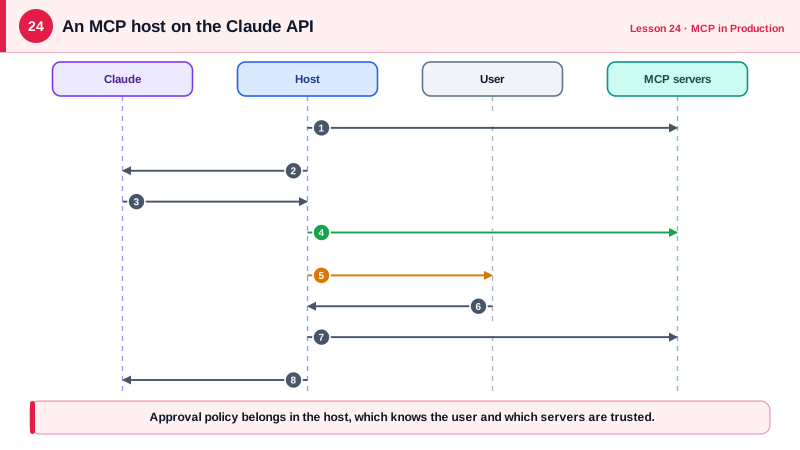
The host's first job is discovery. For each configured server it opens a client, calls tools/list, and converts each MCP tool into the model provider's format. For the Claude API that means a name, a description and an input_schema, which maps almost directly from MCP's name, description and inputSchema. Two details matter. Tool names must be unique across servers, so hosts namespace them, for example shop__run_query, and keep a routing table from the qualified name back to the client and original name. And the Claude API expects plain JSON Schema, so stray keys such as $schema can be removed.
The second job is routing and policy. When the model returns tool_use blocks, the host looks up each qualified name, decides whether the call needs approval, calls the tool on the right client, and converts the MCP result back into a tool_result. Policy belongs here: auto-approve tools that the server marks read-only and that come from trusted servers, ask the user for everything else, and show the actual arguments in the approval prompt. The host also applies the protections from Day 23, such as pinned definitions.
The third job is lifecycle. Clients should be opened once and reused across turns, and closed cleanly. Tool lists can be cached for their ttlMs. If a server is unavailable, the host should continue with the others and tell the model which tools are missing rather than failing the whole conversation.
You do not always have to write this yourself. The Anthropic Python SDK includes helpers that convert MCP tools for the tool runner. The Claude API also offers an MCP connector, where you pass remote server URLs in the request and Anthropic's infrastructure connects to them, which removes client code entirely for remote servers but cannot reach servers on your private network or your machine. The Claude Agent SDK accepts MCP server configurations directly. Writing the loop once, as below, is still the best way to understand what those layers do.
| Host responsibility | Implementation | Why |
|---|---|---|
| Discovery | One client per server, tools/list, convert to provider format | Model sees all available tools |
| Unique names | Prefix with the server name, keep a routing table | Avoid collisions across servers |
| Policy | Auto-approve trusted read-only tools, ask for the rest | Human control over side effects |
| Execution | call_tool on the right client, map result to tool_result | Results flow back to the model |
| Resilience | Skip unavailable servers, cache lists by ttlMs | One server failing does not stop the agent |
Worked Example: A Multi-Server Host on the Claude API
This host connects to the database server from Day 16 and the notes server from earlier, offers their tools to Claude with namespaced names, runs parallel calls concurrently and asks before any tool that is not marked read-only.
import asyncio, contextlib, json, sys
import anthropic
from mcp import Client, StdioServerParameters

SERVERS = {
    "shop": StdioServerParameters(command=sys.executable, args=["shop_server.py"]),
    "notes": "https://notes.internal.example.com/mcp",            # a URL means Streamable HTTP
}

async def approve(name: str, args: dict) -> bool:
    answer = await asyncio.to_thread(input, f"Allow {name}({json.dumps(args)})? [y/N] ")
    return answer.strip().lower() == "y"

def to_claude_tool(server: str, tool) -> dict:
    schema = {k: v for k, v in tool.input_schema.items() if k != "$schema"}
    return {"name": f"{server}__{tool.name}", "description": tool.description or "", "input_schema": schema}

async def call(route: dict, block) -> dict:
    client, tool_name, read_only = route[block.name]
    if not read_only and not await approve(block.name, block.input):
        return {"type": "tool_result", "tool_use_id": block.id, "content": "User declined.", "is_error": True}
    result = await client.call_tool(tool_name, block.input)
    text = "\n".join(c.text for c in result.content if c.type == "text")
    return {"type": "tool_result", "tool_use_id": block.id,
            "content": text or json.dumps(result.structured_content), "is_error": bool(result.is_error)}

async def run(question: str) -> str:
    llm = anthropic.AsyncAnthropic()
    async with contextlib.AsyncExitStack() as stack:
        tools, route = [], {}
        for name, target in SERVERS.items():
            client = await stack.enter_async_context(Client(target))
            for tool in (await client.list_tools()).tools:
                tools.append(to_claude_tool(name, tool))
                read_only = bool(tool.annotations and tool.annotations.read_only_hint)
                route[f"{name}__{tool.name}"] = (client, tool.name, read_only)

        messages = [{"role": "user", "content": question}]
        for _ in range(15):
            resp = await llm.messages.create(model="claude-opus-5-5", max_tokens=16000, tools=tools,
                system="Answer using the tools. Cite the data you used.", messages=messages)
            messages.append({"role": "assistant", "content": resp.content})
            if resp.stop_reason == "end_turn":
                return "".join(b.text for b in resp.content if b.type == "text")
            if resp.stop_reason != "tool_use":
                raise RuntimeError(f"Stopped: {resp.stop_reason}")
            calls = [b for b in resp.content if b.type == "tool_use"]
            results = await asyncio.gather(*(call(route, b) for b in calls))
            messages.append({"role": "user", "content": list(results)})
        return "Stopped after 15 steps."

print(asyncio.run(run("What is the total of all orders, and is there a deploy runbook?")))
Run against the two servers, the model receives tools named shop__list_tables, shop__run_query, notes__search_notes and notes__delete_note. Read-only queries run without prompting, while notes__delete_note asks the user first.
Real-World Examples
- Claude Desktop, Claude Code, VS Code and Cursor all implement this host pattern, and Claude Code exposes MCP tools to the model with names of the form mcp__server__tool, the same namespacing idea as the example.
- The Claude API's MCP connector lets a request list remote MCP servers by URL so Anthropic's infrastructure performs discovery and tool calls, a convenient option when the servers are public and you do not need host-side policy beyond the connector's allow lists.
Review Questions & Answers
Two servers may expose tools with the same name, such as search. Prefixing with the server name keeps names unique and lets the host route each call back to the right client.
In the host. The host knows the user, the context and which servers are trusted, and it is the component that can ask the user. Servers can provide hints such as readOnlyHint, but the decision belongs to the host.
Continue with the other servers, omit the missing server's tools, and optionally tell the model which capabilities are unavailable, rather than failing the whole conversation.
The connector connects from Anthropic's infrastructure, so it can only reach remote servers accessible from the internet, not local stdio servers or servers on a private network, and policy is limited to what the connector supports.