What Happens When You Type a URL in the Browser
On this page
"The site is slow" is five different problems
When someone says a page is slow, the time went somewhere specific: finding the server, connecting to it, securing the connection, waiting for the server to think, or drawing the page. Each has a different cause and a different fix. This course fills in each stage; today is the map.
The six stages of loading a URL
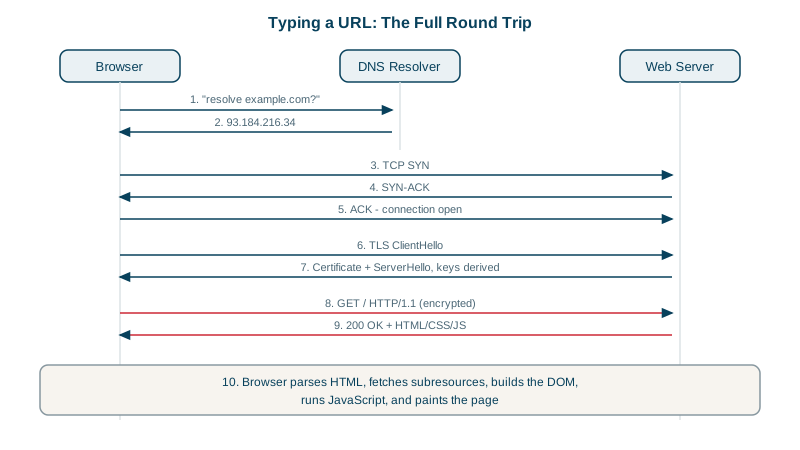
1. Parse the URL. For https://shop.example.com/cart, the browser reads the scheme (https, so port 443 and encryption), the host (shop.example.com) and the path (/cart). A malformed URL fails here, before any packet leaves your machine.
2. Resolve the name (DNS). The browser needs an IP address. It checks its own cache and the operating system's, then asks a DNS resolver. On a cache miss, the resolver walks from the root servers to .com to the domain's own nameservers (Day 11). No address, no connection.
3. Connect (TCP). The browser opens a TCP connection to that address on port 443, using the three-way handshake: SYN, SYN-ACK, ACK (Day 8). That costs one round trip and gives a reliable, ordered byte stream.
4. Secure the connection (TLS). On top of TCP, the TLS handshake agrees on encryption keys and checks the server's certificate, so the browser knows it's talking to the real shop.example.com (Days 16 and 17). TLS 1.3 needs one more round trip.
5. Request and response (HTTP). Now the browser sends GET /cart with headers, and the server returns a status code, headers and HTML (Day 13).
6. Render, and repeat. The browser parses the HTML, finds CSS, JavaScript, images and fonts, and fetches each. Requests to the same host reuse the open connection; new hosts mean new DNS lookups and handshakes. Then it lays out the page and paints pixels.
Timing DNS, TCP, TLS and first byte with curl
curl can report when each stage finished. Every timer counts from the start of the request:
curl -w "dns: %{time_namelookup}s\nconnect: %{time_connect}s\ntls: %{time_appconnect}s\nfirst byte: %{time_starttransfer}s\ntotal: %{time_total}s\n" \
  -o /dev/null -s https://example.com/
From my machine:
dns: 0.024970s
connect: 0.048889s
tls: 0.155215s
first byte: 0.183948s
total: 0.184118s
Read the gaps, not the totals:
| Gap | Stage | Here |
|---|---|---|
0 to time_namelookup | DNS | 25 ms |
namelookup to connect | TCP handshake (about one round trip) | 24 ms |
connect to appconnect | TLS handshake | 106 ms |
appconnect to starttransfer | Server work plus one round trip: time to first byte | 29 ms |
starttransfer to total | Downloading the body | under 1 ms |
A large DNS gap points at resolvers or caching. A large connect gap means distance or a congested path. A large first-byte gap usually means the server is slow. Your browser's DevTools Network tab shows the same breakdown for every request.
Where the course goes from here
The next lessons go down the stack (Ethernet, IP, routing), then back up through TCP, UDP, DNS, HTTP and TLS, and finish with production topics: firewalls, load balancers, CDNs and troubleshooting.
Check yourself
TCP connects to an IP address and port, not a name. Without a resolved address there's nothing to send the SYN to, so the browser reports a DNS error, such as ERR_NAME_NOT_RESOLVED, without touching the network beyond the failed lookup.
TLS needs a reliable, ordered byte stream to carry its handshake and records, and TCP provides it. (HTTP/3 replaces TCP with QUIC, which builds in TLS 1.3.)
At the server. DNS, TCP and TLS finished quickly, so the connection was ready; the two seconds were spent waiting for the first response byte, which means request processing, such as slow database queries, upstream calls or a cold cache.
curl -w with variables like %{time_namelookup}, %{time_connect}, %{time_appconnect}, %{time_starttransfer} and %{time_total}, each measured from the start of the request.
DNS answers are cached, the TCP and TLS connection can be reused, and static assets often come from the browser cache, so most stages are skipped.