HTTP/1.1 Requests, Responses and Headers
On this page
HTTP/1.1 is just text
Under every framework and client library, an HTTP/1.1 request is lines of text on a TCP connection. Once you can read the raw exchange, most HTTP bugs (wrong headers, redirects, caching surprises) become obvious.
A real HTTP request and response with curl -v
curl -v shows what's sent (>) and received (<):
curl -sv http://example.com/ -o /dev/null> GET / HTTP/1.1
> Host: example.com
> User-Agent: curl/8.7.1
> Accept: */*
>
< HTTP/1.1 200 OK
< Date: Sat, 10 Oct 2026 21:59:01 GMT
< Content-Type: text/html; charset=utf-8
< Transfer-Encoding: chunked
< Connection: keep-alive
< Server: cloudflare
< Last-Modified: Fri, 09 Oct 2026 20:19:47 GMT
< Age: 13376
< cf-cache-status: HIT
< alt-svc: h3=":443"; ma=86400
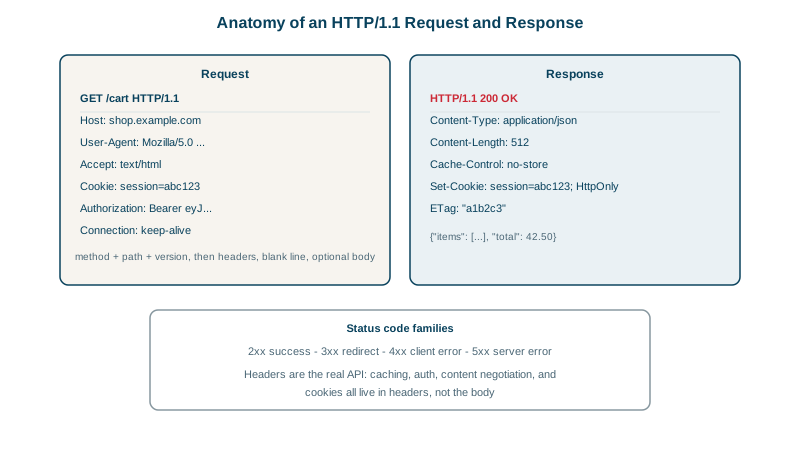
<The request: a request line (method, path, version), then headers, then a blank line. Host is mandatory in HTTP/1.1, because one IP address can serve many sites. A POST or PUT would add a body after the blank line, described by Content-Type and Content-Length.
The response: a status line, headers, a blank line, then the body. A few headers here are worth noticing:
Transfer-Encoding: chunkedsends the body in pieces when the length isn't known in advance.Age: 13376andcf-cache-status: HITshow a CDN served this from cache, 3.7 hours old (Day 24).alt-svc: h3=":443"advertises that HTTP/3 is available on the same port (Day 14).
HTTP methods: safe and idempotent
| Method | Use | Safe (no changes) | Idempotent |
|---|---|---|---|
| GET | Read a resource | Yes | Yes |
| HEAD | Headers only | Yes | Yes |
| POST | Create, or run an action | No | No |
| PUT | Replace a resource | No | Yes |
| PATCH | Partly update | No | Not necessarily |
| DELETE | Remove | No | Yes |
Clients, proxies and browsers rely on these promises. A proxy may retry a GET after a failure; it won't retry a POST, which could charge a card twice.
HTTP status codes by family
- 2xx success: 200 OK, 201 Created, 204 No Content.
- 3xx redirection: 301 and 308 (permanent), 302 and 307 (temporary), 304 Not Modified (use your cached copy).
- 4xx client errors: 400 Bad Request, 401 Unauthorized (not authenticated), 403 Forbidden (authenticated but not allowed), 404 Not Found, 409 Conflict, 429 Too Many Requests.
- 5xx server errors: 500 Internal Server Error, 502 Bad Gateway (a proxy got a bad response from upstream), 503 Service Unavailable, 504 Gateway Timeout (a proxy gave up waiting for upstream).
502 and 504 come from a proxy or load balancer, not your application, which tells you where to look.
Important HTTP headers
- Caching:
Cache-Control(max-age=3600,no-store,private),ETagandIf-None-Match,Last-ModifiedandIf-Modified-Sincefor 304 revalidation. - Content:
Content-Type,Content-Encoding: gziporbr,AcceptandAccept-Encodingfrom the client. - Auth and state:
Authorization,Cookie,Set-Cookie. - Proxies:
X-Forwarded-ForandForwardedcarry the original client address through load balancers.
Revalidation in action: 304 Not Modified
The caching headers are easiest to understand by watching them. Python's built-in web server supports Last-Modified, so you can try this with no setup:
mkdir www && echo "<h1>hello</h1>" > www/index.html
(cd www && python3 -m http.server 8765) &

curl -s -D - -o /dev/null http://127.0.0.1:8765/index.html | grep -iE '^HTTP|last-modified|content-length'
curl -s -D - -o /dev/null -H "If-Modified-Since: Sat, 24 Oct 2026 22:32:02 GMT" \
http://127.0.0.1:8765/index.html | grep -iE '^HTTP|content-length'HTTP/1.0 200 OK
Content-Length: 15
Last-Modified: Sat, 24 Oct 2026 22:32:02 GMT
HTTP/1.0 304 Not Modified(Use the Last-Modified date your own server printed.) The first request downloads the page and learns when it last changed. The second asks "has it changed since then?", and the server answers 304 with no body: "no, use the copy you have." For a small page that saves little, but for a 2 MB image or a big JSON response, every revalidation that ends in 304 saves the whole download. ETag and If-None-Match work the same way, using a fingerprint of the content instead of a date. (The HTTP/1.0 in the status line is just how Python's simple server identifies itself.)
Keep-alive and the one-request-at-a-time limit
HTTP/1.1 keeps connections open by default (keep-alive), so later requests skip the TCP and TLS handshakes. But a connection handles one request at a time: the next request waits until the previous response finishes. Browsers work around this by opening up to 6 connections per host, which is the gap HTTP/2 closes.
Check yourself
Many sites share one IP address on the same server. The request line only carries the path, so the server uses Host to decide which site the request is for. With HTTPS, the TLS SNI extension does the same job during the handshake.
At the upstream application. 504 means the load balancer gave up waiting for a response from the backend, so check the backend's slow requests, timeouts to its own dependencies, and whether the load balancer's timeout is shorter than legitimate requests.
GET is defined as safe and idempotent, so repeating it can't cause additional effects. A POST may already have taken effect before the failure, such as creating an order, and retrying it could do that twice.
It sends the ETag back in an If-None-Match header. A 304 Not Modified response, with no body, means the content hasn't changed, so the browser uses its cached copy.