Ethernet, MAC Addresses and Switches Explained
On this page
Why the local link matters
IP gets a packet across the world, but every step of that trip happens on a local link: your laptop to your Wi-Fi router, a server to its rack switch, one router to the next. Layers 1 and 2 handle that hop. Problems here look like "the network is flaky": dropped packets, duplex mismatches, loops that melt a LAN.
Layer 1: the physical layer
The physical layer turns bits into signals: voltages on copper, light in fiber, radio waves for Wi-Fi. Speeds (1 Gbit/s, 10 Gbit/s), cable types and signal quality live here. You rarely touch it as a developer, but a bad cable or a degraded optic shows up higher up as packet loss and retransmissions.
Layer 2: Ethernet frames and MAC addresses
The data link layer delivers frames between devices on the same link. An Ethernet frame carries:
| Field | Purpose |
|---|---|
| Destination MAC | Which device on this link should take the frame |
| Source MAC | Which device sent it |
| EtherType | What's inside (0x0800 for IPv4, 0x86DD for IPv6, 0x0806 for ARP) |
| Payload | Usually an IP packet, up to 1,500 bytes by default (the MTU) |
| Frame check sequence | A checksum; damaged frames are dropped |
A MAC address is 48 bits, written like 3c:22:fb:9a:10:4e. Manufacturers assign it to the network interface, though software can change it, and phones randomize theirs on Wi-Fi for privacy. MAC addresses only mean something on the local link. A router strips the frame and builds a new one for the next link, with new MACs.
ff:ff:ff:ff:ff:ff is the broadcast address: every device on the link receives the frame.
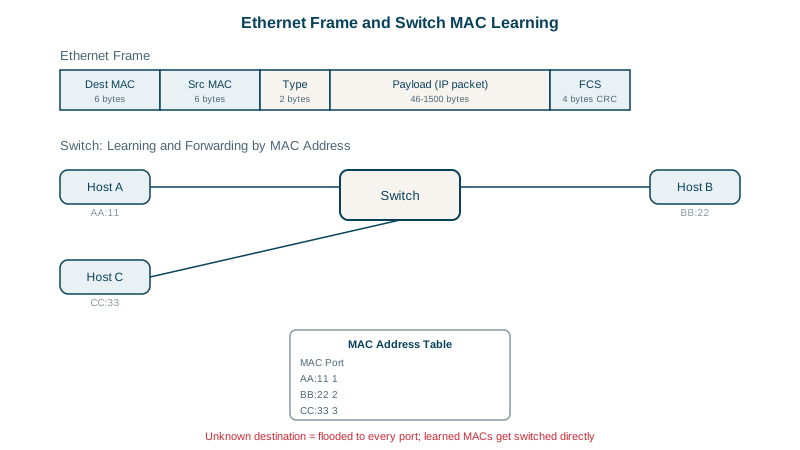
How a switch learns MAC addresses
A switch connects many devices and forwards frames only where they need to go. It builds a MAC address table by watching traffic:
- A frame arrives on port 1 from MAC A. The switch records "A is on port 1".
- The frame is for MAC B, which isn't in the table yet, so the switch floods it out every other port.
- B replies from port 3. The switch records "B is on port 3" and sends the reply only to port 1.
- From now on, frames between A and B go straight to the right port.
No configuration is needed; move a device to another port and the table updates the next time it sends. A managed switch shows its table (Cisco-style syntax):
switch# show mac address-table
Vlan    Mac Address       Type      Ports
----    -----------       ----      -----
10      aabb.cc11.2233    DYNAMIC   Gi0/1
10      aabb.cc44.5566    DYNAMIC   Gi0/3
VLANs and Spanning Tree
- A VLAN splits one physical switch into separate Layer 2 networks. Frames in VLAN 10 never reach devices in VLAN 20 without going through a router, which is where firewall rules can apply (Day 18). Links between switches carry several VLANs using 802.1Q tags.
- Loops are dangerous at Layer 2: a broadcast circulates forever (Ethernet frames have no hop limit), multiplying until the network collapses. The Spanning Tree Protocol disables redundant links to prevent this, and re-enables them if the active path fails.
Check yourself
It floods the frame out every port except the one it came in on, then learns the destination's port from the reply.
MAC addresses are flat and only meaningful on the local link; there's no hierarchy routers could use to find a path, and each hop rewrites them anyway.
Through a router or Layer 3 switch. Each VLAN is a separate Layer 2 network with its own IP subnet, so traffic between them must be routed, and that routing point is where you can filter it with access lists or a firewall.
Layer 2 loops. Redundant links between switches would make broadcast frames circulate forever; STP blocks redundant paths and reopens them if the active path fails.
48 bits, usually written as six hex pairs. The first half identifies the manufacturer and the rest the device, though many devices now randomize MACs for privacy.