How Routing Works: How Packets Find Their Way
On this page
How routing works hop by hop
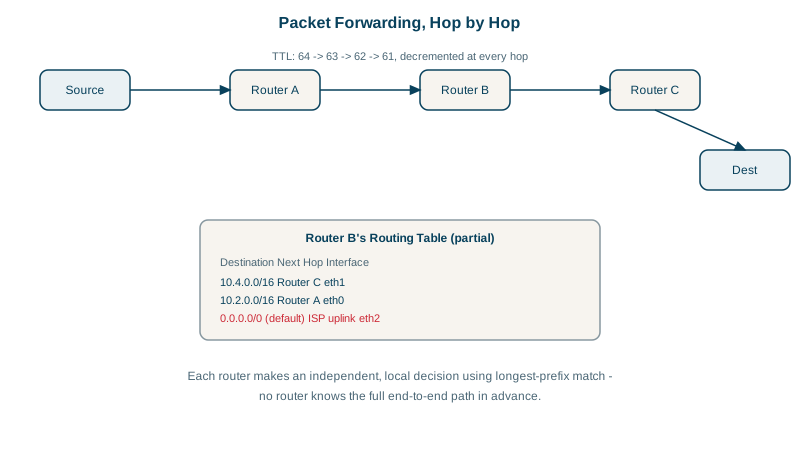
A packet from your laptop to a server in another country crosses maybe 10 to 20 routers. None of them knows the full path. Each router looks at the destination IP, picks the next hop, and forwards the packet. The path emerges from those local decisions.
Routing tables and longest prefix match
Every router, and every host, has a routing table: a list of prefixes and where to send packets for them.
Destination       Next hop        Interface
10.0.1.0/24       directly        eth1
10.0.0.0/16       10.0.255.1      eth2
0.0.0.0/0         203.0.113.1     eth0      (the default route)
For a packet to 10.0.1.42, three entries match: 10.0.1.0/24, 10.0.0.0/16 and the default. The router picks the longest prefix match, the most specific route, here the /24. A packet to 8.8.8.8 only matches 0.0.0.0/0, the default route, which sends it towards the internet.
Here's that rule in a few lines of Python, deciding the next hop for three destinations against the table above:
# lpm.py: pick a route the way a router does, by longest prefix match
import ipaddress

routes = [("10.0.1.0/24", "eth1 (directly connected)"),
          ("10.0.0.0/16", "10.0.255.1"),
          ("0.0.0.0/0",   "203.0.113.1 (default route)")]

def next_hop(dest):
    ip = ipaddress.ip_address(dest)
    matches = [(ipaddress.ip_network(p), hop) for p, hop in routes if ip in ipaddress.ip_network(p)]
    net, hop = max(matches, key=lambda m: m[0].prefixlen)       # the most specific match wins
    others = ", ".join(str(n) for n, _ in matches if n != net)
    print(f"{dest:<12} -> {hop:<28} via {net} (also matched: {others or 'nothing else'})")

for d in ["10.0.1.42", "10.0.7.9", "8.8.8.8"]:
next_hop(d)10.0.1.42 -> eth1 (directly connected) via 10.0.1.0/24 (also matched: 10.0.0.0/16, 0.0.0.0/0)
10.0.7.9 -> 10.0.255.1 via 10.0.0.0/16 (also matched: 0.0.0.0/0)
8.8.8.8 -> 203.0.113.1 (default route) via 0.0.0.0/0 (also matched: nothing else)Think of it like giving directions: "anything in this building, take the stairs" beats "anything in this city, take the bus", which beats "anything else, go to the airport". The more specific instruction wins whenever it applies. Real routers do the same lookup in specialized hardware, millions of times a second.
Your laptop's table is usually tiny: its local subnet, and a default route pointing at your home router (netstat -rn on macOS, ip route on Linux).
TTL: a safety limit on loops
Every IP packet carries a TTL (time to live; in IPv6 it's called hop limit). Each router decrements it; at zero, the router drops the packet and sends an ICMP Time Exceeded message back to the sender. TTL exists so that a routing loop, two routers pointing at each other, doesn't circulate packets forever. Operating systems usually start it at 64 or 128.
Static routes, OSPF and BGP
- Connected routes: subnets the router is directly attached to.
- Static routes: configured by hand, common in small networks and cloud route tables.
- Dynamic routing protocols: routers tell each other what they can reach. Inside an organization, OSPF or IS-IS compute shortest paths. Between organizations, BGP (Border Gateway Protocol) connects the internet's roughly 75,000 autonomous systems (networks such as ISPs, clouds and large companies), each announcing the prefixes it can reach.
BGP runs on trust and policy, not shortest paths. A mistaken announcement can pull traffic the wrong way; Facebook's October 2021 outage began when its BGP routes were withdrawn and its DNS servers became unreachable from the internet.
How to read traceroute output
traceroute sends packets with TTL 1, 2, 3 and so on, and records which router answers each Time Exceeded. That reveals the path. A trace from a home connection (provider addresses replaced with documentation ranges):
$ traceroute -n -q 1 -w 1 1.1.1.1
 1  10.0.0.1         4.547 ms
 2  100.72.14.2     21.921 ms
 3  198.51.100.17   16.916 ms
 4  198.51.100.33   27.059 ms
 5  198.51.100.137  17.020 ms
 ...
How to read it:
- Hop 1 is your home router. Hop 2's
100.xaddress is from the carrier-grade NAT range (Day 4): the provider shares public addresses between customers. - Times aren't strictly increasing: hop 4 shows 27 ms, hop 5 shows 17 ms. Routers answer traceroute at low priority, so a slow hop followed by fast ones isn't a problem.
* * *means a router didn't reply, often because it doesn't send ICMP. It's only a problem if every later hop is silent too.- A sustained jump that persists to the destination (say from 20 ms to 120 ms) shows where distance or congestion starts, such as an ocean crossing.
Check yourself
Via the 10.20.0.0/16 route. Both match, but longest prefix match picks the most specific route, the one with more network bits, so the /16 wins over the /8.
Packets would circulate between the looping routers forever, consuming bandwidth and router capacity until the loop was fixed. TTL decrements at every hop, so each packet is discarded after a bounded number of hops instead.
Probably not. That router answers traceroute slowly, at low priority, while forwarding traffic normally; only a jump that persists to the end matters.
OSPF routes within one organization's network, picking shortest paths by link cost. BGP routes between organizations on the internet, choosing paths by policy, such as business relationships.
Those routers don't send ICMP time-exceeded replies, or rate-limit them to protect their CPU. If later hops respond, traffic is passing through fine; only a run of asterisks to the end suggests a real block.