TCP vs UDP: When to Use UDP
On this page
When reliability is the problem
In a video call, a packet carrying 20 ms of audio is lost. TCP would stop everything and wait for the retransmission, by which time that audio is useless. You'd rather skip it and play the next packet. That's the case for UDP.
TCP vs UDP compared
UDP (User Datagram Protocol) adds almost nothing to IP: source and destination ports, a length and a checksum. 8 bytes of header.
| TCP | UDP | |
|---|---|---|
| Connection setup | Three-way handshake | None; just send |
| Delivery | Reliable, retransmits losses | Best effort; losses stay lost |
| Order | In order | Any order |
| Boundaries | A byte stream; no message boundaries | Each datagram arrives whole or not at all |
| Congestion control | Built in | None; the application must be careful |
| Header | 20 to 60 bytes | 8 bytes |
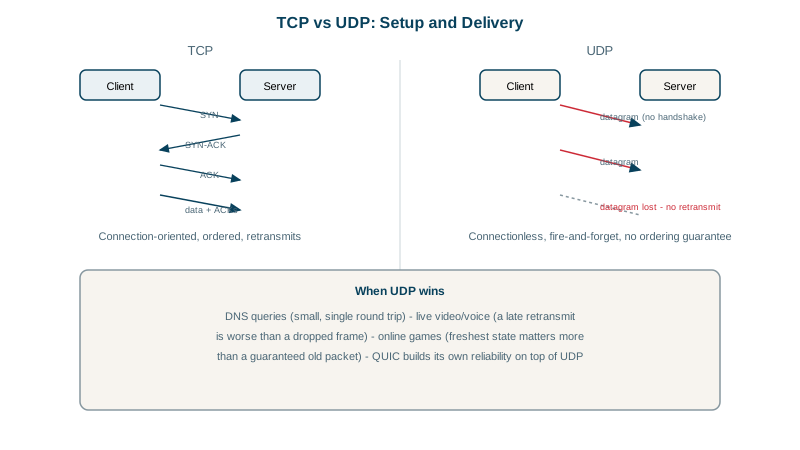
When to use UDP
- Small request and response: DNS sends one question and gets one answer. A handshake would double the time; if the packet is lost, the client simply asks again.
- Real-time media: voice, video and games prefer fresh data over complete data (RTP, WebRTC).
- Many receivers: multicast and broadcast work only over UDP.
- Custom transports: QUIC, the transport under HTTP/3, runs over UDP and builds its own reliability, encryption and per-stream ordering in user space (Day 14). Building on UDP let QUIC ship without waiting for operating systems and middleboxes to support a new protocol.
- Others: DHCP, NTP, syslog, SNMP, WireGuard VPN tunnels (Day 19).
What you take on with UDP
If your application uses UDP directly, it owns what TCP did for you:
- Detecting loss and deciding whether to retransmit.
- Handling reordering and duplicates (sequence numbers).
- Not overwhelming the network (rate limiting, congestion control).
- Keeping datagrams under the path MTU (about 1,200 bytes is a common safe size) to avoid fragmentation.
- Firewalls and NATs expire UDP mappings quickly, often after 30 seconds of silence, so long-lived flows need keepalives.
DNS: UDP first, TCP when needed
DNS uses UDP for most queries but falls back to TCP when an answer doesn't fit. Here google.com's TXT records are too big for a 512-byte UDP response:
dig +ignore +noedns TXT google.com     # UDP only, don't retry over TCP
dig +noedns TXT google.com # default behavior;; flags: qr tc rd ra; QUERY: 1, ANSWER: 0, ...
;; MSG SIZE rcvd: 39
;; Truncated, retrying in TCP mode.
;; flags: qr rd ra; QUERY: 1, ANSWER: 17, ...
;; MSG SIZE rcvd: 1176The first response has the tc (truncated) flag and no answers. The client retries over TCP and gets all 17 records, 1,176 bytes. EDNS lets UDP responses grow beyond 512 bytes (1,232 is the common recommendation), but large answers like DNSSEC still need TCP sometimes. So firewalls must allow DNS on TCP port 53 as well as UDP; blocking TCP causes rare, confusing resolution failures.
Check yourself
A late packet is useless for real-time audio or video, since the moment it belonged to has passed. TCP would stall all later data to retransmit it; with UDP, the app skips the gap and keeps playing, which sounds and looks better.
The answer was truncated because it didn't fit in the UDP response size, often with DNSSEC or many records. The client retries the same query over TCP, so DNS servers and firewalls must allow TCP port 53 as well.
QUIC implements reliability, ordering per stream and encryption itself on top of UDP, which could be deployed without changes to operating system kernels or network equipment.
Whatever reliability you need: retransmission, ordering, duplicate detection, congestion control and handling of packets larger than the path MTU.
A query and answer usually fit in one packet each, so UDP needs no handshake: one round trip, with no connection state on busy servers.