How VPNs Work: Secure Tunneling Explained
On this page
What a VPN is for
Your database lives in a private subnet with no route from the internet (Day 18). You're working from home and need to reach it. Or two offices need their networks connected. A VPN (virtual private network) builds an encrypted tunnel across the internet so private traffic travels safely between those places.
How VPN tunneling works
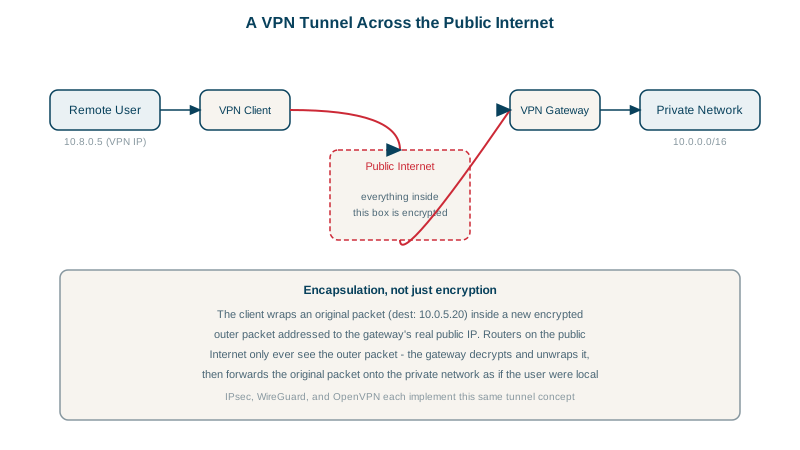
- Your laptop wants to send a packet to
10.0.3.25, a private address. - The VPN client takes that whole packet, encrypts it, and wraps it in a new packet addressed to the VPN gateway's public IP. That's encapsulation.
- The outer packet crosses the internet. Anyone watching sees only encrypted data going to the gateway.
- The gateway decrypts it, unwraps the original packet, and forwards it onto the private network. Replies go back the same way.
Wrapping adds headers, so the inner packet has less room. VPN interfaces use a smaller MTU (WireGuard defaults to 1420 bytes); mismatches cause large transfers to hang while small requests work.
Common VPN uses
- Remote access: a person's device joins the company network.
- Site to site: two networks joined permanently (an office and a cloud VPC, or two clouds).
- Mesh: every device connects to every other through a coordination service (Tailscale, built on WireGuard).
- Privacy services hide your traffic from the local network, but the VPN provider sees it instead.
WireGuard vs IPsec vs OpenVPN
| Protocol | Notes |
|---|---|
| WireGuard | Small codebase, modern fixed cryptography (Curve25519, ChaCha20-Poly1305), UDP, in the Linux kernel since 5.6. Simple to configure. |
| IPsec | The long-standing standard for site-to-site links; supported by every router and every cloud's VPN gateway. More complex to configure. |
| OpenVPN | TLS-based, mature, runs over UDP or TCP (useful when only TCP 443 gets through). |
A WireGuard config, line by line
WireGuard identifies each peer by its public key. A client configuration (keys generated with wg genkey and wg pubkey; never share the private key):
[Interface]
PrivateKey = <this-device-private-key>
Address = 10.8.0.2/32

[Peer]
PublicKey = <gateway-public-key>
Endpoint = vpn.example.com:51820
AllowedIPs = 10.0.0.0/16
PersistentKeepalive = 25Addressis this device's address inside the tunnel.AllowedIPsdoes two jobs: traffic to these addresses goes through the tunnel, and only packets from these addresses are accepted from this peer.AllowedIPs = 10.0.0.0/16is a split tunnel: only company traffic uses the VPN.0.0.0.0/0, ::/0would send everything through it (a full tunnel).PersistentKeepalive = 25sends a packet every 25 seconds so NAT mappings stay open (Day 10).
Beyond the VPN: zero trust access
A VPN often grants access to a whole network once you're connected, which is broad. Many teams now prefer identity-aware access: proxies that check the user and device for each application (Google's BeyondCorp model, cloud identity-aware proxies), or session managers that give shell access without opening SSH ports at all. For cloud networks, private connectivity (VPC peering, private endpoints) keeps service traffic off the internet without managing tunnels.
Check yourself
Encrypted packets between your device and the VPN gateway, their sizes and timing, but not the inner destination addresses or the content. The VPN provider, or whoever runs the gateway, can see the traffic once it leaves the tunnel.
Which destination addresses are routed into the tunnel to that peer, and which source addresses are accepted from it. Setting it to 0.0.0.0/0 sends all traffic through the tunnel; a specific subnet sends only that range.
An MTU problem: tunnel overhead makes large packets too big, and if ICMP "packet too big" messages are blocked, they're silently dropped.
A VPN setup where only traffic to certain networks goes through the tunnel, while everything else uses the normal internet connection.
Instead of putting a device on the internal network, it checks user identity and device posture for every request to each application, granting access only to what's needed.