How DNS Works: Domain Name Resolution Explained
On this page
What DNS does
Every connection starts with a name. The Domain Name System turns names into addresses, and no single server knows them all. It's a distributed, hierarchical database with heavy caching, answering trillions of queries a day.
The DNS hierarchy: root, TLD and authoritative servers
Read a name from right to left:
- Root (the invisible dot at the end:
example.com.): 13 named root server identities (atom.root-servers.net), each run as many machines worldwide with anycast. They know who runs each top-level domain. - Top-level domains (TLDs) like
.com,.org,.uk: their servers know which nameservers are authoritative for each domain under them. - Authoritative nameservers for
example.com: they hold the actual records.
Stub and recursive resolvers: who asks whom
- Your application calls the operating system's resolver (a stub resolver), which checks its cache and
/etc/hosts. - The stub asks a recursive resolver: your ISP's, your company's, or a public one like 1.1.1.1 or 8.8.8.8.
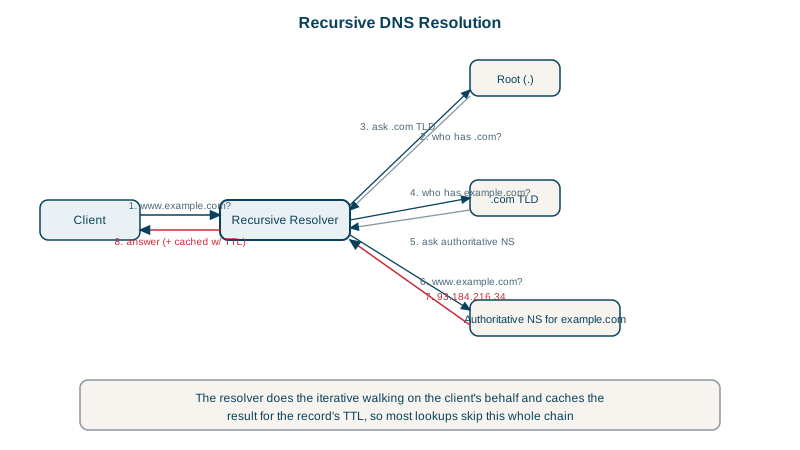
- On a cache miss, the recursive resolver asks a root server, which refers it to
.com's servers. - The
.comservers refer it toexample.com's authoritative nameservers. - The authoritative server answers with the A record.
- The recursive resolver caches the answer for its TTL and returns it.
Following a lookup with dig +trace
dig +trace does the walk itself, starting from the root:
dig +trace +nodnssec example.comCondensed output (one server shown per level):
.             NS  a.root-servers.net.
;; Received 811 bytes from my resolver in 17 ms
com.          NS  a.gtld-servers.net.
;; Received 836 bytes from f.root-servers.net in 17 ms
example.com.  NS  elliott.ns.cloudflare.com.
example.com.  NS  hera.ns.cloudflare.com.
;; Received 359 bytes from l.gtld-servers.net in 33 ms
example.com.  A   104.20.23.154
example.com.  A   172.66.147.243
;; Received 72 bytes from elliott.ns.cloudflare.com in 16 ms
Four steps, each about 16 to 33 ms here. A cold lookup costs the sum; a cached one, a millisecond or less. Resolvers also cache the referrals, so they rarely need the root or .com servers.
DNS TTLs and caching
Every record has a TTL in seconds. Resolvers, operating systems, browsers and some application runtimes cache answers for up to that long.
- Long TTLs (hours): fewer queries, faster lookups, but changes take that long to reach everyone.
- Short TTLs (30 to 300 seconds): faster failover and migrations, more queries.
- Lower the TTL before a planned change, wait for the old TTL to expire, then change the record.
- Failed lookups are cached too (negative caching), for a time set in the zone's SOA record (Day 12).
Common DNS failures
- Resolution fails (
NXDOMAINorSERVFAIL): nothing connects. Check withdigagainst different resolvers. - Stale answers: a client or library cached an old address. Java's JVM historically cached lookups for a long time unless configured; connection pools keep connecting to old addresses.
- Slow lookups: add a visible delay to every new connection. Check
time_namelookupin curl (Day 1). - Resolver outages take down everything that depends on them. The 2016 Dyn attack (Day 20) made many large sites unreachable.
Check yourself
It does the actual work: walks the hierarchy from root to TLD to the authoritative servers on the client's behalf, and caches the results for their TTLs. A stub resolver, in your OS, just sends the question to a recursive resolver and waits.
Lower the TTL now, to something like 300 seconds, so caches hold the old answer only briefly when you make the change.
They cache the referrals to TLD nameservers, like those for .com, which have TTLs of a day or more. Most lookups therefore start at the TLD or authoritative level, and resolvers only revisit the root occasionally.
The resolver couldn't get a valid answer: the authoritative servers were unreachable, misconfigured, or DNSSEC validation failed. NXDOMAIN instead means the name definitely doesn't exist.
Each step of resolution from the root down, querying each server directly, so you can see which level returns a wrong or missing answer.