What Is a CDN and How Does It Work?
On this page
Why CDNs exist: distance is latency
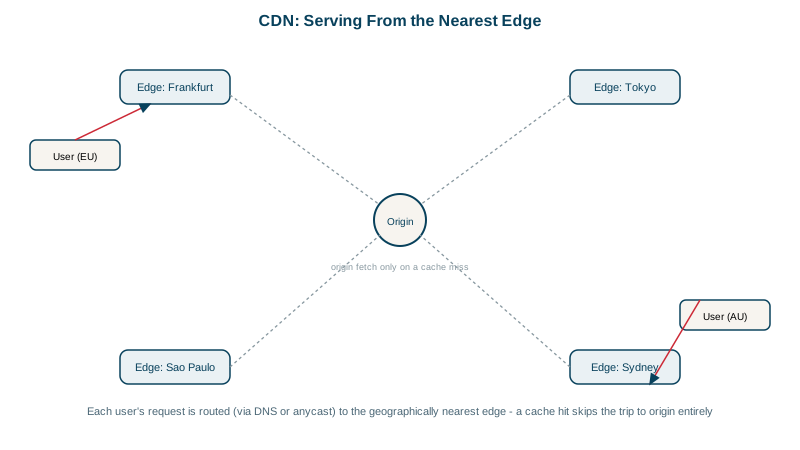
A user in Sydney loading a site hosted in Virginia waits about 200 ms for every round trip, and a page load needs several (Day 1). You can't make light faster, so move the content closer. A CDN (content delivery network) runs hundreds of edge locations worldwide that cache your content and serve it locally.
Anycast and DNS steering to the nearest edge
Two techniques send each user to a nearby edge:
- Anycast: the same IP address is announced from every location via BGP (Day 5), so the internet routes each user to the nearest one.
- DNS steering: the CDN's DNS returns the address of an edge near the user's resolver.
The edge then checks its cache:
- Hit: serve it immediately.
- Miss: fetch from your origin server (often through a regional mid-tier cache, called origin shield), store a copy, then serve it.
What a CDN gives you besides speed
- Origin offload: with a 95 percent hit ratio, your origin sees one request in twenty.
- DDoS absorption across the CDN's huge capacity (Day 20).
- TLS at the edge, so handshakes are short round trips to a nearby server.
- HTTP/2 and HTTP/3 to users, even if your origin speaks only HTTP/1.1.
- Edge compute (Cloudflare Workers, CloudFront Functions, Fastly Compute) for redirects, headers and simple logic.
Cache-Control headers for CDNs
Your origin decides what's cached and for how long, mainly with Cache-Control:
| Header | Meaning |
|---|---|
public, max-age=31536000, immutable | Cache everywhere for a year; never revalidate. For fingerprinted assets like app.3f9a1c.js |
public, max-age=60, s-maxage=300 | Browsers cache for 60 s, shared caches (CDNs) for 300 s |
no-cache | Cache, but revalidate with the origin before each use |
private | Only the user's browser may cache it, never a CDN |
no-store | Don't cache at all |
The pattern that works: fingerprinted static files cached for a year (the URL changes when the content does), HTML cached briefly or revalidated.
Telling a cache hit from a miss
Response headers show what happened. From example.com (Day 13):
< Age: 13376
< cf-cache-status: HIT
< Server: cloudflare
HIT means the edge served its copy; Age says the copy is 13,376 seconds (3.7 hours) old. A MISS means the edge went to the origin. Other CDNs use headers like X-Cache: Hit from cloudfront or x-served-by. If everything is a miss, check that responses aren't marked private or no-store, don't set cookies, and don't vary on headers like User-Agent.
CDN pitfalls
- Caching personal data: a response with one user's details cached as
publicis served to everyone. Mark authenticated responsesprivateorno-store, and be careful with what the CDN uses in its cache key. - Cache key fragmentation: tracking parameters (
?utm_source=...) create separate cache entries for the same content. Strip or ignore them in the cache key. - Purging: when content must change before its TTL, purge by URL or by tag through the CDN's API. Fingerprinted URLs avoid the need entirely.
- Origin exposure: if attackers find the origin's IP, they bypass the CDN. Allow traffic to the origin only from the CDN.
Check yourself
Every edge location announces the same IP address over BGP. Internet routing delivers each user's packets to the closest announcement in network terms, so users reach a nearby edge without any DNS logic, and a failed edge simply stops announcing.
Their URL changes whenever the content does, so a cached copy can never be stale; long caching is safe and maximizes hits.
The response was cacheable by the CDN, and the cache key didn't include the user, so the first user's page was served to everyone. Authenticated responses must send Cache-Control: private or no-store, or be excluded from caching.
Check response headers like X-Cache: HIT, CF-Cache-Status: HIT, or Age, which shows how many seconds the object has been cached. A miss or an Age of 0 means the request went to the origin.
Purging cached objects at the edge. It's slower and less reliable than fingerprinted URLs, where a new version gets a new URL and old copies can stay cached safely.