OSI Model vs TCP/IP Model Explained
On this page
Why layers matter to a developer
"The network is down" isn't a diagnosis. Is the cable unplugged, the route missing, the port closed, the certificate expired, or the app returning errors? Network layers give each of those a place, so you can test one layer at a time instead of guessing.
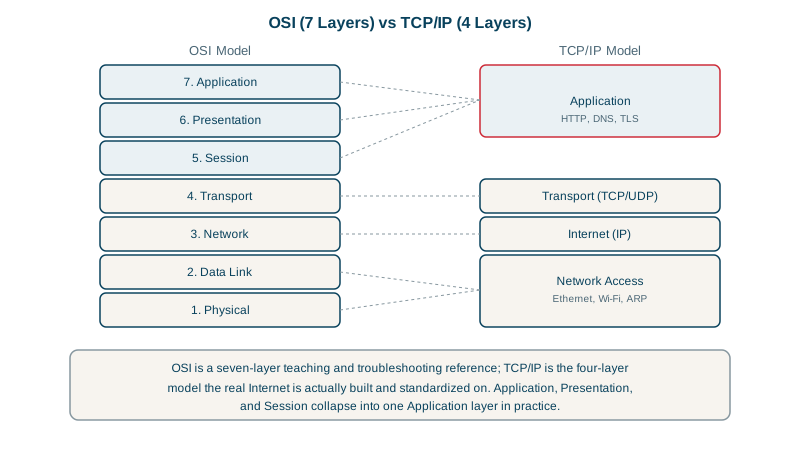
OSI vs TCP/IP: two models, one idea
Each layer uses the one below it and serves the one above. When you send data, each layer wraps it with its own header (encapsulation); the receiver unwraps in reverse.
| OSI layer | What it handles | Examples | TCP/IP model |
|---|---|---|---|
| 7 Application | What the program means | HTTP, DNS, SMTP | Application |
| 6 Presentation | Encoding, encryption, compression | TLS (roughly), JSON, gzip | Application |
| 5 Session | Long-lived conversations | TLS sessions, RPC sessions | Application |
| 4 Transport | Delivery between programs (ports) | TCP, UDP, QUIC | Transport |
| 3 Network | Delivery between machines across networks | IP, ICMP | Internet |
| 2 Data link | Delivery to the next device on the same link | Ethernet, Wi-Fi, ARP | Link |
| 1 Physical | Bits as signals | Copper, fiber, radio | Link |
The OSI model (1984) is a teaching and vocabulary tool; nothing on the internet implements it exactly. The TCP/IP model describes what runs: four layers, with OSI's top three folded into one application layer. Engineers still speak OSI numbers: a "Layer 7 load balancer" reads HTTP; a "Layer 4" one only sees TCP connections (Day 22).
Encapsulation: frames, packets and segments
- Application: a message (an HTTP request).
- Transport: a segment (TCP) or datagram (UDP), with source and destination ports.
- Network: a packet, with source and destination IP addresses.
- Data link: a frame, with source and destination MAC addresses for this hop only.
That last point explains a lot: the IP addresses stay the same end to end (unless NAT rewrites them, Day 6), while MAC addresses change at every hop.
One HTTPS request, wrapped layer by layer
Think of posting a letter inside a company. You write the letter (the data), put it in an envelope with the department's name (the port), put that in an envelope with the building's street address (the IP address), and hand it to a courier with a label for the next depot (the MAC address). Each depot throws away the courier label and writes a new one for the next leg, but never opens the inner envelopes.
Here's what a browser's request for https://example.com/ looks like by the time it leaves your network card, with typical header sizes:
| Layer | Adds | Typical size | Says |
|---|---|---|---|
| Application | The HTTP request itself | A few hundred bytes | GET / HTTP/1.1, Host: example.com |
| TLS (encryption) | A record header and an authentication tag | 5 + 16 bytes | "This is encrypted application data" |
| Transport | A TCP header | 20 bytes, often 32 with options | From port 51000 to port 443 |
| Network | An IPv4 header | 20 bytes (40 for IPv6) | From 10.0.0.11 to 104.20.23.154 |
| Data link | An Ethernet header and checksum | 14 + 4 bytes | From your MAC to your router's MAC |
Two practical consequences fall out of this table. First, headers eat into each frame: of Ethernet's 1,500-byte payload, IP and TCP take at least 40, so a TCP segment carries at most about 1,460 bytes of data, a figure you'll see as the MSS (maximum segment size). Second, each layer only reads its own envelope. A switch reads the Ethernet header, a router reads the IP header, a firewall rule on port 443 reads the TCP header, and only the server, after decrypting, reads the HTTP request.
Debugging "I can't reach the site" by layer
Work up from the bottom and stop at the first failure.
# Layer 3: can this machine reach the host at all?
ping -c 3 example.com

# Layer 4: is the TCP port accepting connections?
nc -zv -G 3 example.com 443

# Layer 7: does the application answer correctly?
curl -sv https://example.com/ -o /dev/null
The port check on a port that's open, then on one that's blocked:
Connection to example.com port 443 [tcp/https] succeeded!
nc: connectx to example.com port 25 (tcp) failed: Operation timed out| Result | Layer | Likely cause |
|---|---|---|
ping fails | 3 or below | No route, host down, or ICMP blocked (so try the port check anyway) |
ping works, port times out | 4 | A firewall silently drops packets to that port |
| Port refused immediately | 4 | Host reachable, nothing listening on that port |
Port open, curl fails | 6 or 7 | TLS certificate problem, or the application is erroring |
The timeout versus refused difference is a useful clue on its own; Day 8 explains where each comes from.
Check yourself
It sees IP addresses and TCP or UDP ports, so it can balance connections, but not HTTP paths, headers or cookies, which live at Layer 7 inside the payload. It can't route /api differently from /static, and with TLS it can't even read them.
MAC addresses only address the next device on the local link; each router builds a new frame for the next link, while the IP packet inside keeps its end-to-end addresses.
The server or a firewall blocks ICMP, which ping uses, while allowing TCP 443. Ping failing doesn't prove the host is down.
It builds a new Ethernet header with new source and destination MAC addresses for the next link. The IP addresses, ports and encrypted HTTP inside stay the same (unless the router also does NAT, which rewrites the source IP and port).