ARP and NAT Explained: Private vs Public IP
On this page
ARP and NAT: two translations behind every connection
Your laptop's address is probably something like 10.0.0.11, yet websites see a completely different address. And before your laptop can send anything to the router, it needs the router's hardware address, which it doesn't know. Two protocols bridge these gaps: ARP and NAT.
ARP: from IP address to MAC address
To send a packet to 10.0.0.1 on the local link, your laptop needs that device's MAC address to build an Ethernet frame (Day 3). ARP (Address Resolution Protocol) finds it:
- The laptop broadcasts: "Who has 10.0.0.1? Tell 10.0.0.11."
- The router replies directly: "10.0.0.1 is at 3c:22:fb:9a:10:4e."
- The laptop caches the answer for a few minutes (
arp -ashows the cache).
For destinations outside the local subnet, the laptop ARPs for the default gateway's MAC, not the destination's. The packet's IP destination stays the far server; the frame goes to the router.
ARP has no authentication: any device can answer. ARP spoofing sends fake replies to redirect a victim's traffic through the attacker (Day 20). That's one reason to encrypt traffic even on "trusted" LANs.
Private vs public IP addresses
IPv4 has only about 4.3 billion addresses, far fewer than devices. So RFC 1918 set aside private ranges that anyone can use internally, and that are never routed on the public internet:
| Range | Size | Typical use |
|---|---|---|
10.0.0.0/8 | 16.7 million addresses | Corporate and cloud networks |
172.16.0.0/12 | 1 million | Docker's default bridge networks use part of it |
192.168.0.0/16 | 65,536 | Home routers |
Public addresses are globally unique and routable, assigned through regional registries and providers.
How NAT shares one public IP address
A home router does NAT (Network Address Translation), more precisely port address translation:
- Your laptop (
10.0.0.11:51000) sends a packet to93.184.215.14:443. - The router rewrites the source to its public address and a free port, say
203.0.113.87:62001, and records the mapping in its translation table. - The reply comes back to
203.0.113.87:62001. The router looks up the mapping and rewrites the destination to10.0.0.11:51000.
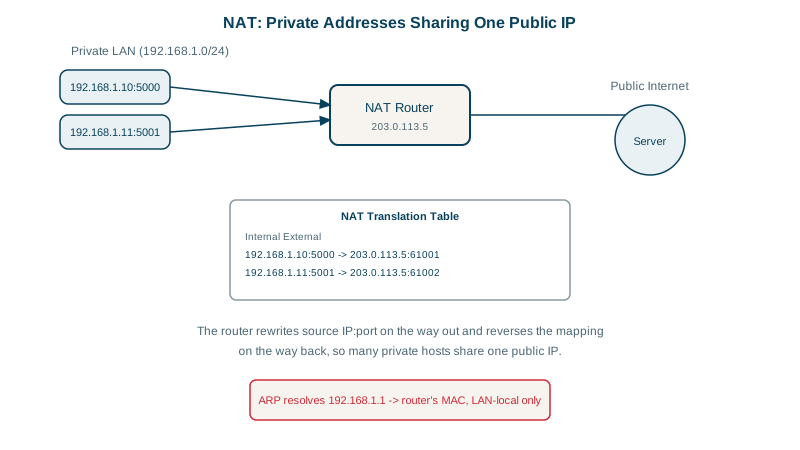
Why rewrite the port as well as the address? Because two devices at home can easily pick the same source port. If the router changed only the address, replies for both would arrive at the same public address and port, and it couldn't tell whose they were. A small simulation of the router's table shows the fix:
# nat.py: a home router's translation table, with two laptops using the same source port
PUBLIC_IP = "203.0.113.87"
table, next_port = {}, 62000                  # public port -> (private ip, private port)

def outbound(src_ip, src_port, dst):
    global next_port
    next_port += 1
    table[next_port] = (src_ip, src_port)     # remember who this public port belongs to
    print(f"out  {src_ip}:{src_port} -> {dst}   rewritten to {PUBLIC_IP}:{next_port} -> {dst}")
    return next_port

def inbound(dst_port, src):
    if dst_port not in table:
        print(f"in   {src} -> {PUBLIC_IP}:{dst_port}   no mapping: dropped")
        return
    ip, port = table[dst_port]
    print(f"in   {src} -> {PUBLIC_IP}:{dst_port}   rewritten to {ip}:{port}")

a = outbound("10.0.0.11", 51000, "93.184.215.14:443")    # laptop A
b = outbound("10.0.0.12", 51000, "93.184.215.14:443")    # laptop B, same source port
inbound(a, "93.184.215.14:443")                          # the server's replies
inbound(b, "93.184.215.14:443")
inbound(8080, "198.51.100.9:40000") # an unsolicited connection attemptout 10.0.0.11:51000 -> 93.184.215.14:443 rewritten to 203.0.113.87:62001 -> 93.184.215.14:443
out 10.0.0.12:51000 -> 93.184.215.14:443 rewritten to 203.0.113.87:62002 -> 93.184.215.14:443
in 93.184.215.14:443 -> 203.0.113.87:62001 rewritten to 10.0.0.11:51000
in 93.184.215.14:443 -> 203.0.113.87:62002 rewritten to 10.0.0.12:51000
in 198.51.100.9:40000 -> 203.0.113.87:8080 no mapping: droppedBoth laptops used port 51000, but each got its own public port, so every reply finds its way home. The last line is the important side effect: a connection that starts from outside has no entry in the table, so the router has no idea which device it's for and drops it. That's the whole reason you can't host a server at home without configuring port forwarding, which is simply a permanent entry in this table.
Compare the address your machine has with the one the internet sees:
ipconfig getifaddr en0          # macOS; on Linux: ip -4 addr show
# 10.0.0.11

curl -s https://api.ipify.org   # what websites see (yours will differ)
# 203.0.113.87
What NAT breaks: inbound connections and more
- No inbound connections by default. A packet arriving at the public address with no matching table entry has nowhere to go. That's why you can't host a server at home without port forwarding, and why peer-to-peer apps (video calls, games) use techniques like STUN and TURN to get through.
- It isn't a firewall, though it blocks unsolicited inbound traffic as a side effect. Use real firewall rules (Day 18).
- In the cloud: instances in private subnets reach the internet through a NAT gateway, which allows outbound calls (package downloads, external APIs) while staying unreachable from outside. Every outbound connection shares the gateway's ports, so very high connection counts can exhaust them.
- Carrier-grade NAT: many providers NAT customers again, using
100.64.0.0/10, so you may sit behind two layers.
Check yourself
The default gateway's. Your laptop sees the destination isn't on its subnet, so it uses ARP to find the router's MAC and puts that in the frame, while the IP header still carries the remote server's address.
Private address ranges aren't routed on the public internet, so packets to 192.168.1.42 can't get to your network. Even sent to your router's public address, there's no NAT mapping for unsolicited inbound traffic, unless you configure port forwarding.
A NAT gateway: it translates their outbound connections to a public address and drops inbound connections that weren't initiated from inside.
It gives each connection a different public port when it rewrites the source, and records which private address and port each public port belongs to, so replies are translated back to the right phone.
An ARP announcement nobody asked for, used legitimately after failover to update neighbors. Attackers abuse it to claim the gateway's IP, redirecting traffic through their machine.