IP Addressing and Subnetting Explained (CIDR)
On this page
Why subnetting matters
You're creating a cloud network and the form asks for a CIDR block: 10.0.0.0/16. Then each subnet asks for another: 10.0.1.0/24. Pick too small and you run out of addresses; overlap with another network and you can never connect the two. A little subnetting makes these choices easy.
Network bits, host bits and CIDR notation
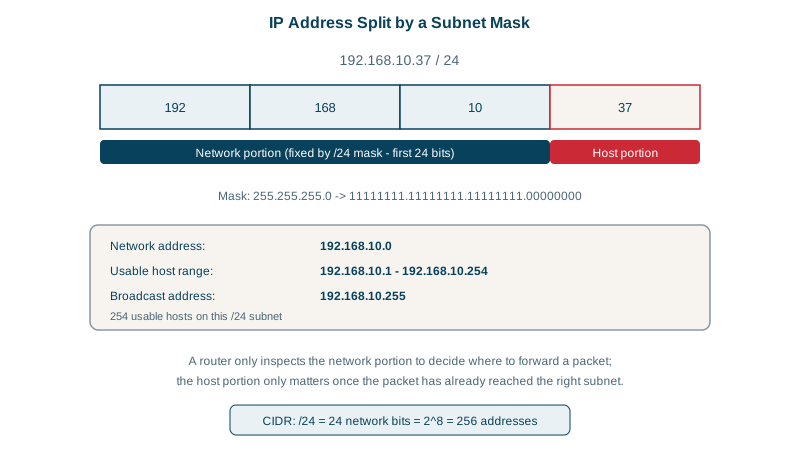
An IPv4 address is 32 bits, written as four bytes in decimal: 192.168.10.37. It has two parts:
- The network part says which subnet the address belongs to.
- The host part identifies the device within that subnet.
The prefix length (the /24 in CIDR notation, Classless Inter-Domain Routing) says how many leading bits are network. 192.168.10.37/24 means the first 24 bits (192.168.10) are the network, and the last 8 bits (37) are the host. The same thing as a subnet mask is 255.255.255.0.
It helps to see the bits once. The prefix length is simply where you draw a line through the 32 bits:
# bits.py: see where a prefix splits an address into network bits and host bits
import ipaddress

def show(cidr):
    iface = ipaddress.ip_interface(cidr)
    n = iface.network.prefixlen
    bits = f"{int(iface.ip):032b}"
    net_bits, host_bits = bits[:n], bits[n:]
    dotted = lambda b, start: "".join(("." if (start + i) % 8 == 0 and start + i else "") + c
                                      for i, c in enumerate(b))
    host = int(iface.ip) - int(iface.network.network_address)
    print(cidr)
    print(f"  network bits: {dotted(net_bits, 0)}")
    print(f"  host bits:    {dotted(host_bits, n).lstrip('.')}")
    print(f"  so: network {iface.network.network_address}, host number {host}\n")

show("192.168.10.37/24")
show("192.168.10.77/26")192.168.10.37/24
network bits: 11000000.10101000.00001010
host bits: 00100101
so: network 192.168.10.0, host number 37
192.168.10.77/26
network bits: 11000000.10101000.00001010.01
host bits: 001101
so: network 192.168.10.64, host number 13With /24 the line falls neatly between bytes, which is why /24 is easy to read: the first three numbers are the network. With /26 the line falls two bits into the last byte. Those two bits, 01, belong to the network, so 192.168.10.77 is host number 13 in the subnet that starts at .64. Every device compares a destination with its own network bits to decide one thing: is it on my local link, so I can deliver it directly, or do I hand it to my router?
How many hosts fit in a subnet
A prefix of /n leaves 32 − n host bits, so 2^(32−n) addresses. Two are reserved in every subnet: the first (the network address) and the last (the broadcast address).
| Prefix | Mask | Addresses | Usable hosts |
|---|---|---|---|
| /16 | 255.255.0.0 | 65,536 | 65,534 |
| /24 | 255.255.255.0 | 256 | 254 |
| /26 | 255.255.255.192 | 64 | 62 |
| /28 | 255.255.255.240 | 16 | 14 |
| /32 | 255.255.255.255 | 1 | a single host route |
Cloud providers reserve more. AWS keeps 5 addresses per subnet, so a /24 there gives 251 usable.
Split a /24 into four subnets
Four office floors need up to 60 devices each, from 192.168.10.0/24. Borrowing 2 bits from the host part gives 2^2 = 4 subnets of /26, each with 62 usable hosts. Python's ipaddress module does the arithmetic:
# subnets.py: split a /24 into four /26 subnets
import ipaddress
for s in ipaddress.ip_network("192.168.10.0/24").subnets(new_prefix=26):
    hosts = list(s.hosts())
print(f"{str(s):<18} broadcast {str(s.broadcast_address):<15} usable {hosts[0]} - {hosts[-1]} ({len(hosts)})")192.168.10.0/26 broadcast 192.168.10.63 usable 192.168.10.1 - 192.168.10.62 (62)
192.168.10.64/26 broadcast 192.168.10.127 usable 192.168.10.65 - 192.168.10.126 (62)
192.168.10.128/26 broadcast 192.168.10.191 usable 192.168.10.129 - 192.168.10.190 (62)
192.168.10.192/26 broadcast 192.168.10.255 usable 192.168.10.193 - 192.168.10.254 (62)Each subnet starts where the last one ended, in steps of 64.
That step is the shortcut for working out subnets without a calculator. The block size is 256 minus the mask's last non-255 number: for a /26 (mask 255.255.255.192) it's 256 − 192 = 64, so subnets start at .0, .64, .128 and .192. To find which subnet 192.168.10.77 is in, find the largest multiple of 64 that isn't bigger than 77: 64. The subnet is 192.168.10.64/26, its broadcast address is the next start minus one (.127), and its usable hosts are .65 to .126. Is a given address in a subnet? ipaddress.ip_address("10.0.1.25") in ipaddress.ip_network("10.0.0.0/16") returns True.
Planning IP address space in the cloud
- Use private ranges for internal networks (RFC 1918):
10.0.0.0/8,172.16.0.0/12,192.168.0.0/16(Day 6). - Never overlap networks you might connect later: two VPCs both using
10.0.0.0/16can't be peered, and a VPN into an office using the same range breaks routing. - Leave room: a /16 per environment with /20 or /24 subnets is a common, roomy starting point. Kubernetes clusters can need many more addresses than you expect, one per pod.
- Small special ranges:
127.0.0.0/8is loopback,169.254.0.0/16is link-local (you see it when DHCP fails), and100.64.0.0/10is shared space used by carrier-grade NAT.
Check yourself
A /27 leaves 5 host bits, so 2^5 = 32 addresses. Subtract the network address and the broadcast address, and 30 are usable for hosts. In AWS, which reserves five addresses per subnet, it's 27.
No. A /26 holds 64 addresses, so that subnet covers 10.0.5.128 to 10.0.5.191; 10.0.5.200 falls in the next one, 10.0.5.192/26.
Their address ranges overlap, so a route for 10.0.x.x would be ambiguous: a packet to 10.0.1.5 could belong to either network. Peering and transit gateways refuse overlapping ranges, which is why IP plans should be coordinated across VPCs from the start.
A /27 mask ends in 224, so the block size is 256 − 224 = 32 and subnets start at .0, .32, .64, .96, .128. 100 falls in the one starting at .96: 172.16.4.96/27, with broadcast 172.16.4.127.