Layer 4 vs Layer 7 Load Balancing
On this page
Layer 4 vs Layer 7 load balancers compared
You have several app servers and need one address in front of them. Load balancers come in two kinds, named after the layer they understand (Day 2), and the choice decides what they can do.
| Layer 4 | Layer 7 | |
|---|---|---|
| Sees | IPs and ports | Full HTTP requests: path, headers, cookies |
| Routes | Whole connections | Individual requests |
| TLS | Passes it through (or terminates without reading HTTP) | Terminates it to read the request |
| Can do | Fast forwarding of any TCP or UDP protocol | Path routing, header rewrites, retries, caching, auth, WAF |
| Cost | Very low latency and overhead | More CPU per request |
| Examples | AWS NLB, Google's network load balancer, HAProxy in TCP mode | AWS ALB, nginx, Envoy, HAProxy in HTTP mode |
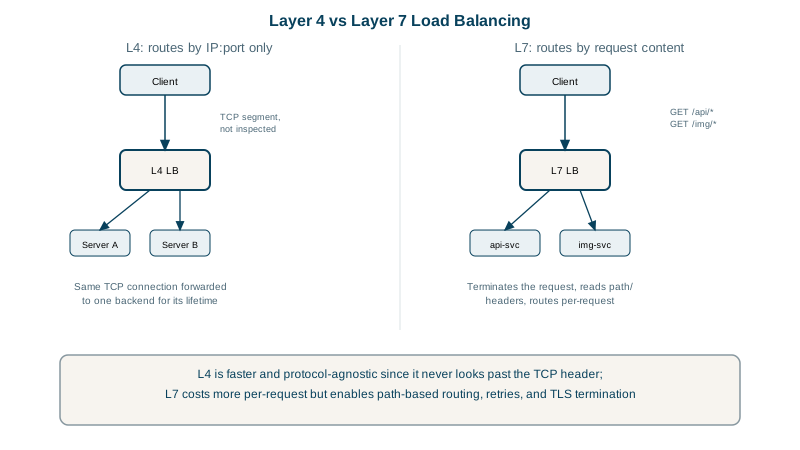
Choose Layer 4 for non-HTTP protocols (databases, MQTT, game servers), for huge connection counts, or when you need end-to-end TLS passthrough. Choose Layer 7 for web applications and APIs, where routing by path and smart retries pay for the overhead. Many setups use both: an L4 balancer in front of a fleet of L7 proxies.
A Layer 7 HAProxy config that routes by path
HAProxy routing /api/ and /images/ to their own pools. haproxy -c validates it:
frontend web_front
    bind *:8443 ssl crt ./example.pem
    http-request set-header X-Forwarded-Proto https
    acl is_api    path_beg /api/
    acl is_images path_beg /images/
    use_backend api_servers   if is_api
    use_backend image_servers if is_images
    default_backend web_servers

backend api_servers
    balance leastconn
    option httpchk GET /healthz
    server api1 10.0.1.10:8080 check
    server api2 10.0.1.11:8080 check
(The image_servers and web_servers backends follow the same pattern.) Running a cut-down version locally with small Python backends:
$ for u in /api/orders /api/orders /cart; do curl -s http://127.0.0.1:9080$u; done
api1 handled /api/orders
api2 handled /api/orders
web1 handled /cart
API requests alternate between the two API servers; everything else goes to the web pool.
Load balancing algorithms
- Round robin: each server in turn, the simplest load balancing. Fine when requests are similar.
- Least connections: the server with the fewest active connections. Better when request durations vary a lot.
- Hashing (by client IP, header or path): the same key always reaches the same server, useful for caches. Use consistent hashing so adding a server moves few keys.
- Weighted versions of each, for servers of different sizes or gradual rollouts.
Health checks, draining and sticky sessions
- Active health checks probe each backend (
option httpchk GET /healthz) and remove failing ones. Make the endpoint check what matters to serving traffic, but not every downstream dependency, or one slow database takes every server out at once. - Connection draining lets in-flight requests finish when a server is removed for a deploy.
- Sticky sessions pin a user to one server with a cookie. They're a workaround for servers holding session state; storing sessions in Redis or a database is better.
- The balancer hides the client's IP from the backend; read it from
X-Forwarded-For(Layer 7) or the PROXY protocol (Layer 4).
Check yourself
A Layer 7 load balancer, because routing by path requires reading the HTTP request, which means terminating TLS. A Layer 4 balancer only sees IPs and ports, so every request on that port looks the same to it.
When request durations vary widely. Round robin keeps sending servers equal shares even while some are stuck on long requests; least connections sends new work to the server with the fewest active requests, evening out the load.
Read the X-Forwarded-For header set by a Layer 7 balancer, or enable the PROXY protocol on a Layer 4 one, trusting it only from the balancer.
When a server is removed, the load balancer stops sending it new requests but lets existing ones finish within a timeout, so deploys don't cut requests off.
Load becomes uneven, and users lose their session when their server fails. Storing session state in a shared store avoids needing stickiness.