Latency vs Bandwidth: Diagnosing Slow Networks
On this page
"Upgrade the connection" often doesn't help
A team doubles its office bandwidth and the app feels exactly as slow. That's because most web slowness is latency, not bandwidth, and more bandwidth does nothing for latency.
Latency, bandwidth, throughput and jitter
- Latency: the time for data to get from A to B, usually measured as round-trip time (RTT). Set mostly by distance (light in fiber covers about 200 km per millisecond), plus queueing in routers.
- Bandwidth: how many bits per second the path can carry. Set by the slowest link.
- Throughput: what you get in practice, which is limited by both, plus loss and TCP behavior.
- Jitter: how much latency varies. Matters most for calls and games.
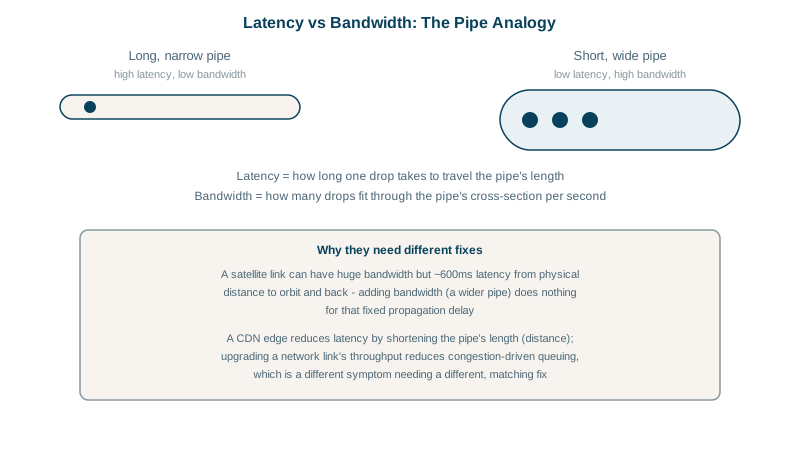
Picture a pipe: latency is how long one drop takes to travel its length, bandwidth is how wide it is. A wider pipe doesn't make the first drop arrive sooner.
Which one is hurting you?
| Symptom | Usually |
|---|---|
| Small requests, pages and API calls feel slow | Latency: each needs several round trips |
| Large downloads and uploads are slow, small things are fine | Bandwidth |
| Everything slows when someone else uploads or streams | Bufferbloat: queues fill and latency jumps under load |
| Random stalls and timeouts | Packet loss, often from Wi-Fi or a bad link |
Some arithmetic shows why latency dominates web pages. A page needs DNS, TCP, TLS and the request: about 3 to 4 round trips before the first byte of HTML. At 200 ms RTT (Sydney to Virginia), that's 600 to 800 ms before anything arrives, on any bandwidth. Downloading 2 MB on a 100 Mbit/s link takes only 160 ms.
The bandwidth-delay product
To fill a path, TCP must keep bandwidth × RTT bytes in flight. For 1 Gbit/s at 100 ms, that's 125 Mbit, about 12.5 MB. If the receive or congestion window is smaller (Day 9), throughput is capped at window ÷ RTT: a 1 MB window over 100 ms gives about 80 Mbit/s, however fast the link. Long, fast paths need large windows, and a single TCP connection may not fill them; tools and protocols open parallel streams for big transfers.
Measuring latency and throughput with ping and iperf3
ping -c 50 8.8.8.8                 # idle latency and jitter
iperf3 -c iperf.example.com        # sustained throughput to a server you control
ping -c 50 8.8.8.8                 # again, WHILE iperf3 runs
If latency jumps from 20 ms idle to 300 ms during the transfer, the link has bufferbloat: an oversized queue fills before packets drop. Smart queue management (fq_codel or CAKE on the router) fixes it. Speed tests that report "latency under load" measure the same thing.
Fixes for latency, bandwidth and loss
- Latency: move content closer (CDN, Day 24; regional deployments), cut round trips (connection reuse, HTTP/2 and HTTP/3, TLS 1.3, fewer sequential API calls), cache, and batch requests.
- Bandwidth: compress (gzip, Brotli, modern image formats), send less (pagination, smaller payloads), or buy capacity.
- Loss: fix the physical link or Wi-Fi; for long-distance paths, BBR congestion control copes better (Day 9).
- Chatty applications: an API flow that makes 30 sequential calls costs 30 × RTT. Parallelize or redesign to a single call. On a 100 ms path, that's 3 seconds saved.
Check yourself
Small requests are dominated by round trips, for DNS, TCP, TLS and the request itself, which depend on latency, the distance and hops, not on how much data the link carries per second. Cutting round trips or moving servers closer helps far more.
Bandwidth multiplied by round-trip time: the amount of data that must be in flight to fill the path, so windows smaller than it cap throughput.
Bufferbloat: the upload fills an oversized buffer in the router, so every other packet waits behind it. Compare ping latency at idle with latency during the upload; a jump of hundreds of milliseconds confirms it. Smart queue management, such as fq_codel or CAKE, fixes it.
The achievable throughput between two hosts, over TCP or UDP, with options for parallel streams and reverse direction. It separates network capacity from application performance.
Bandwidth is the link's maximum capacity. Throughput is what you actually achieve, limited by latency, loss, window sizes and other traffic.